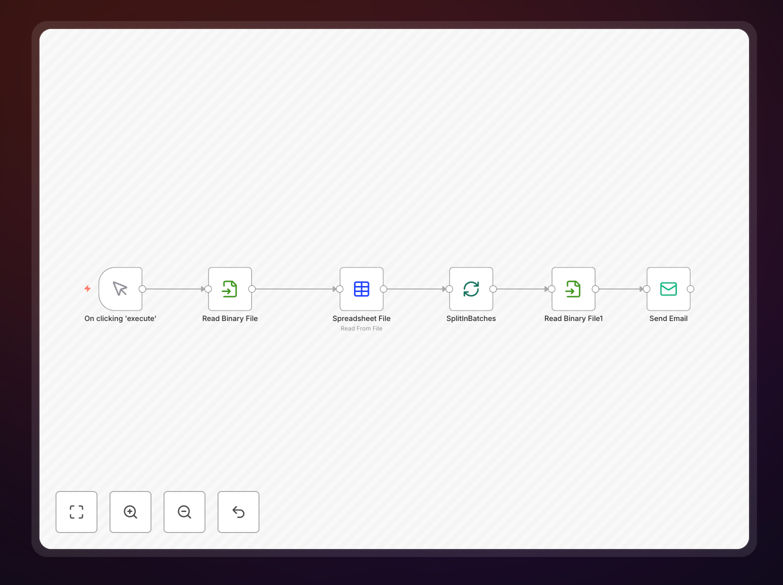
What This Workflow Does
This automation solves the tedious and error-prone process of manually sending personalized emails with specific attachments to multiple recipients. Traditional methods require creating individual emails, attaching the correct files, and carefully checking each recipient - a process that consumes hours of valuable time.
The workflow automatically matches recipients with their designated attachments from a prepared CSV file, then sends personalized emails through your preferred email service. Each recipient receives only the documents relevant to them, with their name and other custom fields inserted into the email body.
How It Works
1. Prepare Your Data
Create a CSV file containing recipient emails, personalized fields (like names), and corresponding attachment filenames. The workflow will reference this data to customize each outgoing email.
2. Upload Attachments
Store all documents in a designated folder accessible to the automation. The system will retrieve files based on the filenames specified in your CSV data.
3. Configure Email Template
Design your email template with merge fields that will be populated from your CSV data. Include placeholders for the recipient's name and any other personalized information.
4. Run the Workflow
Execute the automation to process your CSV file. The system will send each recipient a customized email with their specific attachment, tracking progress and handling errors automatically.
Pro tip: Use variables in your attachment filenames (like "Contract_[LastName].pdf") to make matching easier and prevent file mix-ups.
Who This Is For
This workflow is ideal for HR professionals sending onboarding documents, sales teams distributing personalized proposals, educators sharing assignment feedback, or marketers delivering targeted content. Any business or organization that regularly sends customized documents to multiple recipients can benefit from this automation.
What You'll Need
- An n8n account (free or paid)
- Access to an email service with API capabilities (Gmail, Outlook, SMTP, etc.)
- A CSV file with recipient data and attachment filenames
- All attachment files stored in an accessible location
Quick Setup Guide
- Download the JSON template file
- Import it into your n8n account
- Configure your email service credentials
- Update the CSV file path and attachment folder location
- Test with a small batch before full deployment
Key Benefits
Save 10+ hours per month by eliminating manual email assembly and sending. What used to take a full day can now be completed in minutes.
Eliminate attachment errors with automated file matching. No more sending the wrong document to clients or employees.
Improve response rates with truly personalized communications. Recipients are more likely to engage when content is specifically relevant to them.
Scale your outreach without proportional time investment. Send to 50 or 500 recipients with nearly the same effort.