Google Drive File Management n8n Automation

Bulk file upload to Google Drive with folder management

Automate document organization with intelligent folder creation and file sorting

Download Template JSON · n8n compatible · Free
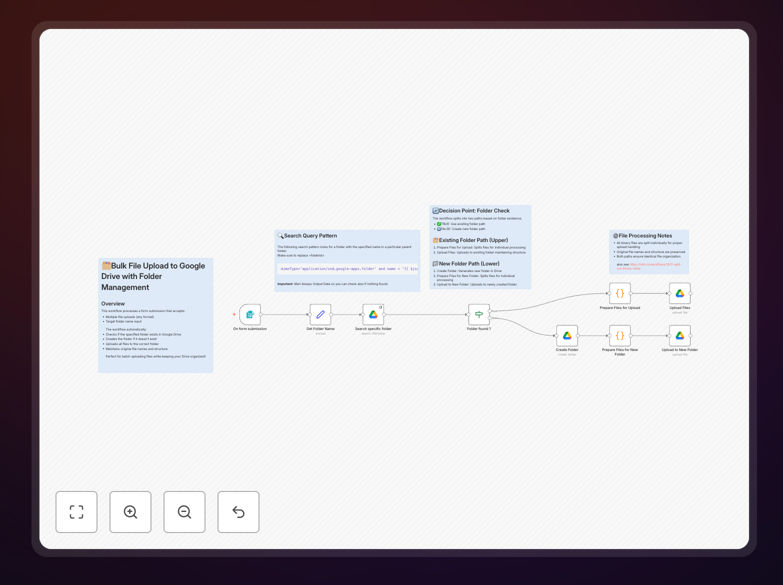
Google Drive bulk upload workflow interface

What This Workflow Does

This automation solves the tedious and error-prone process of manually uploading files to Google Drive and organizing them into folders. Businesses dealing with multiple file submissions from clients, team members, or automated systems often waste hours each week on file management tasks that could be completely automated.

The workflow intelligently processes bulk file uploads by checking for existing folders, creating new ones as needed, and properly sorting all documents. It eliminates the risk of files ending up in the wrong location or getting lost in an unorganized Drive root directory.

How It Works

1. File Submission

Users submit files through a form, email attachment, or direct API connection. The workflow accepts multiple file formats including documents, images, and compressed archives.

2. Folder Verification

The system checks Google Drive for the specified target folder. If the folder doesn't exist, it creates it with the correct permissions and sharing settings.

3. File Processing

Each file is processed individually, checking for duplicates and applying any naming conventions or metadata tags you've configured.

4. Final Upload

Files are uploaded to their designated folders with confirmation notifications sent to both the submitter and administrators if configured.

Who This Is For

This workflow is ideal for businesses that regularly receive documents from multiple sources and need them systematically organized in Google Drive. Common use cases include:

  • Marketing agencies collecting client assets
  • HR departments processing employee documents
  • Educational institutions managing student submissions
  • Legal firms organizing case files

Pro tip: Combine this with Google Docs OCR to automatically extract text from scanned documents during the upload process.

What You'll Need

  1. A Google Workspace account with Drive access
  2. n8n instance (cloud or self-hosted)
  3. A method to submit files (form, email, API)
  4. Folder naming conventions for your organization

Quick Setup Guide

  1. Download the JSON template file
  2. Import into your n8n instance
  3. Connect your Google Drive account
  4. Configure your folder naming rules
  5. Set up your file submission method
  6. Test with sample files
  7. Deploy to production

Key Benefits

Save 5-10 hours per week by eliminating manual file sorting and folder creation. Team members can focus on higher-value work instead of digital janitorial tasks.

Reduce errors by 90% with automated folder placement. No more lost files in the wrong directories or duplicate folder creation.

Scale document processing to handle hundreds of files simultaneously without additional staff time or resources.

Maintain consistent organization across your entire team with standardized folder structures automatically enforced.

Frequently Asked Questions

Common questions about Google Drive integration and automation

Automating Google Drive uploads eliminates manual file management, saving 2-5 hours per week per employee. The system automatically organizes files into proper folders, checks for duplicates, and maintains version control. Businesses handling client documents, marketing assets, or team collaboration files see the greatest time savings from this automation.

For example, a design team receiving 50+ asset files daily can process them automatically instead of manually sorting into client folders. The automation ensures consistent organization while freeing creative staff from administrative tasks.

  • Reduces human error in file placement
  • Enforces company naming conventions
  • Scales effortlessly with business growth

Marketing agencies, legal firms, accounting practices, and educational institutions benefit most from bulk upload automation. These businesses regularly handle large volumes of documents that need organized storage. For example, a marketing agency might receive 50+ design assets weekly from freelancers that need sorting into client-specific folders.

Healthcare providers managing patient records and construction firms handling project documentation also see significant benefits. Any business where multiple team members contribute files to shared drives can improve efficiency with this automation.

  • Ideal for businesses with 5+ team members
  • Best for companies receiving 20+ files weekly
  • Critical for compliance-heavy industries

Automated Google Drive uploads maintain Google's enterprise-grade security. The workflow uses OAuth authentication and only accesses folders you explicitly permit. For added security, you can configure the automation to notify administrators of all uploads and implement approval steps for sensitive documents.

Financial institutions and healthcare providers often add extra validation steps to ensure PHI and PII data remains protected. The automation can be configured to check file contents for sensitive information before processing.

  • Uses Google's encrypted connections
  • Supports two-factor authentication
  • Maintains detailed audit logs

Yes, folder naming can be dynamically generated based on date, project codes, client names, or other variables. The automation can pull information from submission forms, CRM systems, or other business tools to create intelligent folder structures. For example: '2023-Q3/ClientName/ProjectType/Deliverables'.

A real estate agency might configure folders by property address and document type, while a school could organize by academic year, grade level, and subject. The flexibility ensures the system adapts to your existing business processes.

  • Supports dynamic variables
  • Integrates with external data sources
  • Maintains consistent formatting

The workflow can be configured to detect duplicates by filename or content hash. Options include skipping duplicates, creating new versions, or appending timestamps to filenames. Some businesses configure notifications to alert when duplicate files are attempted, helping maintain data hygiene.

For contract management, version control is critical. The automation can maintain revision history while preventing accidental overwrites. Marketing teams often prefer timestamped duplicates to preserve creative iterations.

  • Multiple duplicate handling strategies
  • Configurable notification alerts
  • Content-based duplicate detection

This automation adds intelligent organization that native uploads lack. While Google Drive lets you upload files, this workflow automatically sorts them into proper folders, applies metadata tags, and can trigger downstream processes like notifications or database updates. It transforms simple storage into an organized business system.

Native uploads require manual folder selection for each file. This solution remembers your organizational structure and applies it consistently across all uploads, even from different team members or external contributors.

  • Adds business logic to storage
  • Connects to other business tools
  • Standardizes across teams

Yes! GrowwStacks specializes in custom Google Drive automation solutions tailored to your specific workflows. Our team can integrate Drive with your CRM, project management tools, and other business systems to create a seamless document management ecosystem. We handle everything from initial consultation to implementation and ongoing support.

Custom solutions might include approval workflows for sensitive documents, automatic metadata extraction, or integration with accounting systems for invoice processing. We analyze your current document challenges and design automations that solve your specific pain points.

  • Free initial consultation
  • Industry-specific solutions
  • Ongoing optimization support

Need a Custom Google Drive Integration?

This free template is a starting point. Our team builds fully tailored automation systems for your specific needs.