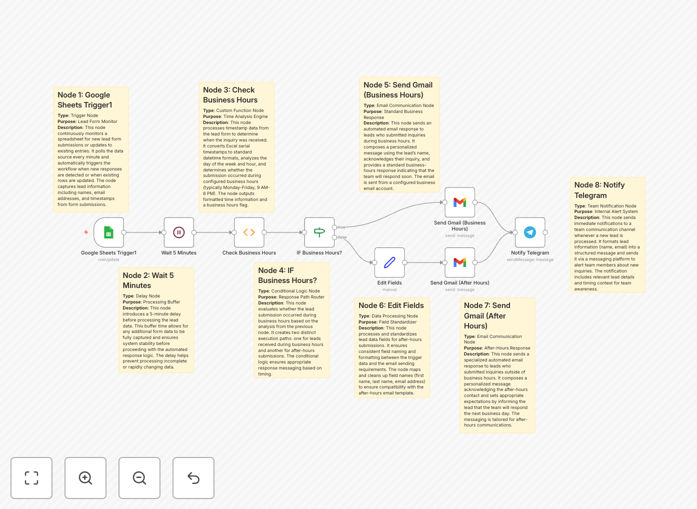
What This Workflow Does
Missed leads mean missed revenue. When potential customers reach out via your website form, contact page, or any other channel, they expect a prompt response. This free n8n workflow template solves that problem by creating a fully automated lead response system that works 24/7.
It monitors a Google Sheet for new form submissions, checks if the inquiry arrived during your defined business hours, and sends an appropriate, professional email reply. During business hours, leads receive an immediate acknowledgment that your team is on it. After hours, they get a polite message setting expectations for a follow-up the next business day. Simultaneously, your sales or support team receives instant Telegram notifications with all lead details, enabling rapid follow-up.
This automation eliminates manual monitoring, ensures consistency, and dramatically improves your lead response time—a key factor in increasing conversion rates and customer satisfaction.
How It Works
The workflow is built on a logical sequence that ensures reliability and appropriate messaging.
Step 1: Trigger on New Sheet Entry
The automation starts when a new row is added to your designated Google Sheet, which acts as your central lead log. This could be from a Typeform, Google Form, Webhook, or any other source that writes to Sheets.
Step 2: Data Validation & Brief Delay
A short wait node (typically 2-5 minutes) ensures the incoming data is complete and avoids processing partial form submissions. This step catches multi-page forms or slow connections.
Step 3: Business Hours Logic Check
A Function or IF node evaluates the submission timestamp against your configured business hours (e.g., 9 AM–6 PM, Monday–Friday). This determines which email template and notification path to use.
Step 4: Send Tailored Email Response
Based on the time check, the workflow uses the Gmail node to send a personalized reply. Business-hour leads get a "we've received your inquiry" message, while after-hours leads get a "we'll contact you tomorrow" acknowledgment.
Step 5: Instant Team Alert via Telegram
Regardless of the time, a formatted message containing the lead's name, contact info, message, and submission time is sent to a designated Telegram group or channel. This puts the information directly in your team's pocket for immediate action.
Pro tip: Use the "Edit Fields" (Set) node to clean and format the lead data before sending the Telegram alert. This ensures the notification is concise and actionable for your team.
Who This Is For
This template is ideal for small to medium businesses, freelancers, and agencies that receive inbound leads but lack a 24/7 sales team. It's perfect for:
- Service-based businesses (consultants, agencies, coaches) who need to project professionalism and responsiveness.
- E-commerce stores handling pre-sale product inquiries or wholesale requests.
- Startups and SaaS companies managing demo requests and trial sign-ups.
- Operations teams tired of manually forwarding form submissions to sales reps.
- Any team using Google Sheets as a simple, free CRM and wanting to add automation layers.
What You'll Need
- A Google Sheet with columns for: Name, Email, Phone, Message, and Timestamp.
- A Gmail account (or Google Workspace) with API access enabled to send automated emails.
- A Telegram account and a bot token created via @BotFather. You'll also need the Chat ID of the group or channel where alerts should be sent.
- An n8n instance, either self-hosted or using n8n.cloud.
- Basic understanding of how to create credentials in n8n for Google and Telegram services.
Quick Setup Guide
Get this automation running in your environment in under 15 minutes.
- Download & Import: Click the "Download Template" button above and save the JSON file. In your n8n instance, go to Workflows > Import from File and select the downloaded file.
- Configure Credentials: Create and connect n8n credentials for Google Sheets (to trigger and read), Gmail (to send), and Telegram Bot (to notify).
- Update Resource IDs: In the Google Sheets trigger node, paste the ID of your lead tracking Sheet and specify the worksheet name.
- Customize Messages: Edit the two Gmail nodes to reflect your company's voice, sender name, and specific business hours.
- Set Telegram Chat ID: In the Telegram node, paste the Chat ID of your team's group or channel.
- Activate & Test: Turn the workflow ON and submit a test entry to your Google Sheet. Verify you receive the correct email and Telegram alert.
Key Benefits
Improve Lead Conversion Rates: Responding within minutes, not hours, significantly increases your chances of closing a deal. Automated acknowledgment keeps your business top-of-mind.
Operate 24/7 Professionalism: Even when your team is asleep or offline, leads receive an immediate, professional response that manages expectations and builds trust from the first interaction.
Eliminate Manual Work & Human Error: No more copying data from sheets to emails or forgetting to notify the team. The entire process is hands-off, consistent, and reliable.
Centralize Lead Data: All inquiries are automatically logged in Google Sheets, creating a searchable, historical record for analysis and reporting without any extra effort.
Empower Your Team with Mobile Alerts: Instant Telegram notifications mean your sales reps can act on hot leads immediately, from anywhere, using their phones.