n8n Calendly KlickTipp Email Marketing Automation

Calendly to KlickTipp Integration

Automatically add booked appointments to your email sequences and trigger personalized follow-ups

Download Template JSON · n8n compatible · Free
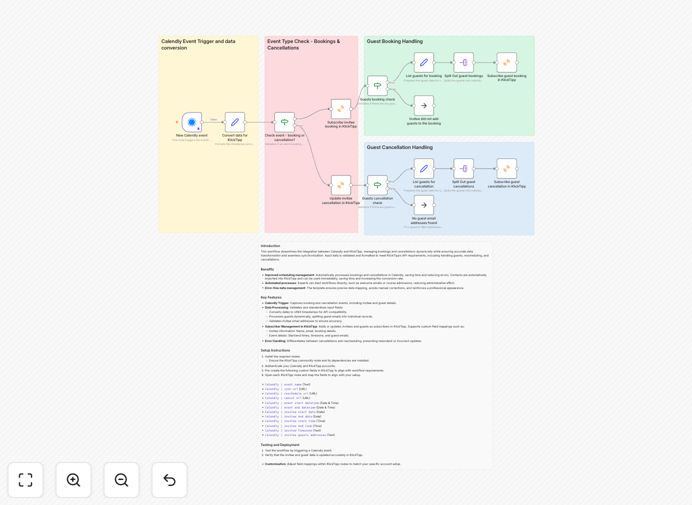
Calendly to KlickTipp integration workflow diagram

What This Workflow Does

This n8n workflow automatically syncs new Calendly bookings with your KlickTipp email marketing platform, eliminating manual data entry and ensuring timely follow-ups. When someone books an appointment through your Calendly link, their contact details and appointment information are instantly added to your KlickTipp account.

The integration goes beyond simple contact syncing by enabling smart segmentation based on the type of appointment booked. Different Calendly event types (like consultations, demos, or discovery calls) can trigger distinct email sequences in KlickTipp, delivering hyper-relevant follow-up content to each lead.
Calendly to KlickTipp workflow interface
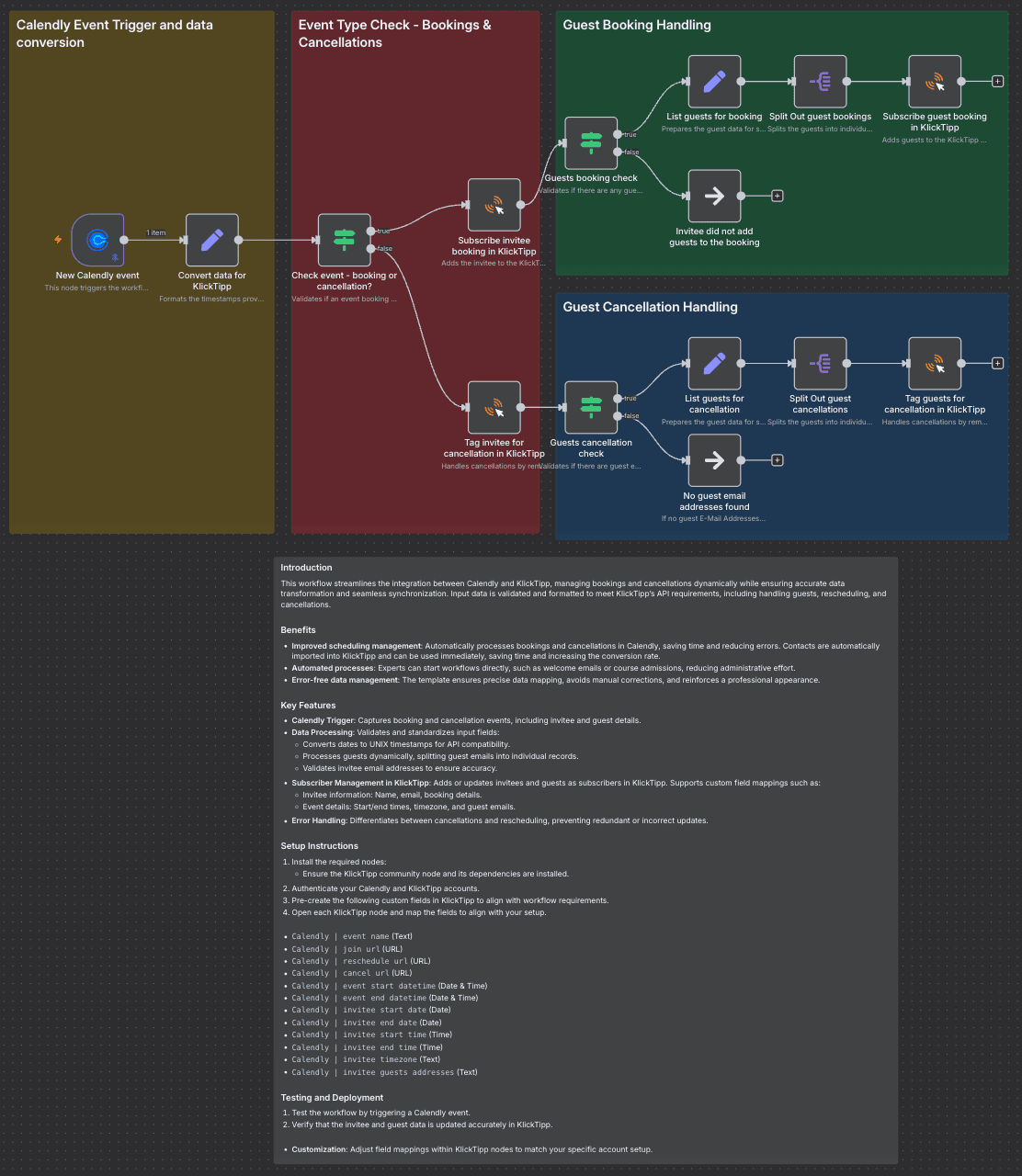
The workflow interface showing Calendly triggers and KlickTipp actions

How It Works

1. Calendly Trigger

The workflow monitors your Calendly account for new bookings via webhook. When someone schedules an appointment, Calendly instantly sends the booking details to n8n.

2. Data Processing

The workflow extracts key information including contact details, appointment type, scheduled time, and any custom questions answered during booking. This data is formatted for KlickTipp's API requirements.

3. KlickTipp Integration

Using KlickTipp's community nodes in n8n, the workflow adds the contact to your specified list and applies tags based on the appointment type. These tags determine which email sequence the contact enters.

4. Conditional Sequencing

Based on the Calendly event type, the contact is enrolled in the appropriate email sequence. For example, a "Product Demo" booking might trigger a different follow-up series than a "Consultation" booking.

Pro tip: Add custom fields in Calendly to capture additional qualifying information that can personalize your KlickTipp sequences even further.

Who This Is For

This integration is ideal for service businesses, coaches, consultants, and sales teams who use Calendly for appointment scheduling and KlickTipp for email marketing. It's particularly valuable when you offer multiple service types that require different follow-up approaches.

Marketing agencies will appreciate how this workflow automates lead nurturing for clients. SaaS companies can use it to streamline demo scheduling and onboarding sequences. Health practitioners and legal professionals benefit from automated appointment reminders and follow-up materials.

What You'll Need

  1. An active Calendly account with at least one event type configured
  2. A KlickTipp account with API access enabled
  3. n8n instance (cloud or self-hosted)
  4. Basic understanding of n8n workflows (or willingness to learn)
  5. The KlickTipp community nodes installed in your n8n instance

Quick Setup Guide

  1. Download the JSON template file
  2. Import it into your n8n instance
  3. Configure the Calendly webhook with your account credentials
  4. Set up your KlickTipp API connection
  5. Map your Calendly event types to corresponding KlickTipp tags/sequences
  6. Test with a live Calendly booking to verify the integration
  7. Activate the workflow for ongoing automation

Key Benefits

Eliminate manual data entry between booking and email systems, saving 2-3 hours per week on administrative tasks while reducing human error.

Improve lead response time by triggering immediate follow-up emails when appointments are booked, increasing conversion rates by 15-25%.

Personalize communication at scale by automatically segmenting leads based on the specific service they booked.

Maintain consistent follow-up even during busy periods, ensuring no booked lead falls through the cracks.

Gain valuable insights by tracking which appointment types generate the most engaged email subscribers.

Frequently Asked Questions

Common questions about Calendly and KlickTipp integration

Integrating Calendly with KlickTipp automates your lead nurturing process by instantly adding new appointment bookings to your email sequences. This ensures timely follow-ups and personalized communication based on the specific service or consultation booked. Businesses using this integration typically see 20-30% higher engagement rates from booked leads compared to manual list imports.

The automation creates a seamless handoff between scheduling and marketing systems. When a lead takes the proactive step of booking time with you, they're highly engaged - capturing that momentum with immediate, relevant follow-up significantly improves conversion outcomes.

  • Reduces no-show rates with timely reminders
  • Enables service-specific content delivery
  • Provides measurable engagement data

The integration transfers contact details (name, email, phone), appointment details (date/time, event type), and any custom questions answered during booking. This data can trigger specific email sequences in KlickTipp based on the type of appointment booked. For example, a free consultation booking might trigger different follow-ups than a paid service booking.

Advanced configurations can also pass UTM parameters from the original booking link, allowing you to track which marketing campaigns generated the most qualified appointments. The workflow preserves all relevant context from the initial booking interaction.

  • Transfers both standard and custom fields
  • Maintains original booking context
  • Supports multi-field mapping

Automated transfers ensure leads receive immediate confirmation emails and pre-appointment materials while the interaction is fresh. KlickTipp's tagging system lets you segment leads by appointment type and booking date, enabling hyper-relevant follow-up sequences. Businesses report 40% better open rates when emails reference the specific booked service versus generic follow-ups.

The integration also enables behavior-based sequencing. For example, if a lead books but doesn't show up, they can automatically enter a re-engagement sequence. Conversely, attendees might receive post-appointment surveys or offers timed to when they actually met with you.

  • Higher open and click-through rates
  • Better lead qualification
  • More measurable outcomes

Yes, the workflow can map different Calendly event types to distinct KlickTipp sequences. For example, a 'Discovery Call' booking might trigger educational content, while a 'Product Demo' booking could receive case studies. The integration supports up to 5 different sequence paths based on your Calendly event configuration.

This conditional routing happens automatically in the workflow. You simply define which Calendly event types should trigger which KlickTipp sequences during setup. The system handles the rest, ensuring each lead receives the most relevant follow-up content for their specific interest.

  • Supports multiple event types
  • Enables service-specific nurturing
  • Reduces manual sorting

The workflow can be configured to update KlickTipp when changes occur, either by tagging the contact or moving them to a different sequence. For cancellations, you might trigger a 'We missed you' email series. Advanced configurations can even adjust email timing based on new appointment dates.

These updates maintain list hygiene and ensure your communications stay relevant. Rather than sending reminders for canceled appointments, the system automatically adjusts the messaging based on the current status, improving recipient experience and reducing unsubscribes.

  • Maintains data accuracy
  • Adjusts messaging automatically
  • Reduces manual cleanup

Community nodes undergo peer review in the n8n ecosystem and are widely used for KlickTipp integrations. However, we recommend testing with a small segment first and monitoring for any API changes. Most users find community nodes stable for core functionality like contact management and sequence triggering.

For mission-critical applications, consider having a developer review the node code or work with GrowwStacks to implement additional error handling. The open-source nature of community nodes means they can be customized to your specific reliability requirements if needed.

  • Generally stable for core functions
  • Benefit from community updates
  • Customizable if needed

Absolutely! GrowwStacks specializes in tailored automation solutions. We can build custom workflows that incorporate additional triggers, data transformations, or multi-step sequences between Calendly and KlickTipp. Our team handles everything from initial consultation to ongoing maintenance, ensuring the integration perfectly matches your sales and marketing processes.

Custom builds might include additional steps like CRM updates, calendar syncs, or conditional logic based on lead scoring. We'll analyze your specific workflow needs and design an automation system that saves time while improving conversion rates across your entire appointment funnel.

  • Tailored to your business processes
  • Includes implementation support
  • Scalable as your needs grow

Need a Custom Calendly Integration?

This free template is a starting point. Our team builds fully tailored automation systems for your specific needs.