What This Workflow Does
Sales teams using Gong.io face a critical challenge: valuable customer insights are trapped in hours of call recordings. Manually reviewing these conversations is time-consuming, inconsistent, and doesn't scale. This creates missed coaching opportunities, inaccurate forecasts, and slower revenue growth.
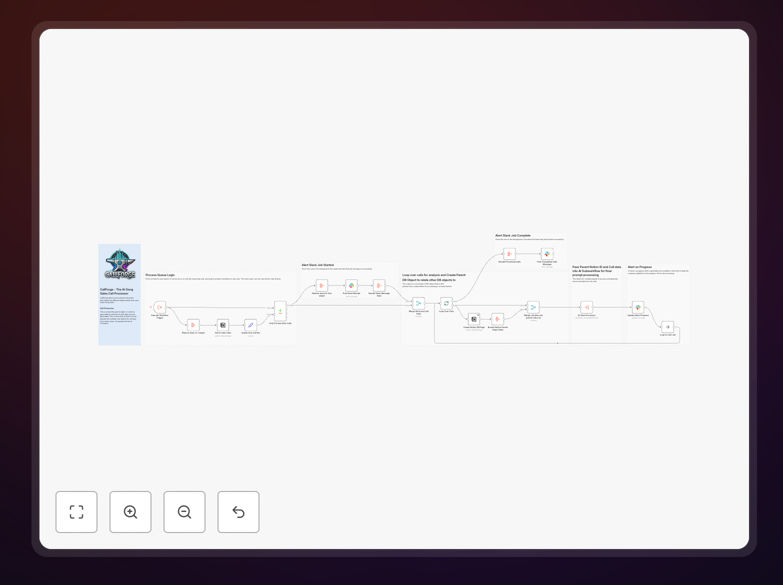
The CallForge workflow solves this by automatically processing every new Gong call through an AI-powered analysis pipeline. It extracts structured insights, prevents duplicate entries by checking against your Notion database, creates organized records for each conversation, and sends real-time Slack alerts to keep your team informed. The system handles API failures gracefully and ensures your sales intelligence is always up-to-date and actionable.
How It Works
1. Trigger on New Gong Calls
The workflow automatically detects when new sales calls are recorded in Gong.io. It retrieves comprehensive metadata including call summaries, participant details, duration, and timestamps, ensuring no conversation slips through unnoticed.
2. Check Against Existing Records
Before processing, the system queries your Notion database to verify the call hasn't already been analyzed. This duplicate prevention mechanism saves processing resources and maintains data integrity across your revenue intelligence system.
3. Create Structured Notion Records
For new calls, the workflow creates detailed parent records in Notion containing call date, title, URL, company name, sales representative, opportunity details, and Salesforce linkage. This creates a centralized knowledge base that your entire revenue team can access and search.
4. Process Through AI Analysis
Each call is sent through an AI processing workflow that extracts key insights like customer objections, competitor mentions, pricing discussions, sentiment analysis, and commitment signals. The AI transforms unstructured conversation into structured, quantifiable data.
5. Deliver Real-Time Alerts
The system sends Slack notifications when processing begins, provides progress updates, and alerts when analysis is complete. This keeps sales managers informed without requiring them to manually check dashboards or databases.
Pro tip: Configure your AI analysis to flag specific keywords unique to your sales process, like competitor names, pricing objections, or product feature requests. This creates early warning systems for deal risks.
Who This Is For
This automation is ideal for sales teams, revenue operations (RevOps) professionals, and sales leaders who use Gong.io for conversation intelligence. It's particularly valuable for scaling businesses where manual call review has become impossible, teams with multiple sales reps generating high call volumes, and organizations implementing data-driven sales coaching methodologies. If you're spending more than 5 hours weekly reviewing calls manually, this workflow will transform your revenue intelligence process.
What You'll Need
- Gong.io Account: Active subscription with API access enabled
- Notion Workspace: Database created for call insights storage
- Slack Workspace: Channel designated for call processing alerts
- n8n Instance: Self-hosted or cloud version with workflow execution capabilities
- AI Processing Endpoint: Access to an AI analysis service (OpenAI, Anthropic, or custom model)
Quick Setup Guide
1. Download the template using the button above and import it into your n8n instance.
2. Configure the Gong.io trigger node with your API credentials and set the polling interval (recommended: every 15 minutes).
3. Connect the Notion node to your database, ensuring field mappings match your existing structure.
4. Set up the Slack webhook for your designated channel and customize alert messages.
5. Point the AI processing node to your analysis endpoint and define the insight extraction parameters.
6. Test with a single recent call, verify all connections work, then activate the workflow.
Pro tip: Start with a small subset of calls (last 7 days) to validate insight quality before processing your entire call history. This allows you to refine AI prompts and field mappings without overwhelming your database.
Key Benefits
Save 40-80 hours monthly in manual call review time for a typical 10-person sales team. Managers regain time for strategic coaching instead of data processing.
Improve forecast accuracy by 15-25% through consistent, data-driven insight extraction from every customer conversation, eliminating gut-feel forecasting.
Accelerate new rep ramp time by 30% by providing immediate access to winning conversation patterns and common objection handling from top performers.
Create scalable revenue intelligence that grows with your team—processing 500 calls requires the same effort as 5 calls, ensuring consistent insight quality during growth periods.
Enable real-time deal risk detection with automatic alerts for competitor mentions, pricing objections, or negative sentiment, allowing proactive intervention.