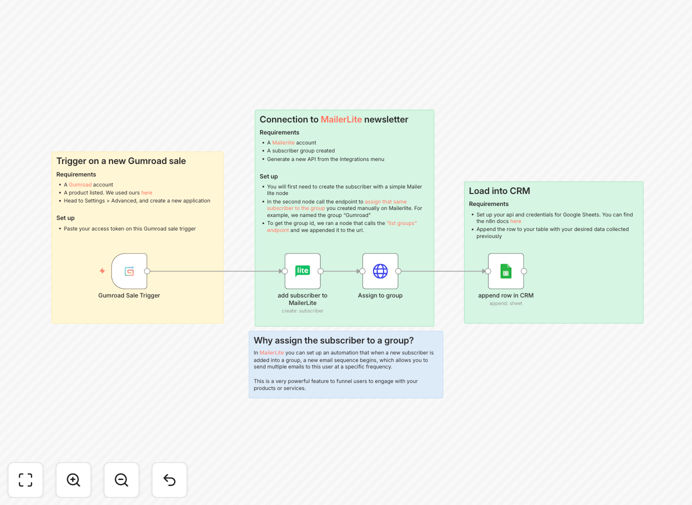
What This Workflow Does
Every time a customer purchases your digital product on Gumroad, you face a critical choice: manually copy their details into your email list and CRM—or automate the entire process. This workflow eliminates the manual grind by instantly capturing new sales, adding buyers to the appropriate MailerLite subscriber group, and logging complete transaction details to your Google Sheets CRM.
The automation ensures your email nurture sequences begin immediately, building customer relationships from the moment of purchase. Meanwhile, your sales data accumulates in a searchable, organized spreadsheet, giving you real-time visibility into what’s selling and who’s buying—without ever opening Gumroad’s dashboard.
How It Works
1. Trigger on New Gumroad Sale
The workflow activates the moment a sale is completed on your Gumroad store. It captures the customer’s name, email, product details, price, and any custom fields you’ve configured.
2. Create or Update MailerLite Subscriber
The buyer’s email and name are sent to MailerLite. If they’re already in your system, their profile is updated; if not, a new subscriber is created, ensuring your list stays clean and current.
3. Assign to Specific MailerLite Group
The subscriber is automatically added to a designated group (e.g., “Gumroad Buyers” or “Product X Customers”). This triggers your pre-built email automation sequences for onboarding, upsells, or content delivery.
4. Log Sale to Google Sheets CRM
All sale details are appended as a new row in your Google Sheets spreadsheet. Columns typically include date, customer email, product name, price, and status, creating a permanent, queryable sales record.
Who This Is For
This automation is ideal for digital creators, course builders, SaaS founders, and indie hackers who sell on Gumroad. If you’re spending time copying customer emails, struggling to follow up consistently, or lacking a clear view of your sales data, this workflow solves those problems. It’s particularly valuable for businesses with multiple products who want to segment their email lists based on purchase behavior.
What You'll Need
- A Gumroad account with at least one product for sale.
- A MailerLite account with an API key and at least one subscriber group created.
- A Google Sheets spreadsheet set up with column headers for your CRM data.
- Access to n8n (cloud or self-hosted) to import and run the workflow.
Pro tip: Before activating the workflow, test with a small Gumroad sale or use Gumroad’s “test mode” to verify the data flow without affecting real customers.
Quick Setup Guide
- Download the template using the button above and import it into your n8n instance.
- Configure the Gumroad trigger node with your access token from Gumroad’s developer settings.
- Set up the MailerLite nodes by adding your API key and specifying the target group ID.
- Connect the Google Sheets node with your spreadsheet ID and worksheet name.
- Activate the workflow and make a test purchase to confirm everything syncs correctly.
Key Benefits
Eliminate manual data entry and reclaim hours each week previously spent copying customer information between platforms.
Improve email marketing performance by ensuring every buyer immediately enters your nurture sequence, boosting open rates and repeat purchases.
Build a centralized sales CRM in Google Sheets that provides instant visibility into your best-selling products and most valuable customers.
Reduce human error with automated, consistent data transfer that never misses a sale or mistypes an email address.
Scale your e-commerce operations without adding administrative overhead, allowing you to focus on creating products rather than managing spreadsheets.