n8n Typeform HubSpot Lead Capture

Capture leads in HubSpot from Typeform

Automatically transfer form submissions to your CRM without manual data entry

Download Template JSON · n8n compatible · Free
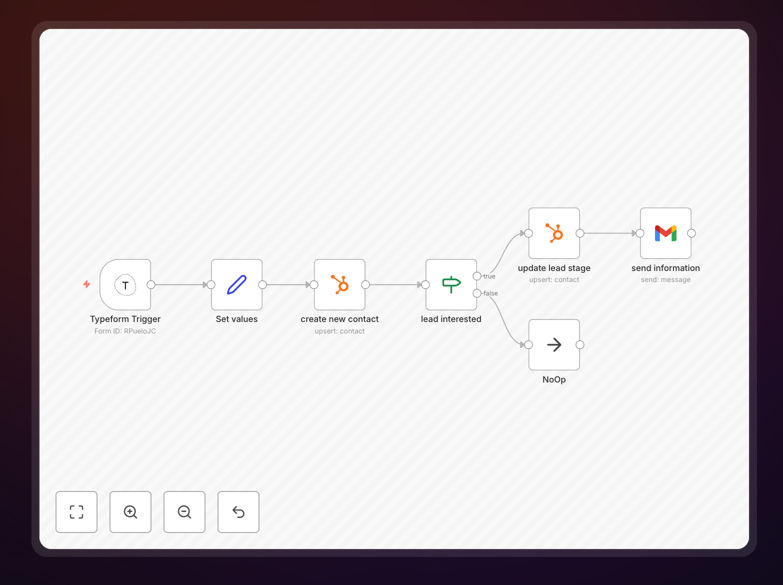
n8n workflow screenshot showing Typeform to HubSpot integration

What This Workflow Does

This automation solves the common problem of manually transferring lead information from Typeform submissions to your HubSpot CRM. Every time a potential customer fills out your Typeform, their details automatically appear in HubSpot as a new contact record.

The workflow eliminates the risk of human error in data entry and ensures no leads slip through the cracks. It captures all form fields including name, email, phone number, and any custom questions you've added to your Typeform.

How It Works

1. Trigger: New Typeform Submission

The workflow activates whenever someone submits your Typeform. n8n instantly receives the complete submission data including all answers and metadata.

2. Data Processing

The workflow maps Typeform fields to corresponding HubSpot contact properties. It can handle conditional logic for different form paths and clean data before sending to HubSpot.

3. Create HubSpot Contact

The processed data creates a new contact in HubSpot with all relevant information. The workflow can also update existing contacts if the email matches.

Pro tip: Add a hidden field in Typeform to track the campaign source, then map it to HubSpot's UTM parameters for better lead attribution.

Who This Is For

This workflow is ideal for marketing teams, sales teams, and business owners who use Typeform for lead generation and HubSpot for CRM. It's particularly valuable for:

  • Companies running lead magnet campaigns through Typeform
  • Businesses collecting demo requests or contact inquiries
  • Teams that need instant lead notifications in their CRM

What You'll Need

  1. An active n8n instance (cloud or self-hosted)
  2. Typeform account with admin access
  3. HubSpot account with API access
  4. The form you want to connect already created in Typeform

Quick Setup Guide

  1. Download the template file
  2. Import it into your n8n workspace
  3. Connect your Typeform account in the trigger node
  4. Connect your HubSpot account in the action node
  5. Map your Typeform fields to HubSpot properties
  6. Test with a form submission and activate the workflow

Key Benefits

Never miss a lead: Automatic transfers eliminate the risk of forgetting to add contacts manually or losing submissions in email inboxes.

Save 5+ hours weekly: No more copying and pasting form responses between systems - the workflow handles it instantly.

Better data quality: Standardized field mapping ensures clean, consistent contact records in HubSpot.

Faster response times: Sales teams get leads in their CRM immediately, allowing quicker follow-up.

Frequently Asked Questions

Common questions about Typeform and HubSpot integration

Automating this connection ensures immediate lead capture without manual work. It eliminates data entry errors and speeds up your sales process by getting leads into HubSpot the moment they submit your form.

For example, a marketing agency running a webinar signup form can automatically add registrants to their HubSpot nurture sequence, triggering follow-up emails instantly rather than waiting for someone to manually import the list.

  • Reduces lead response time from hours to seconds
  • Maintains data consistency across platforms
  • Allows real-time lead scoring in HubSpot

Yes, this workflow supports full customization of field mapping. Any question in your Typeform can be mapped to standard or custom properties in HubSpot.

A common use case is mapping industry-specific questions to custom HubSpot fields. For instance, a real estate agency might map "Preferred Property Type" from their Typeform to a custom dropdown field in HubSpot for better segmentation.

  • Supports all HubSpot field types
  • Handles conditional logic paths
  • Can transform data during mapping

Leads typically appear in HubSpot within 5-15 seconds of form submission. The speed depends on your n8n instance location relative to Typeform and HubSpot's servers.

In practical terms, this means your sales team can see the lead in HubSpot before they've even finished reading the submission confirmation email from Typeform. This immediacy is crucial for high-value leads where quick response impacts conversion rates.

Yes, HubSpot's free CRM tier includes API access, so this integration works perfectly. The only limitation is HubSpot's contact limit for free accounts.

Many small businesses use this exact setup - free HubSpot CRM with automated Typeform imports. It's a cost-effective way to build a sophisticated lead capture system without expensive marketing automation tools.

  • Works with all HubSpot tiers
  • No premium features required
  • Only limitation is contact storage

Absolutely. The workflow can be extended to add new contacts to specific HubSpot lists based on their form responses or other criteria.

For example, you could route webinar registrants to one list and ebook download leads to another. This segmentation happens automatically based on which Typeform they submitted or how they answered certain questions.

  • Supports static list assignments
  • Enables conditional list routing
  • Works with active and static lists

The workflow can be configured to either update existing contacts or skip them. By default, it updates existing records using email as the unique identifier.

This prevents duplicate contacts while ensuring their information stays current. For instance, if a lead submits multiple forms over time, HubSpot will maintain one complete contact record with all their interactions.

Yes! GrowwStacks specializes in building tailored automation solutions. While this free template handles basic integration, we can create custom workflows with advanced features like lead scoring, multi-step verification, or integration with additional systems.

Our team will analyze your specific Typeform usage and HubSpot setup to design an automation that fits your exact business processes. We handle everything from initial configuration to ongoing maintenance.

  • Custom field mapping logic
  • Advanced data transformations
  • Multi-system integrations

Need a Custom Typeform Integration?

This free template is a starting point. Our team builds fully tailored automation systems for your specific needs.