What This Workflow Does
If you're still manually checking your Tally form and copying responses into a spreadsheet or database, you're wasting valuable time and risking lost leads. This automation solves that by creating a seamless, hands-off pipeline from form submission to data storage and customer communication.
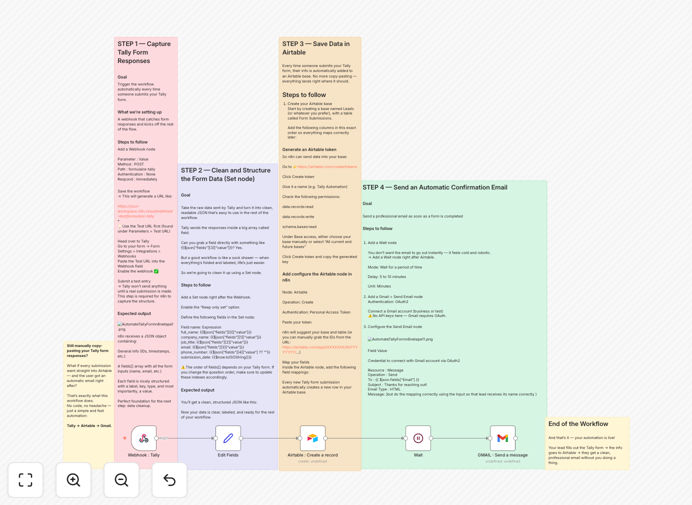
The workflow triggers instantly when someone submits your Tally form. It captures all response data, structures it cleanly, creates a new record in your Airtable base, and then sends a personalized confirmation email to the submitter. The entire process happens in the background, ensuring no lead slips through the cracks and every person receives immediate acknowledgment.
This isn't just about saving time—it's about creating a professional, reliable system that builds trust with potential customers and frees you to focus on higher-value tasks like follow-up and conversion.

How It Works
The automation follows a logical four-step process that mimics how you would manually handle a form submission, but instantly and without error.
1. Capture the Form Submission
A webhook node listens for new submissions from your Tally form. When someone hits "submit," Tally sends the data to this webhook, which triggers the rest of the workflow. This is the starting point that makes the entire automation possible.
2. Clean and Structure the Data
Raw form data can be messy. A Set node organizes the responses into clear, labeled fields like "full_name," "email," and "company_name." This step transforms the data into a consistent format that's easy to use in Airtable and the email template.

3. Save to Airtable
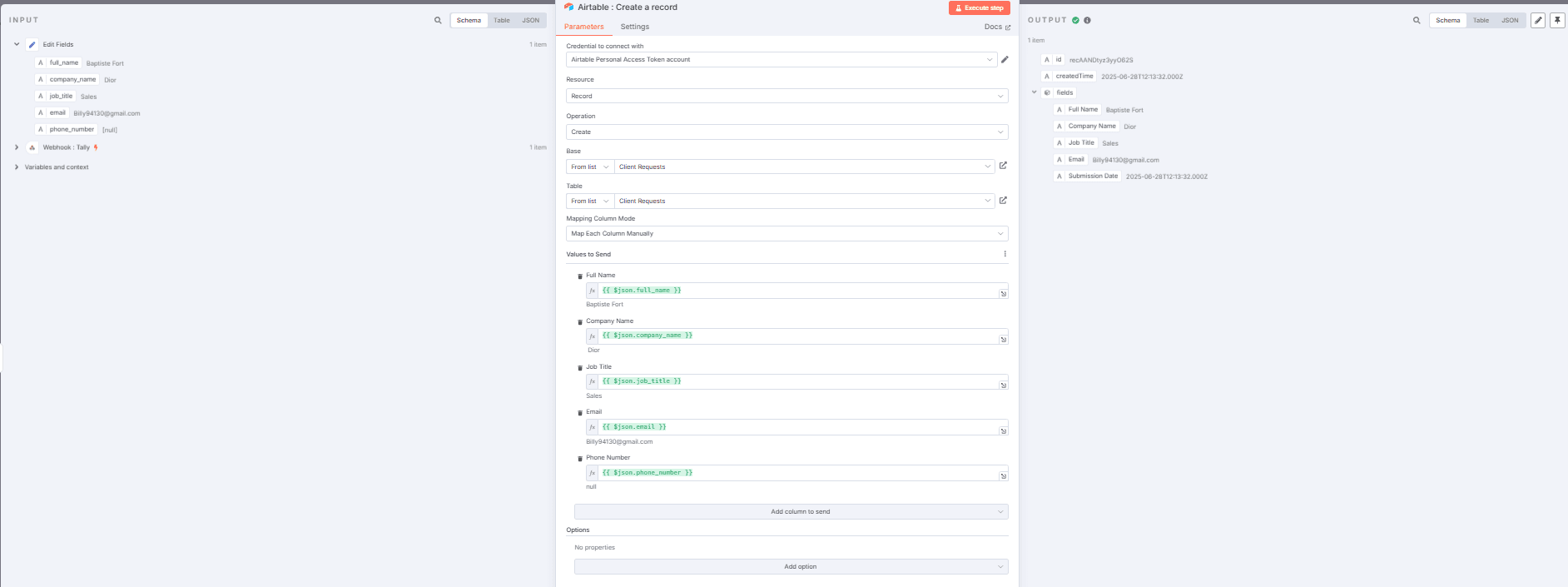
The structured data is sent to Airtable, creating a new row in your specified base and table. All information is now centrally stored, searchable, and ready for your team to review or for triggering other business processes.
4. Send the Confirmation Email
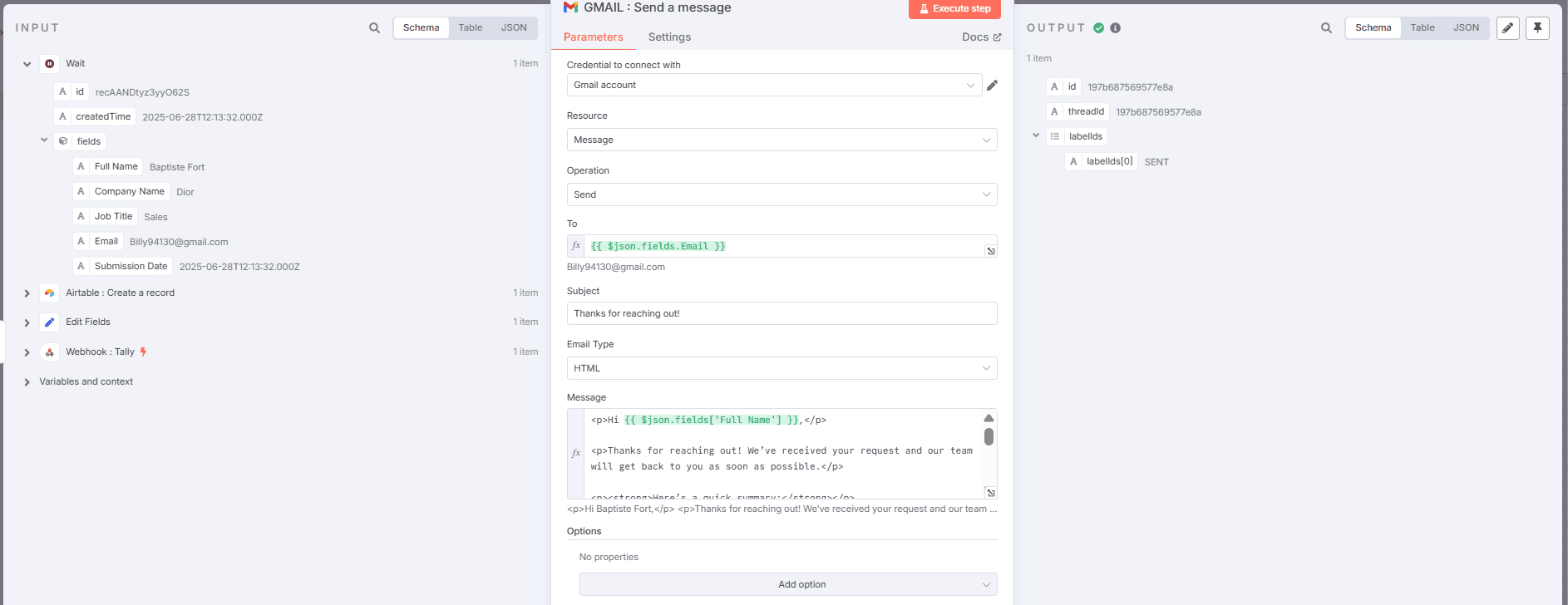
After a short, configurable delay, a personalized email is sent via Gmail to the person who filled out the form. The email can include their name and details from their submission, making it feel personal and professional.
Pro tip: Add a 5–10 minute wait before sending the email. This small delay makes the response feel less robotic and more like a human has seen their submission, which can significantly increase engagement.
Who This Is For
This automation is ideal for solopreneurs, small business owners, marketing teams, and community managers who use Tally for lead generation, contact forms, event registrations, or feedback collection.
If you receive more than a handful of form submissions per week, manually processing them becomes a significant drain on your time. This workflow is perfect for consultants collecting client inquiries, course creators managing sign-ups, startups handling beta tester applications, or any business that wants to appear more responsive and professional.
What You'll Need
- A Tally form that's live and collecting submissions.
- An Airtable account with a base and table ready to receive data (we'll show you the column setup).
- A Gmail or Google Workspace account from which to send automated emails.
- Access to an n8n instance (either n8n.cloud or self-hosted).
- The API tokens/credentials to connect these services (all straightforward to obtain).
Quick Setup Guide
Importing and configuring this template is a straightforward process. Follow these steps to get your automation live in under 30 minutes.
- Download the template using the button above and import it into your n8n workspace.
- Configure the Webhook node: Copy the unique webhook URL generated by n8n and paste it into your Tally form's webhook integration settings.
- Set up your Airtable connection: Create a personal access token in Airtable and connect it to the Airtable node in the workflow. Map the incoming fields to your Airtable columns.
- Connect Gmail: Authenticate the Gmail node with your Google account using OAuth2.
- Customize the email template: Edit the subject and body of the automatic email to match your brand and tone.
- Test and activate: Submit a test entry to your Tally form and watch the automation run. Turn on the workflow in n8n once confirmed.
Key Benefits
Eliminate manual data entry forever. Save 2–5 hours per week that you currently spend copying, pasting, and organizing form responses. That time can be redirected to sales calls, content creation, or product development.
Never miss a lead or inquiry. The system works 24/7, capturing submissions the moment they happen and storing them securely in Airtable. Even if you're on vacation or asleep, your lead capture process is fully operational.
Improve response time and professionalism. Automatic confirmation emails go out within minutes, setting positive expectations and demonstrating that you're organized and responsive. This simple touch can increase conversion rates.
Create a centralized customer data hub. With all form data flowing into Airtable, you have a single source of truth for all inquiries. This makes segmentation, reporting, and team collaboration dramatically easier.
Build a foundation for advanced automation. Once data is in Airtable, you can easily trigger countless other automations—like adding contacts to your email list, creating tasks for your team, or sending Slack notifications.