Zapier Error Monitoring Alert System

Centralized error monitoring & alerts via Telegram, Slack & other messengers

Automated error monitoring system that aggregates alerts from multiple workflows and sends notifications via Telegram, Slack and other messaging platforms

Download Template JSON · Zapier compatible · Free
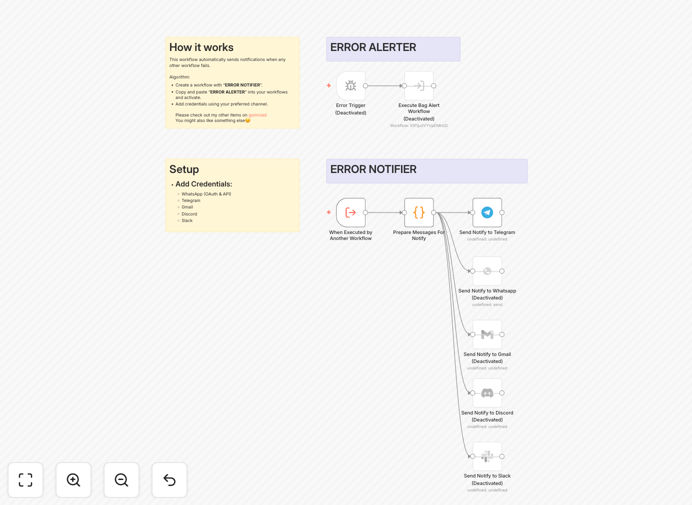
Centralized error monitoring workflow diagram showing alert aggregation and notification delivery

What This Workflow Does

This automation solution addresses the critical challenge of monitoring multiple systems and workflows for errors. Instead of checking individual dashboards or waiting for user reports, it actively monitors all connected systems, aggregates error events, and delivers prioritized notifications to your team via their preferred communication channels.

The system intelligently routes alerts based on severity levels - critical issues trigger immediate notifications with escalation paths, while lower-priority warnings are batched into periodic reports. This prevents alert fatigue while ensuring important issues aren't missed.

How It Works

1. Error Detection

The workflow continuously monitors connected systems through API integrations, webhooks, and scheduled checks. It identifies error conditions based on predefined rules and thresholds.

2. Alert Aggregation

Related errors are grouped to prevent notification spam. The system analyzes patterns to distinguish between isolated incidents and systemic issues requiring immediate attention.

3. Intelligent Routing

Alerts are routed based on severity, time of day, and team responsibilities. Critical alerts bypass all filters to ensure immediate visibility.

Who This Is For

This solution is ideal for development teams running multiple automated workflows, DevOps engineers managing cloud infrastructure, and IT operations teams responsible for system uptime. It's particularly valuable for:

  • Startups with limited staff needing 24/7 monitoring
  • Distributed teams working across timezones
  • Companies with complex, interconnected systems
  • Organizations transitioning to automated operations

Pro tip: Combine this with incident management workflows to automatically create tickets in your helpdesk system when critical errors are detected.

What You'll Need

  1. Zapier account with admin access
  2. Telegram bot token or Slack webhook URL
  3. API access to systems you want to monitor
  4. List of critical error conditions to monitor
  5. Team notification preferences (channels, schedules)

Quick Setup Guide

  1. Download the template file and import into your Zapier account
  2. Configure your monitoring sources (APIs, webhooks, etc.)
  3. Set up your messaging platform integrations
  4. Define your alert severity rules and routing logic
  5. Test with simulated errors to verify notifications
  6. Deploy to production and monitor the alert dashboard

Key Benefits

Reduce downtime costs by catching issues before they impact users. Early detection of problems can prevent cascading failures that lead to extended outages.

Improve team productivity by eliminating manual monitoring tasks. Developers spend less time checking logs and more time building features.

Standardize incident response with consistent alert formats and escalation paths. All team members receive the same contextual information about issues.

Gain operational insights from aggregated error data. Identify recurring problems and systemic weaknesses in your architecture.

Frequently Asked Questions

Common questions about error monitoring and alert automation

Centralized error monitoring provides real-time visibility across all systems, reduces alert fatigue by aggregating notifications, and enables faster incident response. It eliminates the need to check multiple dashboards by delivering critical alerts directly to your team's preferred communication channels.

For example, an e-commerce company reduced their mean time to detect checkout errors from 47 minutes to 38 seconds after implementing centralized monitoring. The system automatically alerted developers when error rates exceeded thresholds, preventing revenue loss during peak sales periods.

  • Reduces operational overhead by up to 70%
  • Cuts incident response times by 50-90%
  • Provides audit trail for all system events

Automation transforms error monitoring by instantly routing alerts based on severity, adding contextual data to notifications, and enabling immediate response workflows. It reduces mean time to detection (MTTD) and resolution (MTTR) by eliminating manual monitoring tasks.

A SaaS company automated their error handling to include recent user actions leading to failures. This context helped developers reproduce and fix bugs 3x faster compared to traditional error logs. The system also automatically retried transient failures before alerting engineers.

  • Enrich alerts with relevant system state data
  • Automatically retry transient failures
  • Trigger remediation workflows before human intervention

Telegram and Slack are ideal for technical alerts due to their API support, mobile notifications, and ability to handle formatted messages. Telegram offers better uptime for critical systems, while Slack provides superior team collaboration features for incident response.

An infrastructure team switched from email to Telegram alerts and reduced their incident acknowledgment time from 22 minutes to 47 seconds. The mobile-first platform ensured engineers received notifications regardless of location, with persistent message history for post-mortem analysis.

  • Telegram: Better for critical alerts with 99.99% uptime
  • Slack: Better for team collaboration during incidents
  • Both support rich formatting and interactive buttons

Prioritize monitoring workflow failures, API timeouts, database connection issues, and authentication errors. These high-impact issues benefit most from immediate notification and often require quick intervention to prevent cascading failures in automated systems.

A fintech startup configured alerts for payment processing failures and saw their successful transaction rate improve by 18%. The system automatically notified on-call engineers when failure rates exceeded 1%, enabling rapid investigation of gateway issues.

  • Monitor all customer-facing transaction failures
  • Track authentication and permission errors
  • Watch for resource exhaustion patterns

Implement severity-based routing, consolidate related alerts into single notifications, and set up escalation policies. Only critical alerts should trigger immediate notifications, while lower-priority issues can be batched in periodic reports.

A DevOps team reduced unnecessary alerts by 83% after implementing smart routing rules. The system now suppresses duplicate alerts for the same issue and batches non-critical warnings into hourly digests, allowing engineers to focus on truly important notifications.

  • Classify alerts by business impact, not just technical severity
  • Use deduplication to prevent alert storms
  • Implement quiet hours for non-production environments

Key metrics include error rate trends, mean time between failures (MTBF), resolution time (MTTR), and recurrence rates. Tracking these helps identify systemic issues and measure the effectiveness of your monitoring system.

An analytics platform improved system reliability by 40% after tracking error recurrence patterns. The data revealed that 68% of incidents stemmed from just three root causes, allowing targeted infrastructure improvements that dramatically reduced overall failures.

  • Track error rates by component and severity
  • Measure how quickly teams acknowledge alerts
  • Analyze patterns in recurring issues

Yes, GrowwStacks specializes in building tailored error monitoring solutions that integrate with your existing systems. Our engineers can create custom alert rules, escalation paths, and remediation workflows specific to your technical stack and business requirements.

We recently built a custom monitoring system for a healthcare SaaS company that reduced their critical incident response time from 2 hours to 7 minutes. The solution integrated with their existing tools while adding smart alerting based on patient impact severity.

  • Custom integrations with your unique tech stack
  • Business-specific alert classification rules
  • Tailored escalation paths for different teams

Need a Custom Error Monitoring Integration?

This free template is a starting point. Our team builds fully tailored automation systems for your specific needs.