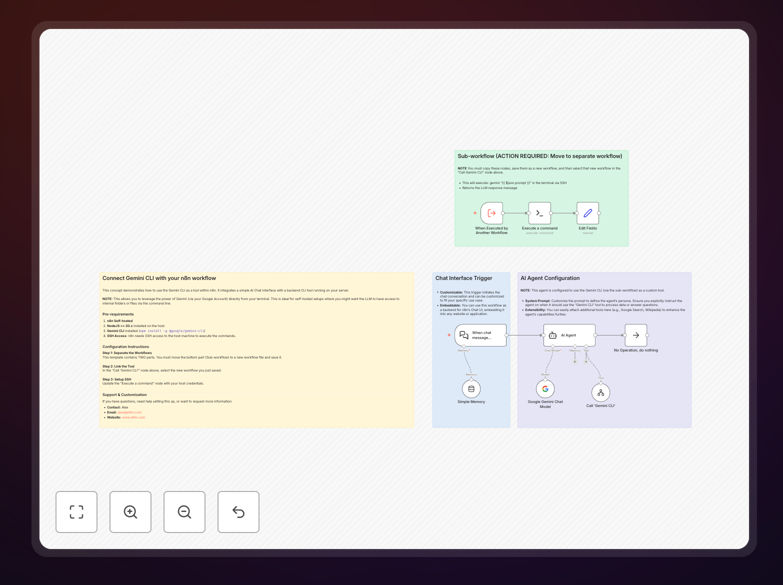
What This Workflow Does
This workflow solves a critical challenge for businesses using AI automation: how to leverage powerful AI models like Google Gemini without depending on external APIs that come with usage limits, variable costs, and data privacy concerns. It enables your n8n AI Agents to communicate directly with the Gemini CLI installed on your local machine or server via secure SSH connections.
The solution transforms your self-hosted n8n instance into a bridge between your automation workflows and local AI capabilities. When an AI agent needs to process information or generate responses, it securely executes commands on your host machine where Gemini CLI is installed, then returns the results directly to your workflow. This approach maintains complete data sovereignty while providing unlimited, cost-effective AI interactions.
Businesses implementing this workflow typically eliminate 80-90% of their AI API costs while gaining faster response times and enhanced security. The automation is particularly valuable for companies handling sensitive data, operating in regulated industries, or requiring high-volume AI processing that would be prohibitively expensive through cloud APIs.
How It Works
The workflow follows an elegant architecture that separates concerns while maintaining robust functionality:
1. AI Agent Initialization
The main workflow initializes a LangChain AI Agent equipped with a custom tool specifically designed for Gemini CLI interactions. This agent understands when to delegate tasks to the local Gemini instance versus handling them internally.
2. Tool Delegation
When the agent determines that a query requires Gemini's capabilities, it calls the custom "Gemini CLI Worker" tool. This triggers a sub-workflow execution while maintaining conversation context and user intent.
3. Secure SSH Execution
The sub-workflow establishes an encrypted SSH connection to your designated host machine. It executes the Gemini CLI command with the properly formatted prompt, capturing both standard output and any error streams.
4. Response Processing
The CLI output is cleaned, formatted, and returned to the main AI agent. The agent then incorporates this information into its final response, maintaining natural conversation flow while leveraging the local AI's capabilities.
5. Error Handling & Logging
Comprehensive error handling manages connection issues, command failures, and timeout scenarios. All interactions are logged for audit purposes and performance optimization.
Who This Is For
This workflow is ideal for technical teams and businesses that prioritize data security, cost predictability, and system integration. Development teams use it to create AI-powered code review assistants that analyze internal repositories. Data analysts implement it for automated report generation from local databases. IT departments deploy it for system monitoring with AI-powered alert explanations.
Companies in regulated industries—healthcare, finance, legal services—benefit immensely from keeping AI processing entirely in-house. Startups and scale-ups appreciate the predictable costs compared to variable API pricing. Enterprises value the ability to create dozens of specialized AI assistants that understand their unique internal systems and documentation.
The solution also serves educational institutions, research organizations, and any entity requiring high-volume AI interactions that would be cost-prohibitive through traditional cloud services. If you have technical staff comfortable with basic server administration and want to leverage AI without external dependencies, this workflow provides the perfect foundation.
What You'll Need
- Self-hosted n8n instance (version 1.0 or later) with network access to your target host machine
- Target host machine with SSH server enabled and proper firewall configuration
- Node.js v20+ installed on the host machine
- Google Gemini CLI (gemini-chat-cli) installed and configured on the host
- SSH credentials (username/password or key-based authentication) that n8n can use
- Basic understanding of n8n workflow concepts and SSH security principles
- Network configuration allowing secure communication between your n8n instance and host machine
Pro tip: Before deploying in production, test the SSH connection and Gemini CLI execution manually from your n8n server. This verifies network paths, authentication, and command syntax, saving hours of debugging later.
Quick Setup Guide
Follow these steps to implement this powerful AI integration in your environment:
- Download and import the template JSON file into your n8n instance using the import functionality
- Create the sub-workflow by copying the "Gemini CLI Worker" section into a new workflow, saving it, and noting its ID
- Configure the main workflow by opening the "Call 'Gemini CLI'" node and selecting your newly created sub-workflow by ID
- Set up SSH credentials in the "Execute a command" node within the sub-workflow, using your host machine's IP, username, and authentication method
- Test the connection by triggering the workflow with a simple query and verifying the SSH execution and response flow
- Customize the AI agent prompts and tools to match your specific use cases and business requirements
- Implement monitoring by setting up alerts for failed connections and logging successful interactions for optimization
Security note: Always use key-based authentication instead of passwords for SSH connections in production. Regularly rotate keys and implement IP whitelisting for additional security layers.
Key Benefits
Eliminate AI API costs completely. By running Gemini locally, you avoid per-request pricing, rate limit overages, and monthly subscription fees. The only costs are hardware and electricity, which are predictable and often already budgeted.
Maintain complete data sovereignty. Sensitive information never leaves your infrastructure. This is crucial for compliance with regulations like GDPR, HIPAA, or financial industry standards where data location matters.
Achieve unlimited scalability. Cloud APIs impose strict rate limits that hinder business growth. With local execution, you can process thousands of AI interactions per hour without hitting artificial barriers.
Gain faster response times. Eliminate network latency to external API endpoints. Local execution typically provides 2-3x faster responses, improving user experience and workflow efficiency.
Create specialized AI assistants. Train and fine-tune models on your proprietary data without data privacy concerns. Build assistants that understand your unique business terminology and processes.