Google Drive Pinecone OpenAI AI Chatbot RAG

Chat with Google Drive Documents using Pinecone and OpenAI RAG

Automate a fully-synced knowledge base. This workflow turns your Google Drive into an intelligent, searchable AI assistant that answers questions using your actual documents.

Download Template JSON · n8n compatible · Free
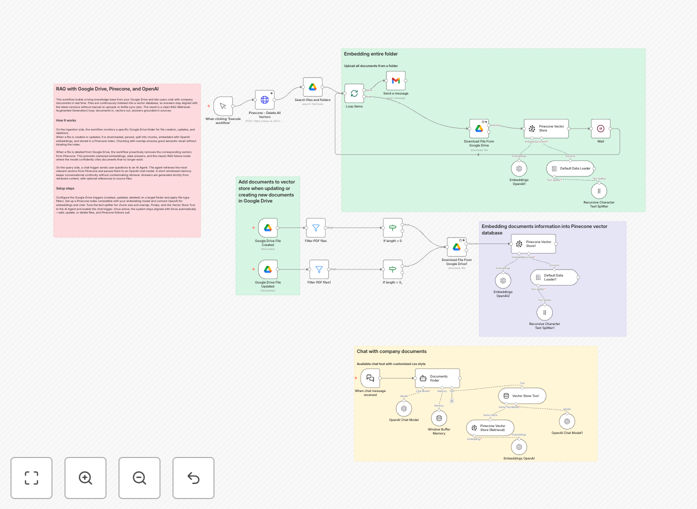
Visual diagram showing Google Drive documents syncing to Pinecone vector database with an AI chatbot interface

What This Workflow Does

This automation solves the problem of scattered, unsearchable company knowledge. Teams waste hours digging through Google Drive folders, emails, and shared documents to find specific information. This workflow creates a self-updating AI knowledge base that understands your content and provides instant, accurate answers.

It implements a complete Retrieval-Augmented Generation (RAG) pipeline that automatically syncs your Google Drive documents to a Pinecone vector database. When documents are added, updated, or deleted, the system processes those changes in real-time. Then, through a chat interface, you can ask natural language questions and get responses grounded exclusively in your company's documentation.

How It Works

1. Document Monitoring & Sync

The workflow watches a specified Google Drive folder for changes. When a file is created or modified, it downloads the content, splits it into manageable chunks using a recursive text splitter, and generates embeddings via OpenAI.

2. Vector Storage & Management

These embeddings (numerical representations of text meaning) are stored in Pinecone with metadata linking them to the source document. If a file is deleted from Drive, the corresponding vectors are automatically removed from Pinecone, maintaining a clean index.

3. Intelligent Query & Response

When a user asks a question through the chat interface, the system searches Pinecone for the most relevant document chunks, injects that context into a prompt, and uses OpenAI's chat model to generate a coherent, sourced answer.

Pro tip: Start with a dedicated "knowledge base" folder in Google Drive. This keeps the automation focused on verified company documents rather than personal or temporary files.

Who This Is For

This template is ideal for teams that rely heavily on documentation: product teams with technical specs, HR departments with policy manuals, consulting firms with client reports, legal teams with contract libraries, and support teams with solution databases. It's particularly valuable for remote teams who need instant access to institutional knowledge without bothering colleagues.

What You'll Need

  1. A Google Cloud Project with the Drive API enabled and service account credentials.
  2. An OpenAI API key with access to embeddings and chat models.
  3. A Pinecone account with an index created for vector storage.
  4. An n8n instance (cloud or self-hosted) to run the workflow.
  5. A dedicated Google Drive folder containing the documents you want to make searchable.

Quick Setup Guide

  1. Import the template: Download the JSON file and import it into your n8n instance.
  2. Configure credentials: Set up the Google Drive, OpenAI, and Pinecone credentials in n8n's credentials management.
  3. Set your folder ID: Update the Google Drive trigger node with the ID of the folder you want to monitor.
  4. Test the sync: Add a test document to your Drive folder and trigger the workflow to verify embedding generation and Pinecone storage.
  5. Ask questions: Use the chat trigger node or connect the workflow to a webhook/interface to start querying your documents.

Key Benefits

Instant knowledge access reduces employee search time by 80%. Instead of manually browsing folders or using basic keyword search, team members get precise answers in seconds, dramatically improving productivity.

Always-current information eliminates outdated guidance. The automatic sync ensures answers reflect the latest document versions, preventing decisions based on obsolete policies or specifications.

Scalable beyond human capacity. The system can index thousands of documents and retrieve relevant information across all of them simultaneously—something impossible for humans to do manually.

Controlled, private AI without data sharing. Unlike public chatbots, your company data stays within your ecosystem (Drive, your OpenAI account, your Pinecone index), maintaining security and compliance.

Reduces repetitive question overhead. Common questions about policies, procedures, or project details are answered automatically, freeing experienced staff for higher-value work.

Frequently Asked Questions

Common questions about RAG automation and document intelligence

RAG is an AI technique that combines a language model with a searchable knowledge base. Instead of relying on the model's general training, it retrieves specific information from your documents (like Google Drive files) and uses that context to generate accurate, relevant answers.

This is useful because it grounds AI responses in your actual company data, reducing hallucinations and providing precise, verifiable information. For businesses, this means you can create an AI assistant that truly understands your internal documentation, policies, and proprietary knowledge.

A standard chatbot answers based on its pre-trained knowledge, which can be outdated or generic. A RAG system answers based on your specific, up-to-date documents. This means it can answer questions about internal policies, project details, or proprietary data that the AI was never trained on.

The improvement comes from relevance and accuracy. For example, asking "What's our vacation policy?" returns the exact policy from your employee handbook, not a generic answer. This provides higher accuracy and relevance for business use cases where precision matters.

Automating document sync ensures your AI's knowledge base is always current without manual effort. When files are added or updated in Google Drive, they're automatically processed and indexed. This eliminates stale information and reduces administrative overhead.

The key benefit is maintenance-free accuracy. Teams get answers based on the latest documentation, improving decision-making and operational efficiency. It also scales as your documentation grows—you don't need to manually update the system every time a policy changes or a new project document is created.

Pinecone is a vector database optimized for fast similarity search. When you combine Google Drive (document storage), OpenAI (embeddings and chat), and Pinecone (vector storage), you get a scalable system that handles real-time retrieval efficiently.

Pinecone handles the search across thousands of document chunks quickly, enabling responsive, real-time chat applications. This architecture separates storage (Drive), intelligence (OpenAI), and retrieval (Pinecone) into specialized components, making the system more robust and scalable than trying to handle everything within a single service.

Text-heavy documents like PDFs, Word files, markdown, and plain text work best. This includes internal wikis, policy manuals, meeting notes, research reports, product documentation, and process guides. The system chunks and indexes the text content, so documents with clear structure and language yield the most accurate retrieval.

For optimal results, ensure documents are well-formatted with headings and paragraphs. The system can handle various formats, but clean text documents produce the best embeddings. Avoid image-only PDFs or scanned documents unless you first extract the text using OCR.

Privacy is maintained by keeping your data within your controlled ecosystem. Documents stay in your Google Drive, embeddings are generated via your OpenAI API key, and vectors are stored in your Pinecone index. The workflow runs on your n8n instance.

No data is shared with third-party chat services, giving you full control over access and compliance with internal security policies. You can implement additional layers like user authentication, audit logging, and data encryption based on your organization's specific requirements.

Yes, GrowwStacks specializes in building custom RAG and AI automation systems tailored to your specific business needs. We can integrate additional data sources, add user authentication, implement advanced filtering, customize the chat interface, and optimize the pipeline for your document types and scale.

Our team handles the entire implementation so you get a production-ready system that fits your workflow perfectly. We work with you to understand your use case, security requirements, and integration needs, then deliver a solution that provides immediate value to your team.

  • Integration with multiple data sources (SharePoint, Confluence, databases)
  • Custom metadata filtering and access controls
  • Performance optimization for large document sets
  • Branded chat interfaces and deployment support

Need a Custom RAG Automation?

This free template is a starting point. Our team builds fully tailored automation systems for your specific business needs.