What This Workflow Does
This automation solves the challenge of setting up document Q&A systems without the complexity of traditional vector stores. Many businesses struggle with implementing Retrieval-Augmented Generation (RAG) systems due to their technical overhead and maintenance requirements.
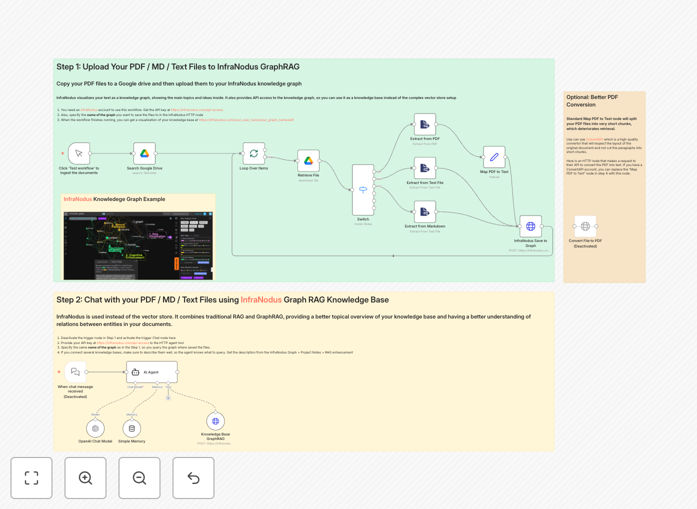
The workflow provides a complete solution for ingesting documents into a knowledge graph and querying them conversationally. It eliminates the need for complex vector database setup while maintaining high-quality responses through GraphRAG technology.
How It Works
The workflow uses InfraNodus' GraphRAG technology to create a knowledge graph from your documents, which serves as the foundation for conversational Q&A.
Document Ingestion
Files from Google Drive are processed through PDF/text conversion and analyzed to build a comprehensive knowledge graph of concepts and relationships.
Query Processing
When users ask questions, the system retrieves relevant information from the knowledge graph rather than using traditional vector similarity search.
Response Generation
An LLM (like OpenAI) synthesizes the retrieved graph information into coherent, context-aware answers.
Who This Is For
This template is ideal for:
- Knowledge managers needing to make documents searchable
- Teams maintaining internal wikis or documentation
- Businesses wanting customer-facing document Q&A
- Researchers analyzing collections of documents
What You'll Need
- InfraNodus account and API key
- Google Drive access with documents
- LLM provider (OpenAI or equivalent)
- Optional: ConvertAPI account for better PDF processing
Pro tip: For best results with PDFs, use ConvertAPI which preserves document layout better than basic PDF extractors.
Quick Setup Guide
- Add documents to a Google Drive folder
- Configure Google Drive OAuth in the workflow
- Add your InfraNodus API credentials
- Set up your LLM provider connection
- Run the ingestion workflow
- Activate the chat interface
Key Benefits
Simplified setup: Eliminates the complex infrastructure required for traditional RAG implementations.
Visual knowledge mapping: See relationships between concepts in your documents, not just isolated chunks.
Better context understanding: GraphRAG retrieves information based on conceptual relationships rather than just text similarity.
Easier maintenance: No vector store to manage or keep synchronized with document changes.
Flexible document support: Works with PDFs, text files, and Markdown documents.