PostgreSQL AI Agent Database Query Natural Language n8n

Chat with Your PostgreSQL Database Using AI

Ask questions in plain English and get instant answers from your database—no SQL knowledge required.

Download Template JSON · n8n compatible · Free
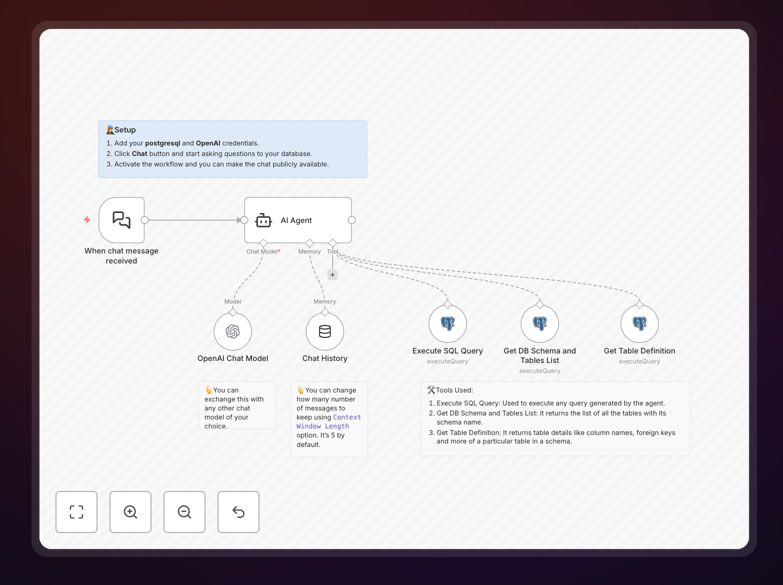
AI agent workflow diagram showing natural language query to PostgreSQL database

What This Workflow Does

This workflow transforms how your team interacts with data. Instead of writing complex SQL queries or waiting for a developer to build a report, anyone in your organization can ask questions in natural language and get immediate answers directly from your PostgreSQL database.

The template uses an AI agent powered by OpenAI to understand your question, examine your database schema, generate the appropriate SQL query, execute it, and return the results in a clear, readable format. It bridges the gap between business questions and technical data retrieval, making database insights accessible to non-technical team members.

Whether you need sales figures, customer counts, inventory status, or performance metrics, this automation delivers answers in seconds—eliminating manual query writing and reducing dependency on technical staff.

How It Works

Step 1: User asks a question

Someone in your team—a manager, salesperson, or analyst—types a question into a chat interface (like Slack, a web form, or directly in n8n). For example: "What were our top-selling products last quarter?" or "How many new customers signed up this month?"

Step 2: AI agent analyzes the request

The workflow passes the question to an AI agent configured with tools to understand your database structure. The agent first retrieves your PostgreSQL schema and table definitions to understand what data is available and how tables relate.

Step 3: SQL generation and execution

Based on the schema knowledge and the user's question, the AI constructs a precise SQL query. It then executes this query against your live PostgreSQL database through a secure connection.

Step 4: Results formatting and delivery

The raw database results are processed and formatted into a human-friendly answer. The AI agent can summarize, highlight key numbers, or present the data in tables—then delivers the answer back to the user through the same interface they asked from.

Who This Is For

This template is ideal for any business that stores data in PostgreSQL but wants to make that data accessible to non-technical teams. Perfect for:

  • Business managers who need quick answers without waiting for SQL reports
  • Sales teams wanting real-time performance metrics
  • Marketing analysts exploring campaign results
  • Operations teams monitoring inventory or logistics data
  • Startups and SMEs without dedicated data analysts
  • Developers who want to automate repetitive query tasks

If your team frequently asks "Can you pull this data for me?"—this workflow eliminates that bottleneck.

What You'll Need

  1. A PostgreSQL database with data you want to query
  2. Database connection credentials (host, port, database name, username, password)
  3. An OpenAI API key (or alternative LLM provider) for the AI agent
  4. n8n instance (cloud or self-hosted) to run the workflow
  5. Basic understanding of your database schema (table names and relationships)

Quick Setup Guide

1. Import the downloaded JSON template into your n8n workspace.

2. Configure the PostgreSQL credentials node with your database connection details.

3. Set up the OpenAI (or other LLM) node with your API key.

4. Adjust the AI agent's tools to match your specific database schema if needed.

5. Test with a simple question like "How many records are in the customers table?"

6. Connect the workflow to a trigger—like a Slack webhook, HTTP endpoint, or schedule.

7. Deploy and share with your team.

Pro tip: Start with read-only database permissions for the AI agent. Never grant write access initially. Monitor the queries generated to ensure they match your security policies.

Key Benefits

Democratize data access: Makes database insights available to everyone in your organization, not just SQL experts.

Reduce developer workload: Eliminates hours spent writing custom SQL for ad-hoc business questions.

Speed up decision-making: Answers arrive in seconds instead of days waiting for report development.

Improve data literacy: Team members learn to ask better questions and understand data patterns through natural interaction.

Scalable knowledge: As your database grows, the AI agent adapts—no need to rebuild queries for new tables.

Frequently Asked Questions

Common questions about AI-powered database querying and automation

Natural language database querying lets you ask questions about your data in plain English instead of writing SQL. For example, you can ask "What were our sales last month?" and get an answer directly from your PostgreSQL database without needing technical SQL knowledge.

This approach uses AI agents that understand your question, translate it into SQL, execute the query, and return the results in a readable format. It bridges the gap between business questions and technical data retrieval.

Automating database queries with AI saves hours of manual SQL writing and reduces dependency on technical staff. Business teams can get instant answers to data questions, enabling faster decision-making and freeing developers from repetitive query tasks.

Beyond efficiency, it improves data accessibility across your organization. Marketing, sales, operations, and management teams can explore data independently without waiting for SQL support.

Modern AI agents like OpenAI's models are highly accurate for generating SQL queries when they have access to your database schema. They understand table relationships and can produce correct JOINs, WHERE clauses, and aggregations for common business questions.

Accuracy improves when the AI agent is configured with detailed schema information. For complex queries, you can add validation steps or human review before execution.

Yes. The AI agent in this template uses tools to examine your database schema and table definitions before generating SQL. It can handle multi-table joins, aggregations, filtering, and sorting—essentially any query a human analyst would write for business reporting.

For extremely complex analytical queries involving multiple subqueries or window functions, you may need to fine-tune the agent instructions. But most business intelligence questions work perfectly.

Security is critical. The workflow should run in a controlled environment with read-only database permissions for the AI agent. Never grant write access. Use connection credentials with limited scope and monitor query logs to ensure only approved data is accessed.

Implement additional safeguards like query validation, result filtering, and user authentication if exposing this system externally. Always follow your organization's data governance policies.

Traditional BI tools require predefined reports and dashboards. AI-powered natural language querying is dynamic—you can ask any question instantly without waiting for report development. It's ideal for ad-hoc analysis and exploratory questions that dashboards don't cover.

Combine both approaches: use BI dashboards for routine monitoring and AI querying for unexpected questions. This gives your team complete data flexibility.

The same AI agent approach works with MySQL, SQLite, Microsoft SQL Server, and other SQL databases. The workflow structure remains identical; you just change the database connection node. n8n supports dozens of database integrations for this purpose.

For NoSQL databases like MongoDB, the approach differs slightly—the AI agent would need to understand document structure instead of tables. But the same natural language query concept applies.

Yes. GrowwStacks specializes in building tailored database automation systems that connect your PostgreSQL, MySQL, or other databases with AI agents, Slack, email, or custom dashboards. We design workflows that match your exact data structure and business questions.

Our team can integrate this with your existing tools, add security layers, train the AI on your specific schema, and deploy a complete solution that your entire team can use daily.

  • Custom integration with your internal chat platforms
  • Multi-database support for consolidated queries
  • Result formatting tailored to your reporting standards
  • Full security audit and compliance alignment

Need a Custom Database Automation?

This free template is a starting point. Our team builds fully tailored automation systems for your specific business needs.