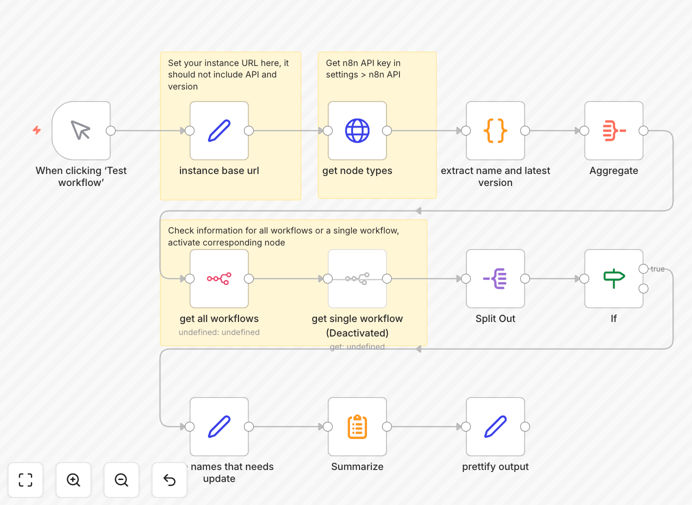
What This Workflow Does
This n8n workflow template solves a critical maintenance challenge for automation teams - identifying outdated nodes across your workflow library. As n8n continuously updates its built-in nodes with new features and security patches, running workflows with obsolete versions can lead to reliability issues, security vulnerabilities, and missed functionality.
The template systematically scans all your workflows, compares each node's version against the latest available, and generates a comprehensive report highlighting where updates are needed. It provides node name, type, current version, and latest version - giving you complete visibility into your workflow dependencies.
How It Works
1. Workflow Scanning
The template first retrieves a list of all your n8n workflows through the API. It processes each workflow individually to examine its node configuration.
2. Node Version Analysis
For each node in every workflow, the system checks the installed version against the latest available version from n8n's node repository. This comparison happens for all built-in node types.
3. Outdated Node Identification
When a node version mismatch is detected, the workflow captures detailed information including the node name, type, current version, and latest version. This data is compiled into an organized report.
4. Reporting Results
The final output presents all outdated nodes in an easy-to-read format, allowing you to prioritize updates based on version gaps. You can configure the workflow to send notifications via email, Slack, or other channels.
Pro tip: Schedule this workflow to run weekly and send reports to your team's channel. This creates an automated maintenance alert system for your n8n instance.
Who This Is For
This template is essential for n8n administrators, automation engineers, and IT teams responsible for maintaining workflow reliability. It's particularly valuable for:
- Teams running multiple production workflows in n8n
- Organizations with compliance requirements for software versions
- Businesses that need to minimize workflow downtime
- Developers managing shared n8n instances
What You'll Need
- An active n8n instance (self-hosted or cloud)
- API access to your n8n workflows
- Basic familiarity with n8n's interface
- Permission to install and run workflows
Quick Setup Guide
- Download the JSON template file
- Import it into your n8n instance
- Configure your n8n API credentials in the HTTP Request node
- Set up your preferred notification method (email, Slack, etc.)
- Test the workflow with a small set of workflows first
- Schedule it to run automatically at your preferred interval
Key Benefits
Prevent workflow failures: By identifying outdated nodes before they cause problems, you maintain higher uptime for critical business processes.
Save maintenance time: Automating version checks eliminates hours of manual workflow auditing each month.
Improve security posture: Stay current with security patches and vulnerability fixes in node updates.
Access new features: Ensure your team can leverage the latest capabilities in each node type.
Document node versions: Create an audit trail of your workflow dependencies for compliance and troubleshooting.