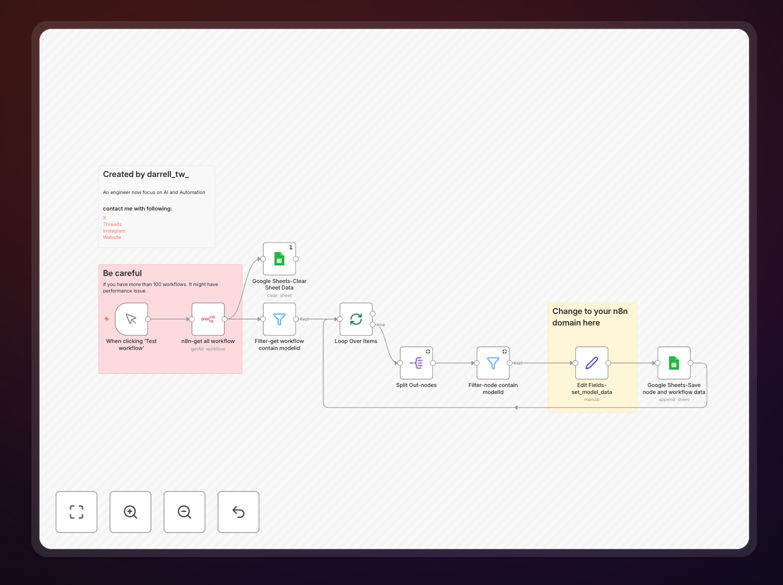
What This Workflow Does
As businesses increasingly integrate AI into their automation workflows, tracking which models are being used becomes critical for cost management, compliance, and optimization. This free n8n template solves the common problem of "AI model sprawl" – where teams lose visibility into which AI models power their automations, leading to unexpected costs and compliance risks.
The workflow automatically scans your n8n instance, identifies all workflows containing AI nodes, extracts detailed model information, and exports everything to Google Sheets. This creates a centralized inventory of your AI usage that updates automatically, giving you complete visibility without manual auditing.
How It Works
The automation follows a systematic process to ensure comprehensive tracking of all AI models across your workflows.
Step 1: Fetch All Workflows
The workflow connects to your n8n API and retrieves a complete list of all automation workflows in your instance. This ensures no AI-powered process is missed during the audit.
Step 2: Filter AI-Enabled Workflows
Using intelligent filtering, the system identifies workflows containing nodes with modelId settings – the telltale sign of AI integration. This includes LLM nodes, AI agents, and custom AI integrations.
Step 3: Extract Model Details
For each identified AI node, the workflow extracts the node name, model ID, model name, workflow name, and direct workflow URL. This creates a detailed record of exactly where and how each AI model is being used.
Step 4: Export to Google Sheets
All extracted information is automatically written to a connected Google Sheet, with old data cleared before new results are added. This creates a clean, up-to-date inventory that's easy to analyze and share with stakeholders.
Pro tip: Schedule this workflow to run weekly to maintain an always-current view of your AI model usage. This helps catch unexpected model changes or unauthorized AI integrations before they impact your budget.
Who This Is For
This template is ideal for automation managers, IT directors, and business leaders who need visibility into their AI investments. If you manage multiple n8n workflows with AI components, struggle with tracking AI costs, or need to demonstrate compliance with data governance policies, this audit system provides the documentation and insights you need.
Development teams implementing AI-powered automations will find it invaluable for maintaining clean architecture, while finance teams can use the exported data for accurate cost allocation and budgeting. Companies in regulated industries benefit from the audit trail for compliance reporting.
What You'll Need
- n8n instance with API access enabled
- Google Sheets account for storing audit results
- Google Sheet template (provided in the workflow notes)
- 5 minutes for initial setup and configuration
- Basic understanding of n8n credentials and API connections
Quick Setup Guide
Getting started with AI model auditing takes just a few simple steps.
- Import the template into your n8n instance using the downloaded JSON file
- Configure n8n API credentials to allow the workflow to access your instance
- Connect Google Sheets and create a new sheet using the provided template link
- Update the domain URL in the workflow to point to your n8n instance
- Test the workflow with a manual trigger to verify data extraction
- Schedule regular runs (weekly recommended) for ongoing monitoring
Performance note: If you have over 100 workflows, consider running this audit during off-peak hours. The workflow includes batch processing to handle large volumes efficiently.
Key Benefits
Complete cost visibility: Track exactly which AI models are being used across all automations, enabling accurate budgeting and identifying opportunities to switch to more cost-effective models without sacrificing performance.
Compliance documentation: Create an automatic audit trail that demonstrates which models process sensitive data, helping meet GDPR, HIPAA, and other regulatory requirements with minimal manual effort.
Performance optimization: Identify underperforming AI models or redundant AI calls that can be eliminated, improving both workflow efficiency and cost-effectiveness of your automation stack.
Centralized management: Replace scattered, manual tracking with a single source of truth in Google Sheets that updates automatically and can be easily shared with stakeholders across your organization.
Proactive alerting: Set up notifications for unusual AI usage patterns or cost spikes, allowing you to address issues before they impact your operations or budget significantly.