What This Workflow Does
Managing WeChat public account articles manually is time-consuming and inefficient. Content creators, marketers, and researchers often spend hours reading, categorizing, and summarizing articles to extract valuable insights. This workflow automates that entire process.
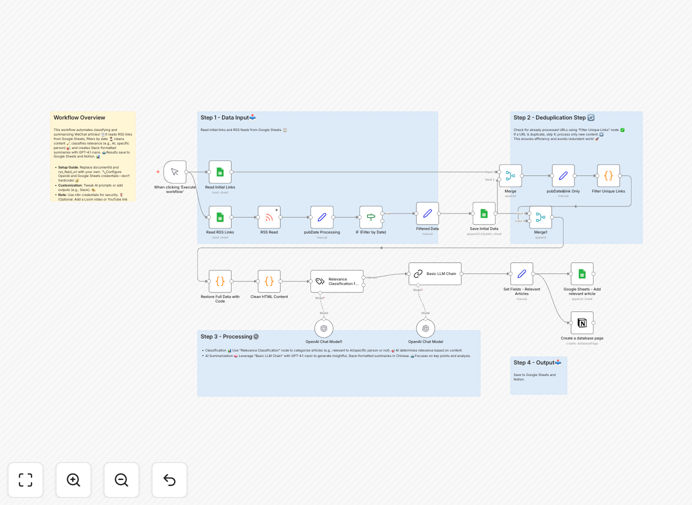
It automatically retrieves articles from WeChat RSS feeds, filters them by date, cleans the HTML content, classifies each article as relevant or not using AI, generates insightful Chinese summaries with GPT-4 Nano, and saves the results to both Google Sheets for structured data tracking and Notion for collaborative insight sharing. The output is formatted for easy team collaboration, turning raw content into actionable intelligence without manual effort.
How It Works
Step 1: Fetch WeChat Articles
The workflow starts by reading RSS feed links from a predefined Google Sheet. It pulls the latest articles from specified WeChat public accounts.
Step 2: Filter and Clean Content
An IF node filters articles published within the last 10 days, ensuring you only process recent content. HTML cleaning nodes strip formatting to prepare text for AI analysis.
Step 3: AI Classification and Summarization
A text classifier node evaluates each article against your custom categories (like "AI" or "欧阳良宜") to determine relevance. GPT-4 Nano then generates concise Chinese summaries, extracting key points and sentiment.
Step 4: Save to Google Sheets and Notion
Relevant articles and their summaries are appended to a Google Sheet for quantitative tracking. Simultaneously, a Notion database receives the insights for team review and collaboration.
Step 5: Output for Team Use
The final output is formatted in a Slack-friendly structure, ready to be shared with your team or integrated into your communication workflows.
Who This Is For
This template is ideal for content creators, marketers, market researchers, and business analysts who monitor WeChat for industry trends, competitor activity, or consumer sentiment. It's especially valuable for teams targeting Chinese audiences, managing multilingual content strategies, or conducting automated market intelligence. If you use Google Sheets for tracking and need to convert raw articles into organized insights, this automation eliminates the manual bottleneck.
What You'll Need
- An n8n account with access to Google Sheets and OpenAI integrations.
- A WeChat public account RSS feed URL.
- Google Sheets document with two sheets: "Save Initial Links" and "Save Processed Data".
- OpenAI API credentials (avoid hardcoding keys).
- Optional: A Notion database if you want to save summaries there.
- Basic understanding of JSON and node configuration to customize categories.
Quick Setup Guide
- Download the template and import it into your n8n workspace.
- Replace the example Google Sheets documentId with your own. Set up the two required sheets with the specified gid values.
- Add your Google Sheets and OpenAI API credentials securely in n8n.
- Update the rss_feed_url in the "RSS Read" node with your actual WeChat RSS feed.
- Customize the "Relevance Classification" and "Basic LLM Chain" prompts to match your topics of interest.
- If using Notion, swap the databaseId with your own.
- Trigger the workflow manually via the "When clicking ‘Execute workflow’" node to test. Consider adding a "Schedule Trigger" for automation.
Pro tip: Start with a narrow set of categories (2-3 topics) to ensure high classification accuracy before expanding. Regularly review the AI summaries for a week to refine prompts.
Key Benefits
Saves 5–10 hours weekly on manual content review. Automating article fetching, reading, and summarization reclaims time for analysis and strategy.
Provides real-time market intelligence. Get filtered, summarized insights on Chinese consumer trends and competitor activity as soon as articles publish.
Ensures consistent insight capture. AI-driven classification and summarization eliminate human bias and inconsistency in note-taking.
Creates a scalable research pipeline. The workflow can be extended to monitor multiple feeds, add more categories, and output to additional platforms like Slack or email.
Enables collaborative decision-making. By saving results to both Google Sheets (data) and Notion (insights), teams have shared resources for quantitative and qualitative analysis.