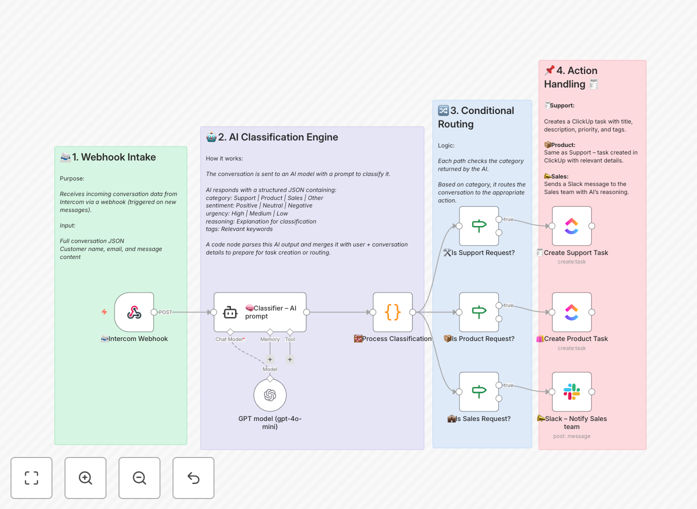
What This Workflow Does
Customer messages in Intercom can be chaotic. Support queries, product feedback, and sales inquiries all land in the same inbox, forcing your team to manually read, label, and route each one. This process is slow, error-prone, and diverts your team from high-value work.
This automation solves that. It acts as an intelligent triage system. When a new conversation arrives in Intercom, the workflow instantly analyzes the message content using OpenAI's GPT-4o-mini. The AI determines the category (Support, Product, Sales, or Other), assesses sentiment and urgency, and extracts key tags. Based on this classification, it automatically creates a detailed task in ClickUp for your support or product team, or sends a real-time alert to a designated Slack channel for your sales team to act on immediately.
The result is a fully automated, intelligent routing system that ensures the right person gets the right message at the right time, eliminating manual sorting and dramatically speeding up response times.
How It Works
The workflow is a precise, multi-step automation pipeline designed for reliability and clarity.
1. Webhook Trigger & Data Capture
A webhook node listens for new Intercom conversations. When triggered, it captures the complete conversation payload, including the customer's name, email, message body, and any custom attributes. This raw data is passed forward as the foundation for the AI analysis.
2. AI-Powered Classification
The core intelligence step. The conversation data is sent to the OpenAI node (GPT-4o-mini) with a carefully crafted system prompt. The AI is instructed to output a clean JSON object containing the classification: category (Support, Product, Sales, Other), sentiment (Positive, Neutral, Negative), urgency (Low, Medium, High), a short reasoning string, and relevant tags (e.g., "bug", "billing", "demo_request").
3. Data Processing & Enrichment
A Code node receives the AI's JSON output and the original Intercom data. It merges them, structures the information, and prepares formatted fields for the next steps. This includes creating a task title, a comprehensive description combining the user's message and the AI's reasoning, and setting priority based on the urgency score.
4. Conditional Routing & Action
An IF node evaluates the AI's category decision. If the message is classified as "Support" or "Product," the workflow proceeds to create a task in a specified ClickUp list, populated with all the enriched data. If the category is "Sales," the workflow instead sends a formatted, actionable alert to a pre-defined Slack channel, ensuring your sales team can follow up instantly. Messages tagged as "Other" can be logged for later review.
Who This Is For
This template is ideal for customer-facing teams that use Intercom for support and communication but struggle with internal handoffs. It's perfect for:
- Support Teams drowning in a mixed inbox who need to automatically create tracked, prioritized tickets in their project management tool (ClickUp).
- Product Managers who want to automatically capture and categorize feature requests and bug reports from user conversations.
- Sales Teams that need instant notifications when a hot lead or demo request comes through Intercom, bypassing the support queue.
- Startups and SMBs where team members wear multiple hats and need clear, automated routing to ensure nothing gets missed.
- Operations Managers looking to implement AI-driven process efficiency without complex, custom-coded solutions.
What You'll Need
- An n8n instance (Cloud or self-hosted).
- An active Intercom account with admin access to set up a webhook.
- An OpenAI API key with access to the GPT-4o-mini model.
- A ClickUp account and API token, with a specific List ID where tasks should be created.
- A Slack workspace and a webhook URL for the channel where sales alerts should be posted.
- Basic familiarity with n8n's interface to paste API credentials and configure node settings.
Pro tip: Before you begin, create a dedicated "AI-Triaged" list in ClickUp and a #incoming-leads channel in Slack. This keeps the automated tasks and alerts organized and separate from other communications.
Quick Setup Guide
You can have this automation running in under 15 minutes.
- Download & Import: Click the "Download Template" button above and save the JSON file. In your n8n dashboard, create a new workflow and use the "Import from File" option to load this template.
- Configure Credentials: In the workflow canvas, click on each node (Intercom, OpenAI, ClickUp, Slack) and add your respective API keys and access tokens in the "Credentials" section.
- Set Your Destinations: In the ClickUp node, paste the ID of your target ClickUp List. In the Slack node, paste the webhook URL for your chosen channel.
- Customize the AI Prompt (Optional): Open the OpenAI node to review the system prompt. You can tweak the categories, instructions, or output format to better match your business language.
- Activate the Webhook: Turn the workflow ON. n8n will provide you with a unique webhook URL. Copy this URL.
- Connect Intercom: In your Intercom admin settings, go to "Apps & Integrations" and create a new webhook. Paste the n8n webhook URL and select the "Conversation created" event.
- Test & Go Live: Send a test message in Intercom. Within seconds, you should see a corresponding task appear in ClickUp or an alert in Slack, depending on the message content.
Key Benefits
Eliminate Manual Triage: Free your team from the tedious, time-consuming task of reading and sorting every single incoming message. The AI handles categorization instantly and consistently.
Speed Up Response Times: Urgent support tickets and hot sales leads are routed to the correct team in real-time. No more waiting for a human to notice and forward the message, which can cut initial response time from hours to seconds.
Improve Data Consistency: Every task created in ClickUp follows the same format, with standardized fields for priority, category, and customer context. This creates a clean, actionable paper trail for every customer interaction.
Capture Every Opportunity: Sales inquiries are no longer buried in a general support inbox. Instant Slack alerts ensure your sales team can engage with potential customers while their interest is highest.
Scale Without Adding Headcount: As your customer conversation volume grows, this automated system scales with you, handling increased load without requiring additional manual labor or creating bottlenecks.