What This Workflow Does
Every minute a lead sits unqualified is potential revenue lost. Sales teams waste hours manually reading through inquiry forms, emails, and chat messages trying to gauge interest level and urgency. This AI-powered automation solves that problem by instantly analyzing the emotional tone and intent behind every incoming lead.
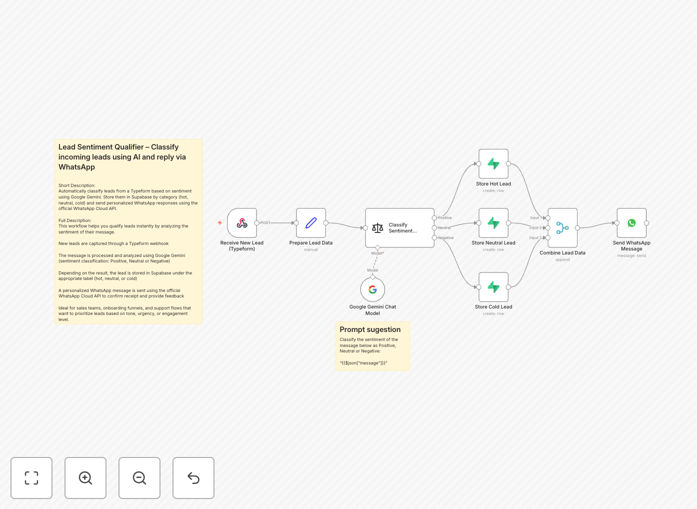
The workflow captures lead information from Typeform (or any webhook source), uses Google Gemini's advanced natural language processing to classify the sentiment as positive (hot lead), neutral (warm lead), or negative (cold lead), stores the categorized data in Supabase for tracking and segmentation, and then sends perfectly tailored WhatsApp messages through the official WhatsApp Cloud API. What used to take 15-30 minutes of manual review now happens in seconds, with personalized follow-up already initiated.
How It Works
Step 1: Lead Capture & Data Structuring
The workflow begins when a prospect submits information through a Typeform contact form, website chatbot, or any webhook-enabled source. The system captures all relevant data—name, email, phone number, and most importantly, their message or inquiry text. This raw data is then cleaned and structured for consistent processing.
Step 2: AI Sentiment Analysis with Google Gemini
Google Gemini analyzes the lead's message using sophisticated natural language understanding. It evaluates word choice, sentence structure, emotional indicators, and context to assign a sentiment score. The AI classifies leads into three categories: Positive (hot leads showing clear buying intent), Neutral (warm leads seeking information), or Negative (cold leads with complaints or low interest).
Step 3: Database Storage & Organization
Each classified lead is automatically stored in Supabase under the appropriate category table. This creates a searchable, filterable database where sales teams can view all hot leads in one place, track conversion rates by sentiment category, and generate reports on lead source effectiveness. The database also preserves the original message alongside the AI's classification for quality review.
Step 4: Personalized WhatsApp Response Delivery
Based on the sentiment classification, the workflow sends a customized WhatsApp message through the official WhatsApp Cloud API. Hot leads receive immediate, enthusiastic responses with clear next steps. Warm leads get informative, helpful replies that build trust. Cold leads receive empathetic, problem-solving messages designed to salvage the relationship. Each message template is pre-approved and includes the lead's name for personalization.
Pro tip: Configure different response times based on sentiment—hot leads should receive WhatsApp messages within 60 seconds, while warm leads can wait 5-10 minutes. This mimics human response patterns while maintaining automation efficiency.
Who This Is For
This automation is ideal for sales teams, customer success departments, and marketing agencies managing multiple client lead streams. Specifically:
B2B SaaS companies receiving 50+ demo requests weekly who need to prioritize enterprise accounts.
E-commerce stores with high-value products where customer intent significantly impacts conversion probability.
Service-based businesses (consulting, agencies, freelancers) where lead quality matters more than quantity.
Real estate agencies needing to instantly identify serious buyers from casual browsers.
Educational institutions processing enrollment inquiries with varying levels of commitment.
What You'll Need
- Typeform account (or any form/webhook source) to capture lead information
- Google Gemini API key for AI sentiment analysis (available through Google AI Studio)
- Supabase account with a database project created for lead storage
- WhatsApp Business API access through Meta's developer platform or an approved provider
- n8n instance (cloud or self-hosted) to run the automation workflow
- Approved WhatsApp message templates for each sentiment category (requires Meta approval)
Quick Setup Guide
1. Download the template using the button above and import it into your n8n instance.
2. Configure the Webhook node with your Typeform form ID or custom webhook URL.
3. Add your Google Gemini API credentials in the AI node settings.
4. Connect to your Supabase project and ensure tables exist for hot_leads, warm_leads, and cold_leads.
5. Input your WhatsApp Business API credentials and approved message templates for each sentiment category.
6. Test with sample lead data to verify classification accuracy and message delivery.
7. Activate the workflow and connect your live lead sources.
Pro tip: Run a two-week parallel test where both the AI and human team classify leads. Compare results to fine-tune the sentiment thresholds before full automation.
Key Benefits
Reduce lead response time from hours to seconds. Hot leads receive personalized WhatsApp messages within 60 seconds of submission, dramatically increasing conversion probability. Studies show response within 5 minutes increases conversion rates by 9x compared to 30-minute responses.
Eliminate 10+ hours weekly of manual lead sorting. Sales teams regain time previously spent reading through inquiries to gauge interest level. This time can be redirected to actual selling, relationship building, or strategic activities that directly impact revenue.
Improve lead qualification accuracy with consistent AI analysis. Unlike human reviewers who experience fatigue, mood variations, and subjective bias, the AI applies the same criteria to every lead 24/7. This creates standardized qualification that improves over time as the model learns from your specific lead patterns.
Create searchable lead databases for targeted follow-up campaigns. All classified leads are stored in Supabase with sentiment scores, enabling advanced segmentation. Run campaigns specifically for warm leads who need nurturing, or create special offers for cold leads to re-engage them.
Scale lead handling without proportional staffing increases. The system processes 100 leads as efficiently as 10, allowing business growth without linear increases in sales team size. This creates significant operational leverage, especially during seasonal spikes or marketing campaigns.