Zapier Tally Forms Notion Google Drive Slack

Client Onboarding Automation: Tally Forms to Google Drive, Notion & Slack

Streamline your client intake process with automated form processing and team notifications

Download Template JSON · n8n compatible · Free
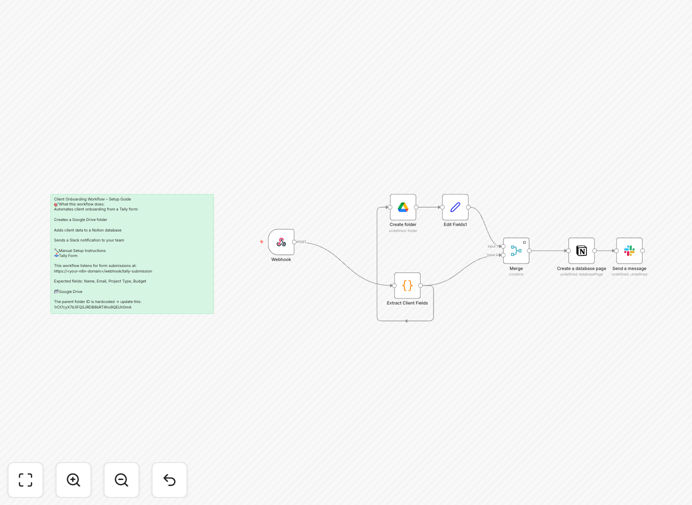
Diagram showing client onboarding automation flow from Tally Forms to multiple platforms

What This Workflow Does

This automation transforms your client onboarding from a manual, error-prone process into a seamless digital workflow. When a new client submits information through your Tally form, the system automatically:

  • Creates organized client folders in Google Drive
  • Updates your Notion client database
  • Notifies your team via Slack
  • Ensures no client information falls through the cracks

By eliminating repetitive data entry, you'll reduce onboarding time by 70-80% while improving data accuracy and client experience. The workflow handles all the administrative heavy lifting so your team can focus on delivering great service.

How It Works

1. Form Submission Trigger

The workflow activates when a new submission arrives in your Tally form. It captures all form fields including client contact details, service preferences, and any custom questions you've configured.

2. Data Processing

The system parses the form response, extracting key information while validating data formats (emails, phone numbers, etc.). Invalid submissions trigger automatic follow-up requests.

3. Google Drive Organization

A dedicated folder structure is created for each client, named using a consistent convention (ClientName_ServiceType_Date). The workflow generates subfolders for contracts, intake documents, and project assets.

4. Notion Database Update

Client information is added to your Notion database with all relevant fields populated. The entry includes links to the Google Drive folder and timestamps for tracking onboarding progress.

5. Team Notification

A formatted Slack message alerts your team with client details and next steps. The message includes quick-action buttons for common follow-up tasks.

Pro tip: Add a delay step before Slack notifications to avoid after-hours pings if clients submit forms outside business hours.

Who This Is For

This workflow is ideal for:

  • Consulting firms onboarding new clients
  • Marketing agencies processing new projects
  • Freelancers managing multiple client engagements
  • Service businesses with standardized intake processes
  • Teams using Notion for client management

If you onboard more than 5 clients per month or have a team handling intake, this automation will save significant time and reduce coordination overhead.

What You'll Need

  1. A published Tally form collecting client information
  2. Google Drive account with folder creation permissions
  3. Notion database configured with client fields
  4. Slack workspace with appropriate channel access
  5. n8n instance (cloud or self-hosted)

Quick Setup Guide

  1. Download the template JSON file
  2. Import into your n8n instance
  3. Configure your Tally form webhook URL
  4. Connect your Google Drive, Notion and Slack accounts
  5. Test with sample form submissions
  6. Activate the workflow

Key Benefits

Eliminate manual data entry - Client information flows automatically between systems without copy-paste or rekeying.

Reduce onboarding time by 75% - What typically takes hours happens in minutes without human intervention.

Never lose client information - Automated systems don't forget to save files or update records.

Improve team coordination - Everyone gets notified simultaneously with consistent information.

Scale your operations - Handle 10x more clients without proportionally more admin work.

Frequently Asked Questions

Common questions about client onboarding automation and integration

Automating client onboarding saves hours of manual data entry, reduces human error, and ensures consistent onboarding experiences. Businesses report 60-80% time savings on administrative tasks when implementing automated onboarding workflows.

The automation also improves client perception by providing immediate confirmation and next steps, rather than waiting for manual processing. This professional touch can increase client satisfaction and retention rates.

The workflow uses encrypted API connections between platforms. Sensitive client data remains secure as it moves between systems without manual handling or spreadsheet exports.

All integrations use OAuth authentication and follow platform security best practices. You maintain control over which team members can access client information in each system.

Service businesses with frequent new client intake (agencies, consultants, law firms) see the biggest benefits. Any company onboarding 10+ clients monthly should consider automating the process.

The workflow is particularly valuable for businesses that require consistent documentation collection or have compliance requirements for client records. It creates an audit trail of the onboarding process.

Yes, the workflow can be extended to include contract generation, payment processing, calendar scheduling, and custom welcome sequences based on client type or service package.

Common additions include: integrating with DocuSign for contracts, connecting to Calendly for onboarding calls, or triggering custom email sequences based on service selection.

The workflow includes error handling that logs failures and notifies administrators. Partial submissions can be recovered without data loss.

Built-in retry logic attempts to complete failed steps, and the system maintains a queue of pending actions that can be manually processed if needed.

The template is designed for customization. Common modifications include swapping Google Drive for Dropbox or adding CRM integrations like HubSpot or Salesforce.

Most tool substitutions require changing just the connection settings while maintaining the same workflow logic. The visual interface makes it easy to see how data flows between steps.

Yes, GrowwStacks specializes in building tailored onboarding automations. Our team can design workflows that match your exact business processes and tool stack.

Custom solutions typically include: mapping to your existing systems, branding the client experience, adding conditional logic for different service types, and training your team on maintenance.

  • Free consultation to assess your needs
  • 2-week implementation timeline for most projects
  • Ongoing support and optimization available

Need a Custom Client Onboarding Automation?

This free template is a starting point. Our team builds fully tailored automation systems for your specific business needs.