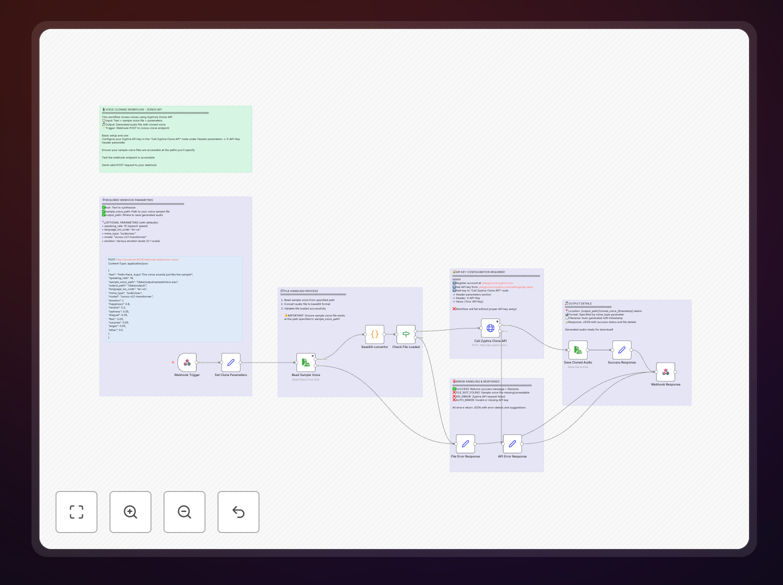
What This Workflow Does
This automation solves the challenge of creating natural-sounding synthetic voices at scale. Traditional voice recording requires expensive studio time and professional talent, while basic text-to-speech systems produce robotic, impersonal audio. The Zyphra Zonos API bridges this gap by cloning voices from sample recordings.
The workflow automatically converts text inputs into high-quality speech that maintains brand voice consistency across all your content. It handles the entire process from API authentication to audio file generation and distribution, eliminating manual steps in voiceover production.
How It Works
1. Text Input Processing
The workflow receives text content from your CMS, database, or form submissions. It cleans and formats the text for optimal speech synthesis, handling special characters, abbreviations, and pronunciation exceptions.
2. Voice Profile Selection
Based on rules you configure, the system selects the appropriate voice profile from your Zyphra Zonos library. This could be determined by language, content type, target audience, or other business logic.
3. API Call to Zyphra Zonos
The formatted text and voice parameters are sent to Zyphra's API endpoint. The workflow handles authentication, rate limiting, and error recovery automatically.
4. Audio File Generation
Upon successful synthesis, the workflow receives the generated audio file in your specified format (MP3, WAV, etc.). Quality checks ensure the output meets your standards before proceeding.
5. Distribution & Integration
The final audio is saved to your cloud storage, attached to CMS records, or sent to video editing pipelines based on your configured rules. Notifications alert teams when new voice content is ready.
Who This Is For
This automation benefits content teams at e-learning platforms, marketing agencies, video production houses, and customer experience departments. Podcast networks use it to maintain consistent host voices across episodes, while global businesses leverage it for multilingual customer support content.
Pro tip: Start with cloning frequently used brand voices (like product explainer narrations) before expanding to customer-specific voice profiles.
What You'll Need
- A Zyphra Zonos API account with voice cloning credits
- Existing voice samples (minimum 30 minutes of clean audio per voice profile)
- n8n instance or Zapier account for workflow execution
- Storage destination for generated audio files (S3, Google Drive, etc.)
- Text content source (CMS, database, or form submissions)
Quick Setup Guide
- Download and import the JSON template into your n8n or Zapier account
- Configure your Zyphra Zonos API credentials in the workflow settings
- Map your text input source (database field, webhook, etc.)
- Set up output destinations for generated audio files
- Test with sample text and verify audio quality
- Deploy the workflow and monitor initial executions
Key Benefits
Reduce voiceover production costs by 80% by eliminating studio sessions and voice actor fees for routine content updates.
Scale multilingual content effortlessly - clone voices once, then generate speech in multiple languages while maintaining vocal characteristics.
Maintain brand consistency across all customer touchpoints with perfectly matched voice profiles for every interaction.
Accelerate content production cycles from days to minutes - update voiceovers instantly when products or messaging changes.
Enhance accessibility by automatically converting text content into high-quality audio for visually impaired users.