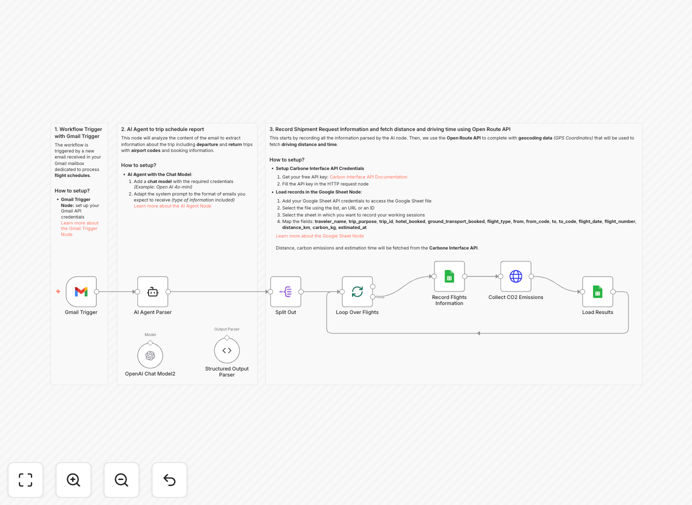
What This Workflow Does
This automation solves the growing challenge of tracking and reporting carbon emissions from employee business travel. Most companies struggle with manual processes that are time-consuming, error-prone, and difficult to scale across departments. The workflow automatically processes flight confirmation emails, extracts travel data using AI, calculates precise CO2 emissions using the Carbon Interface API, and logs everything in Google Sheets for sustainability reporting.
By connecting Gmail, AI processing, carbon calculation APIs, and spreadsheet reporting, this system eliminates hours of manual work per month while providing accurate, auditable emissions data. It transforms scattered travel information into structured environmental metrics that support ESG reporting, compliance requirements, and corporate sustainability initiatives.
How It Works
Step 1: Email Trigger & AI Extraction
The workflow monitors a designated Gmail inbox for flight confirmation emails from systems like SAP Concur or travel agencies. When a new email arrives, an AI agent reads the content and extracts structured data including departure/arrival airports, flight dates, flight numbers, and passenger counts.
Step 2: Data Validation & Storage
Extracted travel data is validated for completeness and stored in a Google Sheet as a master record. This creates a centralized repository of all business trips with metadata ready for carbon calculation.
Step 3: Carbon Calculation API Call
For each flight leg in the itinerary, the workflow calls the Carbon Interface API with airport codes and passenger count. The API returns precise distance calculations and CO2 emissions in kilograms based on aircraft type and load factors.
Step 4: Automated Reporting
Emission data is appended to the corresponding trip record in Google Sheets, creating a complete audit trail with timestamps. The system can be extended to generate monthly reports, trigger alerts for high-emission trips, or integrate with sustainability dashboards.
Who This Is For
This automation is ideal for sustainability managers, travel coordinators, finance teams, and corporate responsibility officers in companies with regular business travel. It's particularly valuable for organizations subject to ESG reporting requirements, those pursuing carbon neutrality goals, or companies looking to optimize travel spending while reducing environmental impact. The workflow scales from small businesses to enterprise-level operations with hundreds of monthly flights.
What You'll Need
- A Gmail account receiving travel confirmation emails
- A Google Sheet for storing trip data and emissions
- A free Carbon Interface API key from carboninterface.com
- Access to OpenAI or another AI provider for email parsing
- Sample flight confirmation emails for testing
- An n8n instance (cloud or self-hosted)
Pro tip: Start by creating a dedicated Gmail label or folder for travel confirmations to keep test emails separate from regular correspondence. This makes initial setup and troubleshooting much easier.
Quick Setup Guide
- Download the template and import it into your n8n instance
- Configure the Gmail trigger node with your credentials and email filter settings
- Set up your Google Sheets connection and specify the spreadsheet ID
- Add your Carbon Interface API key to the HTTP Request nodes
- Configure the AI agent node with your preferred model and parsing instructions
- Send a test flight confirmation email to trigger the workflow
- Verify that emissions data appears correctly in your Google Sheet
Key Benefits
Reduce manual work by 80%: What previously took hours of spreadsheet work each month now happens automatically with zero human intervention.
Improve reporting accuracy: Automated calculations eliminate human errors in distance conversions and emission factor applications.
Enable real-time monitoring: Get immediate visibility into travel emissions rather than waiting for quarterly manual reports.
Support compliance requirements: Maintain detailed, auditable records for ESG reporting frameworks and regulatory requirements.
Identify optimization opportunities: Data reveals patterns in high-emission routes, enabling targeted travel policy adjustments.