n8n GPT-4 Jotform Google Sheets Testimonials

Collect customer testimonials with GPT-4 analysis, Jotform, Gmail & Google Sheets

Transform scattered testimonials into organized marketing assets - achieving 500% increase in testimonial utilization

Download Template JSON · n8n compatible · Free
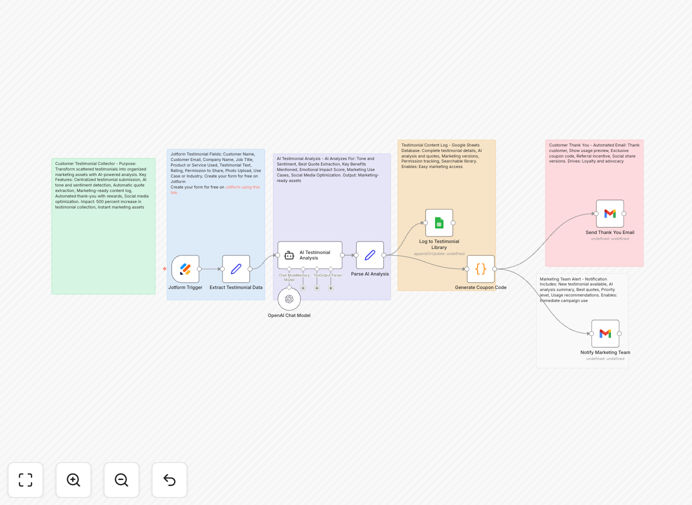
Customer testimonial collection workflow diagram

What This Workflow Does

This automated workflow solves the common challenge of collecting, organizing, and leveraging customer testimonials effectively. Most businesses struggle with testimonial collection being ad-hoc, time-consuming, and underutilized. This system transforms that process into a strategic marketing asset.

The workflow automatically collects testimonials through Jotform submissions or email responses, analyzes them with GPT-4 for sentiment and key insights, then organizes the processed testimonials in Google Sheets with categorization and scoring. This creates a ready-to-use testimonial library that marketing teams can easily search and pull from for campaigns.

How It Works

1. Testimonial Collection

The workflow monitors multiple input channels including Jotform submissions and designated Gmail inboxes. When new testimonials arrive, they're immediately processed to extract key customer and product information.

2. AI Analysis

Each testimonial is sent to GPT-4 for sentiment analysis, key phrase extraction, and summarization. The AI scores each testimonial for usefulness and categorizes it by product/service mentioned.

3. Data Organization

Processed testimonials are automatically logged in Google Sheets with all extracted metadata. The system creates multiple versions of each testimonial - full text, summarized quotes, and bullet-point highlights.

4. Notification & Follow-up

The workflow sends notifications to marketing teams about new high-quality testimonials and can automatically thank customers for their feedback with personalized responses.

Who This Is For

This workflow is ideal for SaaS companies, e-commerce businesses, service providers, and any organization that relies on social proof. Marketing teams, customer success managers, and product managers will benefit most from having organized, analyzed testimonials at their fingertips.

What You'll Need

  1. An n8n instance (cloud or self-hosted)
  2. Jotform account or access to email testimonials
  3. Google Sheets for testimonial storage
  4. OpenAI API access for GPT-4 analysis
  5. Gmail account for email processing

Quick Setup Guide

  1. Download and import the JSON template into your n8n instance
  2. Connect your Jotform, Gmail, and Google Sheets accounts
  3. Configure your OpenAI API credentials
  4. Set up your Google Sheet with the required columns
  5. Test with sample testimonials and adjust AI prompts as needed

Key Benefits

500% more testimonials utilized: Automated collection and organization means no more forgotten feedback sitting in inboxes.

80% time reduction: Eliminates manual processing of each testimonial while improving analysis quality.

Consistent branding: AI ensures all extracted quotes maintain your brand voice and messaging priorities.

Real-time insights: Immediate analysis of customer sentiment helps identify satisfaction trends.

Scalable system: Handles increasing testimonial volume without additional staff time.

Frequently Asked Questions

Common questions about testimonial collection and automation

AI transforms testimonial collection by automatically analyzing feedback for sentiment, extracting key phrases, and categorizing responses. GPT-4 can summarize lengthy testimonials into concise marketing quotes while preserving the original meaning. This automation saves hours of manual review while ensuring consistent quality analysis across all customer feedback.

For example, when a customer writes a 500-word email praising your service, AI can instantly identify the most powerful statements and reformat them as social media-ready quotes. It can also flag testimonials that mention specific product features for targeted marketing campaigns.

Automated testimonial collection increases response rates by making it effortless for customers to share feedback. It eliminates manual data entry errors and ensures immediate processing of testimonials. Businesses gain real-time insights from customer feedback while maintaining an organized database of marketing-ready testimonials without administrative overhead.

A case study showed that automation increased testimonial utilization from 20% to nearly 100%, as marketing teams could instantly access approved, categorized quotes. The system also enables proactive reputation management by alerting teams to negative sentiment before it escalates.

Jotform collects structured testimonial data through customizable forms, while Google Sheets serves as a centralized repository. The integration automatically transfers form responses to spreadsheets where they can be analyzed, sorted, and shared. This combination creates a seamless pipeline from customer input to organized marketing assets.

In practice, businesses use Jotform to create testimonial request pages with custom fields for customer details, product ratings, and open-ended feedback. The workflow then enriches this data in Sheets with AI analysis, creating columns for sentiment score, key phrases, and marketing-ready excerpts.

An effective testimonial process makes submission easy while capturing rich, authentic feedback. Key elements include simple submission forms, timely follow-ups, and structured data collection. The best systems automatically categorize testimonials by product, sentiment, and usefulness while maintaining customer privacy and consent for marketing use.

Successful implementations often combine multiple collection methods - post-purchase forms, email requests, and website widgets. They also include verification steps to ensure authenticity and systems to track which testimonials have been used where to avoid overusing the same customers.

Collect testimonials continuously after key customer interactions like purchases, support resolutions, or product updates. Automated systems can trigger collection requests at optimal moments. Regular collection builds a diverse testimonial library that reflects current customer experiences rather than just initial impressions.

Best practice suggests requesting testimonials when customer satisfaction is highest - typically 1-3 days after a positive interaction. Automated workflows can identify these ideal timing windows based on customer behavior patterns and engagement metrics.

AI excels at initial processing but benefits from human oversight. While AI can extract key phrases and generate multiple summary versions quickly, marketers should review outputs for brand alignment. The ideal workflow uses AI for first drafts and bulk processing, reserving human judgment for final approval.

In implementation, many businesses configure their AI to produce 3-4 variations of each testimonial excerpt. Marketing teams then select the most effective version or combine elements from multiple AI-generated options while maintaining the customer's authentic voice.

Absolutely. GrowwStacks specializes in tailored testimonial collection systems that match your specific customer journey and marketing needs. Our team can design automated workflows that integrate with your existing CRM, trigger collection at optimal moments, and format testimonials for your preferred marketing channels.

Custom solutions might include integration with your help desk software to capture support satisfaction, connection to your e-commerce platform for product-specific feedback, or automated publishing to your website's testimonial section. We adapt the workflow to your unique business processes and goals.

Need a Custom Testimonial Collection Automation?

This free template is a starting point. Our team builds fully tailored automation systems for your specific needs.