LinkedIn Lead Generation AI SerpAPI OpenAI

Collect LinkedIn Profiles with AI Processing

Automate LinkedIn profile discovery, enrichment, and storage using SerpAPI, OpenAI, and NocoDB. Perfect for recruiters, sales teams, and researchers.

Download Template JSON · n8n compatible · Free
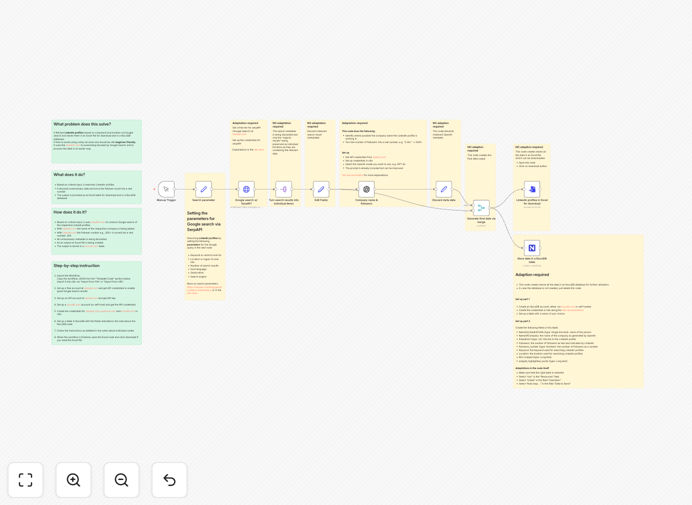
LinkedIn profile collection automation workflow diagram showing SerpAPI, OpenAI, and NocoDB integration

What This Workflow Does

Manual LinkedIn prospecting is time-consuming and inconsistent. Recruiters, sales teams, and marketers spend hours searching for relevant profiles, copying data, and organizing it in spreadsheets. This workflow automates the entire process, turning days of research into minutes of automated execution.

It searches for LinkedIn profiles based on specific keywords and locations using SerpAPI (which avoids Google search blocks), enriches the data with AI-powered company identification and follower count normalization, and stores everything in a structured NocoDB database with an optional Excel export. The result is a clean, actionable list of potential leads or candidates ready for outreach or analysis.

This automation is particularly valuable for businesses scaling their outbound efforts, agencies building client lists, or recruiters sourcing passive candidates. By eliminating manual data entry and ensuring consistent data quality, it dramatically increases efficiency while reducing human error.

How It Works

1. Profile Search & Collection

The workflow starts with a manual trigger where you input search criteria (keywords like "Marketing Director" and locations like "San Francisco"). It uses SerpAPI to perform Google searches for LinkedIn profiles matching these parameters, bypassing LinkedIn's own API limitations and avoiding IP blocks.

2. Data Cleaning & Processing

Raw profile data often contains inconsistencies. The workflow processes each profile through multiple nodes that clean the data—removing unnecessary metadata, extracting relevant information, and preparing it for AI enrichment.

3. AI-Powered Enrichment

OpenAI analyzes each profile to identify the company name (even from ambiguous descriptions) and converts follower ranges (e.g., "500+" or "1K followers") into exact numbers. This transforms messy, human-readable data into structured, machine-readable information.

4. Database Storage & Export

The enriched data is automatically inserted into a NocoDB table with consistent fields. Simultaneously, an Excel file is generated with all collected profiles, ready for download. This creates both a live database for ongoing use and a static file for sharing or backup.

Who This Is For

This workflow is ideal for recruitment agencies sourcing candidates, sales teams building prospect lists, marketing agencies identifying influencers, startups looking for advisors or partners, and researchers analyzing professional networks. It's particularly valuable for businesses that need to regularly build targeted contact lists without manual effort.

Technical recruiters can use it to find developers with specific skills. Sales teams can identify decision-makers in target companies. Marketing agencies can build influencer databases. The flexibility of the search criteria makes it adaptable to virtually any professional sourcing need.

What You'll Need

  1. n8n instance (cloud or self-hosted)
  2. SerpAPI account (free tier available) for LinkedIn profile searches
  3. OpenAI API key for AI-powered data enrichment
  4. NocoDB account (free cloud version or self-hosted) for database storage
  5. Basic understanding of n8n workflow import and credential setup

Pro tip: Start with SerpAPI's free credits to test the workflow before scaling. Their Google Search API handles the LinkedIn search without triggering blocks, which is crucial for reliable automation.

Quick Setup Guide

Follow these steps to get your LinkedIn automation running in under 30 minutes:

  1. Import the workflow using the downloaded JSON file via n8n's import function
  2. Create free accounts for SerpAPI, OpenAI, and NocoDB if you don't have them
  3. Set up credentials in n8n for all three services using your API keys
  4. Configure your NocoDB table with the fields shown in the workflow notes
  5. Test with a simple search like "software engineer" and "remote" to verify everything works
  6. Adjust search parameters for your specific use case and run the workflow

Key Benefits

Save 10+ hours weekly on manual research by automating profile discovery and data entry. What used to take a full day now completes in minutes.

Improve data accuracy with AI processing that standardizes company names and follower counts, eliminating manual interpretation errors.

Build scalable lead databases that grow with your business, with structured data ready for CRM integration or outreach campaigns.

Avoid LinkedIn search limitations by using SerpAPI's compliant Google search method, ensuring consistent access to profile data.

Create reusable automation assets that can be modified for different roles, industries, or locations without starting from scratch.

Frequently Asked Questions

Common questions about LinkedIn automation and AI-powered lead generation

The most effective way to automate LinkedIn lead generation is by combining search automation with AI enrichment. Use tools like SerpAPI to scrape LinkedIn profiles based on keywords and location, then process the data with AI to extract company names, clean follower counts, and structure the information.

This approach saves hours of manual searching and data entry while ensuring you get accurate, actionable lead data. The automation can run on schedule, continuously building your prospect database while you focus on outreach and relationship building.

AI can significantly enhance LinkedIn profile analysis by extracting and structuring key information. It can identify company names from ambiguous descriptions, convert follower ranges (like '500+') into exact numbers, summarize professional backgrounds, and categorize profiles based on experience level or industry.

This transforms raw profile data into organized, searchable databases for better targeting and segmentation. AI also helps normalize data from different formats and languages, creating consistency across your entire lead database.

Storing LinkedIn data in NocoDB creates a centralized, searchable database of potential leads or candidates. Benefits include easy filtering by location, industry, or experience; tracking engagement history; integrating with other tools like CRMs; and maintaining historical data for trend analysis.

Unlike spreadsheets, a database allows for relationships between data points, automated updates, and team collaboration. It turns scattered profile information into a structured asset for sales, recruitment, or marketing teams.

When done responsibly using official APIs or services like SerpAPI (which complies with LinkedIn's terms), collecting public profile data for business intelligence is generally acceptable. Always respect privacy settings, avoid excessive requests, use data only for legitimate business purposes, and consult legal advice for specific use cases.

This workflow uses compliant methods to access publicly available information. It's designed for ethical sourcing—building prospect lists for legitimate outreach, not spamming or violating terms of service.

This automation can save 10-20 hours per week for recruiters or sales teams. Manually finding 100 relevant profiles might take 8-10 hours including research and data entry. This workflow can accomplish the same in minutes, with added AI enrichment.

Over a month, that's 40-80 hours reclaimed for higher-value activities like outreach and relationship building. The time savings increase exponentially when running multiple searches or maintaining ongoing prospecting pipelines.

Absolutely. The workflow is highly customizable for any industry, role, or search criteria. You can modify keywords for specific job titles (e.g., 'VP of Marketing' vs 'Software Engineer'), adjust location filters, add additional AI processing for skills extraction, or integrate with different databases.

The modular design allows easy adaptation to various recruitment, sales, or research needs. You can add filters for experience level, education, or specific companies, and connect the output to your preferred CRM or marketing automation platform.

This workflow can be extended to integrate with CRM systems like HubSpot or Salesforce for automatic lead creation, email platforms like Mailchimp for outreach campaigns, project management tools like Trello for candidate tracking, or communication apps like Slack for notifications.

You can also add sentiment analysis or scoring algorithms to prioritize the most promising profiles, connect to email verification services, or trigger personalized outreach sequences based on profile characteristics.

Yes, GrowwStacks specializes in building custom LinkedIn automation solutions tailored to your specific business needs. We can create workflows that integrate with your existing CRM, add custom AI processing for your industry, set up automated outreach sequences, or build comprehensive recruitment pipelines.

Our team designs automation that aligns with your unique processes and goals. Whether you need industry-specific filters, integration with niche tools, or complex scoring algorithms, we can build a solution that saves you time and improves your results.

  • Custom AI models trained on your ideal customer profile
  • Integration with your existing tech stack
  • Ongoing maintenance and optimization support

Need a Custom LinkedIn Automation?

This free template is a starting point. Our team builds fully tailored automation systems for your specific business needs.