What This Workflow Does
Manual LinkedIn sourcing is time-consuming and repetitive. This automation solves that by turning Google search into a powerful LinkedIn prospecting engine. You provide keywords (like "python developer Warsaw" or "fintech marketing manager"), and the workflow automatically searches Google for matching LinkedIn profiles, extracts the profile URLs and names, and saves everything to a Google Sheet.
The system handles pagination—searching multiple pages of results—so you can collect dozens or hundreds of profiles in one run. It's perfect for recruiters building talent pools, sales teams identifying prospects, or marketers researching industry contacts. Instead of hours of manual searching and copying, you get a clean, organized spreadsheet ready for outreach.
This approach is particularly valuable because it works around LinkedIn's API restrictions by using Google's search index of public LinkedIn profiles. You get access to profile data without needing expensive LinkedIn Recruiter seats or violating platform terms.
How It Works
The workflow follows a logical sequence to transform your search criteria into actionable lead lists.
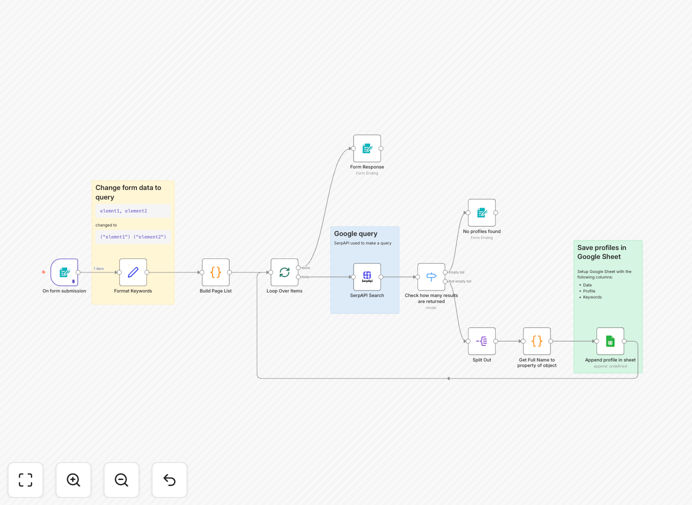
1. Form Trigger & Input Collection
A web form (or manual trigger) captures your search parameters: comma-separated keywords and the number of Google results pages to scrape. This becomes the starting point for your automated search.
2. Query Formatting & Pagination Setup
The workflow reformats your keywords into Google-optimized search syntax with parentheses for better relevance. It then creates a batch list for pagination, calculating the proper "start" parameters for each results page.
3. SerpAPI Google Search Execution
Using the SerpAPI community node, the automation queries Google with your formatted search terms, specifically looking for "site:linkedin.com/in/" results. It processes each results page sequentially, respecting rate limits.
4. Results Processing & Data Extraction
Each search result is parsed to extract the LinkedIn profile URL and clean the person's name (removing titles, dashes, and other formatting artifacts). The system checks for empty results and handles errors gracefully.
5. Google Sheets Population
Clean profile data—including submission timestamp, profile URL, extracted name, and original keywords—is appended to your designated Google Sheet. The structure ensures easy sorting, filtering, and integration with other tools.
Who This Is For
This automation delivers immediate value for recruitment agencies, talent sourcers, sales development representatives, and business development teams. If you regularly need to build lists of professionals by skill, location, or industry, this workflow eliminates the manual grind.
Marketing agencies conducting influencer research, startups building advisor networks, and consultants identifying potential clients will also find this invaluable. The workflow is particularly useful for roles that require building targeted prospect lists at scale without manual data entry.
What You'll Need
- n8n instance (self-hosted recommended for SerpAPI community node compatibility)
- SerpAPI account with an active API key (for Google search queries)
- Google Sheets access with OAuth2 credentials configured in n8n
- A Google Sheet prepared with columns for Date, Profile URL, Full Name, and Keywords
- Basic understanding of n8n credential management and workflow activation
Important Note: The SerpAPI node used in this workflow is a community node available primarily on self-hosted n8n instances. n8n Cloud users may need to adapt the workflow using HTTP Request nodes with SerpAPI's REST API.
Quick Setup Guide
Follow these steps to implement this LinkedIn sourcing automation in your environment:
- Import the template into your n8n instance using the downloaded JSON file.
- Configure SerpAPI credentials in n8n with your API key from serpapi.com.
- Set up Google Sheets OAuth2 connection to grant n8n write access to your spreadsheet.
- Update the Google Sheets node with your specific spreadsheet ID and worksheet name.
- Optional: Adjust location parameters in the SerpAPI node if searching outside Warsaw, Poland.
- Test with a simple keyword search to verify the workflow captures and saves data correctly.
- Activate the workflow and use the webhook URL or manual trigger to start sourcing.
Key Benefits
Save 10+ hours weekly on manual sourcing. What previously required hours of repetitive searching, clicking, and copying now happens automatically while you focus on higher-value activities like outreach and qualification.
Build targeted prospect lists 10x faster. Search across multiple keywords, locations, and job titles simultaneously, compiling comprehensive lists that would take days to assemble manually.
Maintain organized, searchable databases. All collected profiles land in a structured Google Sheet with timestamps and source keywords, creating a searchable prospect repository that grows with each automation run.
Scale recruitment or sales efforts without additional headcount. Automate the initial sourcing bottleneck, allowing your existing team to handle significantly larger volumes of prospects without burnout or quality degradation.
Ensure consistency and reduce human error. Automated data extraction eliminates typos, missed profiles, and formatting inconsistencies that plague manual LinkedIn sourcing efforts.