Twitter Airtable Data Collection Market Research n8n

Collect posts from Twitter and send to Airtable

Automatically gather tweets, eliminate duplicates, and build a searchable database—without manual work.

Download Template JSON · n8n compatible · Free
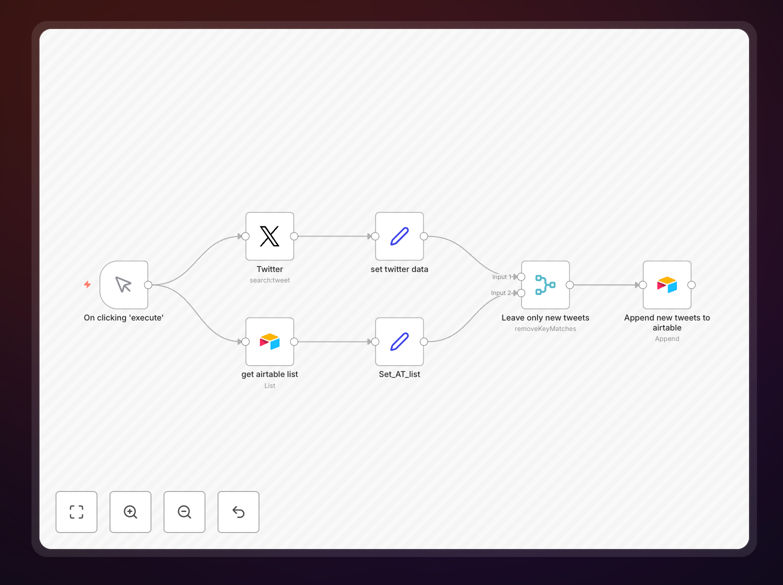
Twitter to Airtable automation workflow interface showing data flow between services

What This Workflow Does

Manual Twitter monitoring is time-consuming, inconsistent, and prone to missed opportunities. This automation solves that by automatically collecting tweets (configurable quantity) and sending them directly to Airtable. Starting from the second execution, the workflow intelligently checks for existing Tweet IDs, ensuring only new content gets added—eliminating duplicates completely.

Whether you're tracking brand mentions, monitoring competitors, gathering market research, or collecting user feedback, this workflow transforms scattered social data into structured, actionable information. It runs on any schedule you set, providing consistent data collection without manual intervention.

How It Works

Step 1: Twitter Data Collection

The workflow connects to the Twitter API using your credentials and retrieves tweets based on your configured search parameters—keywords, hashtags, accounts, or geographic filters. You can adjust the number of tweets collected per run (default 100).

Step 2: Data Processing & Deduplication

Each tweet's unique identifier is checked against previously stored records in Airtable. This intelligent filtering prevents duplicate entries, ensuring your database remains clean and contains only fresh content.

Step 3: Airtable Record Creation

Processed tweets are formatted and sent to your specified Airtable base and table. Each record includes the tweet text, author, timestamp, engagement metrics, and any other relevant metadata you choose to capture.

Step 4: Scheduled Execution

The workflow can be scheduled to run hourly, daily, or weekly—automatically gathering new content while maintaining data integrity through its built-in duplicate prevention.

Who This Is For

This automation is ideal for marketing teams tracking campaign performance, research firms gathering social sentiment, startups monitoring competitor activity, sales teams identifying potential leads, and content creators curating relevant discussions. Any business that needs organized social media data without manual collection will benefit.

What You'll Need

  1. Twitter Developer Account: API credentials (consumer key, consumer secret, access token, access token secret) with appropriate permissions.
  2. Airtable Account: A base and table ready to receive tweet data, with appropriate field structure.
  3. n8n Instance: Either self-hosted n8n or n8n.cloud account to run the workflow.
  4. Basic Configuration: Search parameters (keywords, accounts, etc.) and scheduling preferences.

Quick Setup Guide

  1. Download the template using the button above and import it into your n8n instance.
  2. Configure Twitter credentials in the Twitter node with your API keys.
  3. Set up Airtable connection by adding your base ID, table name, and authentication.
  4. Adjust search parameters to match your monitoring needs (keywords, user accounts, etc.).
  5. Test the workflow with a manual execution to verify data flows correctly.
  6. Activate the schedule to run automatically at your preferred interval.

Pro tip: Start with a small batch size (50 tweets) during testing to ensure your Airtable structure captures all desired fields before scaling up collection.

Key Benefits

Save 5-10 hours weekly by eliminating manual Twitter monitoring and data entry. This time can be redirected to analysis and strategy instead of collection.

Ensure data completeness with automated, scheduled collection that never misses relevant conversations due to human oversight or time constraints.

Create actionable insights by transforming unstructured social data into searchable, analyzable records in Airtable for trend spotting and decision-making.

Scale effortlessly as your monitoring needs grow—add more search terms, increase frequency, or expand to additional Airtable bases without proportional time investment.

Improve team collaboration by centralizing social data in Airtable where multiple stakeholders can access, filter, and analyze information simultaneously.

Frequently Asked Questions

Common questions about Twitter to Airtable automation and integration

Automating Twitter data collection saves hours of manual monitoring, ensures you never miss relevant conversations, and provides structured data for analysis. Businesses use this for market research, competitor tracking, lead generation, and brand sentiment analysis without constant manual effort.

For example, a marketing agency can automatically track campaign mentions across hundreds of keywords, while a product team can gather user feedback without manually scrolling through feeds daily.

  • Eliminates repetitive manual data entry
  • Provides consistent, scheduled data collection
  • Enables real-time monitoring and alerting

Connecting Twitter to Airtable creates a searchable, organized database of social media content. You can analyze trends over time, share insights across teams, trigger follow-up actions, and build custom reports—turning real-time social data into actionable business intelligence.

Airtable's flexible structure allows you to categorize tweets by topic, sentiment, or priority, then create views and dashboards that different departments can use according to their needs.

  • Centralizes scattered social data in one location
  • Enables cross-team collaboration on social insights
  • Creates foundation for advanced analytics and reporting

Proper automation uses unique identifiers (like Tweet IDs) to check existing records before adding new ones. This prevents duplicates, maintains data integrity, and ensures your database only contains fresh, relevant content without manual cleanup.

The workflow in this template stores each tweet's unique ID in Airtable, then compares new tweets against this list during subsequent runs. Only tweets with new IDs get added, while previously captured content is ignored.

  • Uses Twitter's unique tweet identifiers for accuracy
  • Maintains clean, non-redundant databases
  • Reduces storage costs and improves query performance

Marketing agencies, research firms, startups, and sales teams benefit significantly. Agencies track campaign mentions, researchers gather public sentiment data, startups monitor competitor activity, and sales teams identify potential leads from social conversations—all automated.

Even established enterprises use this automation for brand monitoring, crisis management, and customer service tracking across multiple product lines or geographic regions.

  • Marketing teams: Campaign performance tracking
  • Research organizations: Sentiment analysis data collection
  • Sales departments: Lead identification from social signals

Yes, advanced automation allows filtering by keywords, hashtags, user accounts, date ranges, engagement metrics, and sentiment. You can create targeted collections for specific campaigns, products, or topics, ensuring only relevant data enters your Airtable database.

Beyond basic keyword filtering, you can implement logic to prioritize tweets with high engagement, exclude spam accounts, or focus on specific time periods relevant to your analysis.

  • Filter by keywords, hashtags, and mentions
  • Exclude irrelevant accounts or spam content
  • Prioritize high-engagement or verified accounts

Frequency depends on your needs: hourly for real-time monitoring, daily for trend analysis, or weekly for summary reports. Automation can run on any schedule without manual intervention, ensuring consistent data flow regardless of team availability or time zones.

Consider starting with daily collections to establish baseline data, then adjust based on volume and urgency. Real-time monitoring might be necessary for crisis management, while weekly summaries suffice for general market research.

  • Real-time monitoring: Hourly or trigger-based
  • Trend analysis: Daily collections
  • Summary reporting: Weekly or monthly aggregation

Twitter data in Airtable can trigger notifications in Slack, create tasks in Asana, generate reports in Google Sheets, enrich CRM contacts, or feed into BI tools like Tableau. This creates complete workflows where social insights drive actions across your entire tech stack.

For instance, negative sentiment tweets can automatically create customer support tickets, while positive mentions might trigger thank-you messages or sales follow-ups in your CRM.

  • Slack/Teams for real-time alerts
  • CRM systems for lead enrichment
  • BI tools for advanced analytics and visualization

Yes, GrowwStacks specializes in building custom automation solutions tailored to your specific business needs. We can create advanced filtering, integrate additional data sources, set up custom reporting, and ensure the system scales with your requirements.

Our team works with you to understand your unique use case, then designs and implements a solution that fits seamlessly into your existing workflows while providing maximum value from your social data.

  • Custom filtering and data processing logic
  • Integration with your existing tech stack
  • Ongoing support and optimization as needs evolve

Need a Custom Twitter to Airtable Automation?

This free template is a starting point. Our team builds fully tailored automation systems for your specific business needs.