AI Testing Google Sheets LLM Comparison Automation n8n

Compare LLM Responses Side-by-Side with Google Sheets

Automatically test and compare two AI models, log their outputs to Google Sheets, and choose the best one for your production needs.

Download Template JSON · n8n compatible · Free
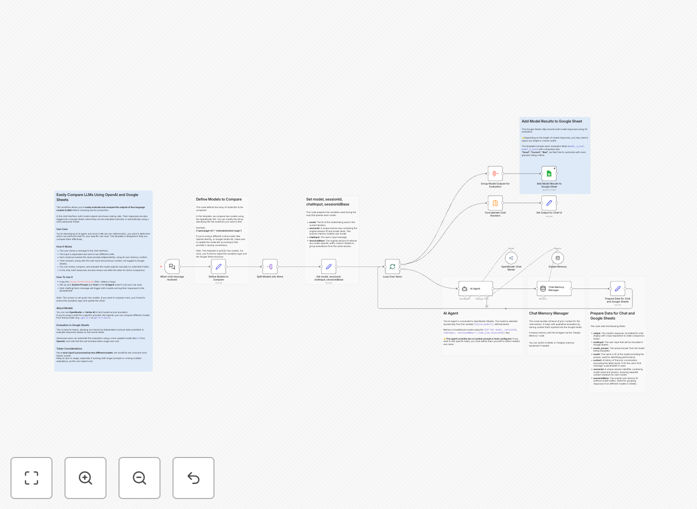
Visual diagram showing two AI models processing a prompt and logging results to Google Sheets

What This Workflow Does

Choosing the right language model (LLM) for your AI application is critical. Different models produce varied outputs—some are more creative, others more factual, some faster, others cheaper. Manual comparison is tedious and inconsistent.

This n8n workflow automates the comparison process. It sends the same user prompt to two different LLMs simultaneously, captures their responses, logs everything into a Google Sheet for review, and displays both answers side-by-side in a chat interface. You get a structured, repeatable way to evaluate which model performs best for your specific use case before committing to production.

Whether you're building a chatbot, an AI agent, or any LLM-powered tool, this template eliminates guesswork and provides data-driven decision-making.

How It Works

1. User Input Trigger

The workflow starts when a user sends a message through a chat interface (like Telegram, Slack, or a webhook). This input is captured and duplicated for parallel processing.

2. Parallel LLM Processing

The prompt is sent to two separate AI Agent nodes configured with different models (e.g., GPT-4 vs Claude, or OpenAI vs OpenRouter). Each node maintains its own memory context, ensuring independent conversation history.

3. Response Logging to Google Sheets

Both model responses, along with the original user input and conversation context, are appended to a Google Sheets spreadsheet. This creates a permanent record for team review or automated scoring.

4. Side-by-Side Output Display

The workflow returns both responses to the chat interface, allowing the user to see them juxtaposed. This immediate visual comparison helps identify differences in tone, accuracy, or completeness.

5. Optional Automated Evaluation

Advanced users can add a third AI Agent node that reviews the logged responses and assigns scores based on custom criteria, creating a fully automated evaluation loop.

Who This Is For

This template is ideal for:

  • AI Developers & Engineers building chatbots, agents, or LLM-integrated applications who need to select the optimal model.
  • Product Teams launching AI features and wanting to validate model performance before rollout.
  • Data Scientists conducting comparative analysis of different LLMs across various prompts.
  • Business Stakeholders who need transparent, documented evidence for model selection decisions.
  • Startups & SMBs balancing cost, accuracy, and speed when choosing an AI provider.

Pro tip: Use this workflow during your development phase to test 3–5 different models with a set of 50–100 real user prompts. The accumulated Google Sheets data will clearly show which model consistently delivers the best results for your application.

What You'll Need

  1. n8n instance (cloud or self-hosted) with access to AI Agent nodes.
  2. API credentials for at least two LLM providers (OpenAI, Anthropic, Google Vertex AI, OpenRouter, etc.).
  3. Google Sheets account and a prepared spreadsheet template (link provided in the workflow description).
  4. A chat interface trigger (Telegram, Slack, WhatsApp, or a simple webhook) to initiate the comparison.
  5. Basic understanding of n8n node configuration (setting system prompts, tools, and memory buffers).

Quick Setup Guide

  1. Copy the Google Sheets template: Use the provided link to create your own copy of the logging spreadsheet.
  2. Import the workflow JSON: Download the template and import it into your n8n workspace.
  3. Configure AI Agent nodes: Set your system prompts, tools, and choose your two comparison models.
  4. Connect Google Sheets: Authorize n8n to access your copied spreadsheet and map the output fields.
  5. Set up your trigger: Connect your chosen chat platform (Telegram, Slack, etc.) to the workflow trigger node.
  6. Test with real prompts: Send messages through your chat interface and watch the responses populate the sheet.

Key Benefits

Data-Driven Model Selection: Replace subjective hunches with logged, comparable outputs. Choose the LLM that actually performs best for your prompts.

Team Collaboration & Transparency: Google Sheets allows multiple stakeholders to review, comment, and score responses. Decisions become collaborative and documented.

Cost & Performance Optimization: Identify if a cheaper, faster model delivers comparable quality to a premium one—directly impacting your AI budget.

Scalable Testing Framework: Once configured, you can run hundreds of test prompts automatically, building a robust dataset for model evaluation.

Future-Proofing: Easily add new models to the comparison as they emerge. The workflow structure supports expansion beyond two LLMs.

Frequently Asked Questions

Common questions about AI model comparison and automation

Different LLMs produce varied outputs for the same prompt. Comparing them side-by-side helps you select the model that best fits your specific use case—whether you need accuracy, creativity, cost-efficiency, or speed. Testing ensures you deploy the right AI for your business needs.

For example, a customer support chatbot might prioritize factual accuracy, while a creative writing tool might value imaginative output. Without comparison, you risk choosing a model that underperforms for your actual application.

The template is configured for two models. You can extend it to compare three or more by adding additional AI Agent nodes and expanding the Google Sheets logging structure. This flexibility lets you test multiple providers like OpenAI, Anthropic, Google Vertex AI, or OpenRouter simultaneously.

Simply duplicate the AI Agent and logging nodes, adjust the Google Sheets columns to accommodate extra outputs, and you can run a multi-model tournament to find the best performer.

Google Sheets provides a structured, shareable record of every test. Teams can collaboratively review outputs, add scoring columns, or use formulas to automate evaluation. It turns subjective comparison into a measurable, repeatable process that stakeholders can audit.

You can add columns for human ratings, cost per response, latency, or even use Sheets functions to calculate similarity scores. This creates a living benchmark dataset that grows with every test.

Manual testing is slow and inconsistent. n8n automates the entire comparison pipeline: sending prompts to multiple models, capturing responses, logging them, and even triggering automated scoring. This saves hours per test cycle and ensures identical prompts are used for fair comparison.

Automation also allows you to run tests overnight, compare hundreds of prompts, and maintain perfect consistency—something impossible with manual copy-paste into different chat interfaces.

Yes. You can add a third AI Agent node that reviews the logged responses and assigns scores based on criteria like accuracy, tone, or completeness. This creates a fully automated evaluation loop where models are tested and ranked without human intervention.

For example, you could configure a "judge" LLM (like GPT-4) to rate each response on a 1–10 scale for relevance, then automatically highlight the highest-scoring model for each prompt.

Yes, each prompt is sent to both models, so token usage increases. However, the cost is justified by preventing expensive mistakes later. Choosing the wrong model for production could waste thousands in inefficient API calls or poor output quality.

Think of comparison as an insurance investment: a few hundred dollars in testing tokens can save thousands in production costs and ensure your AI application delivers the expected value.

The template uses separate AI Agent nodes with independent memory buffers. This ensures each model maintains its own conversation history, allowing you to test how each LLM builds context over multiple interactions—critical for chatbot or agent applications.

You can test whether one model remembers user preferences better, handles follow-up questions more coherently, or deteriorates over longer conversations. Context memory comparison is essential for real-world usage.

Yes. GrowwStacks specializes in building tailored AI evaluation systems. We can design workflows that compare 5+ models, integrate with your internal data sources, add automated scoring algorithms, and set up dashboards for team review. Book a free consultation to discuss your needs.

Our team can extend this template to include cost tracking, performance dashboards, automated alerting when a model underperforms, and integration with your existing tools like Jira or Slack for team notifications.

  • Multi-model tournament workflows with 5+ LLMs
  • Custom scoring algorithms based on your business criteria
  • Integration with internal data lakes or CRM systems
  • Real-time dashboards and alerting

Need a Custom LLM Comparison Automation?

This free template is a starting point. Our team builds fully tailored automation systems for your specific business needs.