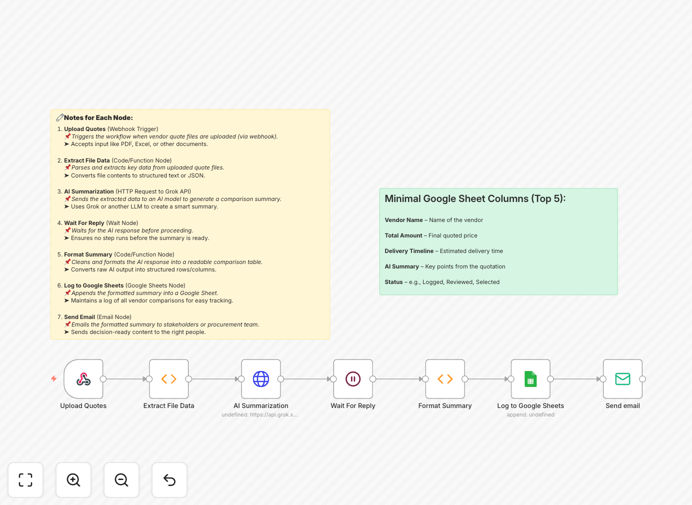
What This Workflow Does
Procurement teams waste countless hours manually comparing vendor quotations in different formats—PDFs, Excel sheets, Word documents. This creates delays, increases errors, and leads to suboptimal purchasing decisions. The manual process is inconsistent, difficult to audit, and slows down your entire supply chain.
This automation solves that by creating a standardized vendor evaluation system. It automatically processes incoming quotations, uses Grok AI to extract and compare key terms, generates intelligent summaries, and logs everything to Google Sheets for tracking. Stakeholders receive formatted comparison emails, enabling faster, data-driven decisions while maintaining complete audit trails.
How It Works
1. Upload Quotes
A webhook trigger listens for new vendor quotation files uploaded via email, form, or cloud storage. The system accepts multiple formats including PDF, DOCX, and Excel files containing pricing, specifications, and terms.
2. Extract File Data
The workflow parses each uploaded document to extract structured data: vendor names, itemized pricing, delivery timelines, payment terms, and special conditions. This creates a standardized dataset for comparison regardless of original format.
3. AI Summarization
Extracted data is sent to Grok AI (or your preferred AI service) with custom prompts to analyze quotations against your evaluation criteria. The AI identifies key differences, highlights best values, and generates human-readable comparison summaries.
4. Format Summary
The AI-generated insights are formatted into clear comparison tables, executive summaries, and decision-ready reports. The system structures information for easy stakeholder review and approval processes.
5. Log to Google Sheets
All comparison data, AI insights, and timestamps are automatically appended to a Google Sheet. This creates a searchable procurement database for historical analysis, vendor performance tracking, and audit compliance.
6. Send Email
Formatted comparison reports are emailed to predefined stakeholders—procurement managers, department heads, finance teams—with clear recommendations and next steps. The system can route based on approval thresholds.
Pro tip: Configure different AI prompts for different procurement categories. Use specialized prompts for IT equipment versus office supplies to get more relevant comparison insights.
Who This Is For
This automation is ideal for procurement teams, purchasing managers, operations directors, and finance departments in manufacturing, retail, healthcare, education, and professional services. It's particularly valuable for businesses that:
- Evaluate 5+ vendor quotations monthly
- Manage complex RFPs with multiple evaluation criteria
- Need audit trails for compliance (ISO, SOC, government)
- Want to reduce manual data entry errors
- Seek faster procurement cycles to secure better pricing
What You'll Need
- n8n instance (self-hosted or cloud version)
- AI API access (Grok AI, OpenAI, Anthropic, or similar)
- Google Sheets account with edit permissions
- Email service (SMTP, Gmail, or SendGrid)
- File storage for uploaded quotations (Google Drive, Dropbox, or local server)
- Evaluation criteria defined for your procurement categories
Quick Setup Guide
- Import the workflow into your n8n instance using the downloaded JSON file
- Configure webhook URL to receive quotation uploads from your preferred source
- Connect AI service by adding your API key and customizing prompts for your industry
- Link Google Sheets by authenticating and selecting your tracking spreadsheet
- Set up email notifications with recipient lists and approval routing logic
- Test with sample quotations to validate extraction accuracy and formatting
- Deploy and monitor initial procurement cycles before full rollout
Pro tip: Start with one procurement category (like office supplies) to refine the workflow before expanding to more complex categories like capital equipment or services.
Key Benefits
Save 10-15 hours per RFP cycle by eliminating manual quotation comparison and data entry. Procurement teams can focus on negotiation and relationship building instead of administrative work.
Reduce errors by 95% through automated data extraction and standardized comparison. Eliminate spreadsheet mistakes, missed terms, and calculation errors that cost businesses thousands.
Secure 3-7% better pricing through faster, more consistent vendor evaluation. Quicker decision-making lets you capitalize on time-sensitive offers and negotiate from stronger positions.
Create complete audit trails automatically in Google Sheets. Every quotation, comparison, and decision is timestamped and documented for compliance and performance analysis.
Scale procurement operations without adding staff. Process hundreds of quotations simultaneously while maintaining consistent evaluation standards across your organization.