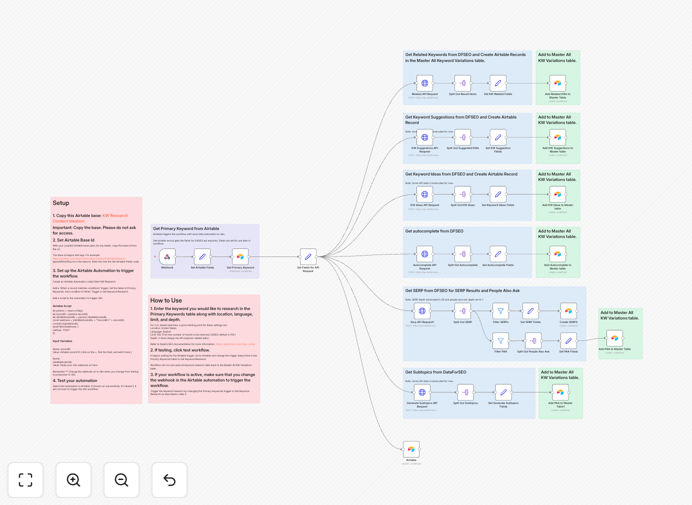
What This Workflow Does
Manual keyword research is a time-consuming, repetitive task that often leads to data silos and missed opportunities. This automated workflow solves that by connecting the deep, pay-as-you-go data of the DataForSEO API with the organizational power of Airtable.
Instead of juggling multiple tabs and spreadsheets, you input a seed keyword, and the system automatically fetches comprehensive metrics—search volume, keyword difficulty, cost-per-click, search intent, and a list of related terms and questions. All this data is structured and pushed into a pre-built Airtable base, turning raw numbers into actionable content insights.
The result is a centralized, living database of keyword intelligence. Content teams can filter by difficulty and volume to find "low-hanging fruit," writers can see the exact questions searchers are asking, and strategists can identify content gaps and cluster topics—all without ever leaving their workflow.
How It Works
The workflow acts as a bridge between a powerful data source and a flexible database, automating the entire collection and organization process.
Step 1: Trigger & Input
You provide a starting keyword or list of keywords. This can be done manually for a one-off analysis or triggered automatically on a schedule (e.g., weekly for your core topics). The workflow accepts your input and prepares the API call.
Step 2: Data Fetching from DataForSEO
The workflow sends a request to the DataForSEO API. It retrieves a rich dataset for each keyword, including search volume estimates, keyword difficulty scores, CPC data, and categorized search intent (informational, commercial, transactional). It also pulls in lists of related keywords and "People Also Ask" questions.
Step 3: Data Processing & Enrichment
Raw API data is cleaned and transformed. The workflow calculates opportunity scores, categorizes keywords by intent and topic clusters, and formats everything into a consistent structure ready for Airtable. This step ensures the data is usable, not just a dump.
Step 4: Populating Airtable
The processed data is sent to your Airtable base. It creates or updates records across linked tables—one for main keywords, another for related terms, and another for questions. Relationships are established between records, creating a true relational database of search demand.
Step 5: Output & Ready for Analysis
Your Airtable base is now populated. You can immediately use Airtable's views, filters, and grouping to sort keywords by difficulty vs. volume, see all questions for a topic cluster, and start planning your content calendar based on concrete, organized data.
Pro tip: Use Airtable's "Group by" feature on the 'Intent' field to quickly see how many keywords are commercial (ready to buy) vs. informational (needs education). This helps prioritize content for different stages of your funnel.
Who This Is For
This template is designed for marketers, content creators, and business owners who rely on SEO for growth but are tired of manual processes.
SEO Specialists & Agencies: Scale your research for multiple clients. Automate initial audits and ongoing tracking, delivering data-driven reports faster.
Content Teams & Blog Managers: Move from guesswork to a data-backed editorial calendar. Identify what your audience is actually searching for and create content that matches their intent.
E-commerce & SaaS Businesses: Research product-related keywords and buying intent terms. Understand the language your customers use to find solutions like yours.
Startups & Solopreneurs: Get enterprise-level keyword insights without the enterprise-level software budget. Use the pay-as-you-go DataForSEO model to control costs.
What You'll Need
- An n8n instance: Either a self-hosted installation or a n8n.cloud account.
- DataForSEO API Credentials: Sign up for a DataForSEO account to get your login and API key. Their pay-per-request model is perfect for automated, scalable use.
- An Airtable Account: A free plan works to start. You'll need to create a base with the structure provided in the template's documentation.
- Basic Understanding of APIs: You'll need to know how to input API keys into n8n nodes, but no coding is required.
Quick Setup Guide
- Download & Import: Download the JSON file and import it into your n8n instance.
- Configure Credentials: In n8n, set up credentials for the DataForSEO API node and the Airtable node using your respective account keys.
- Set Up Your Airtable Base: Duplicate the base template link provided in the workflow notes. This creates the necessary tables and fields.
- Map Your Base ID: In the Airtable node within the workflow, paste your new base ID and ensure the table names match.
- Test with a Seed Keyword: Run the workflow manually with a single keyword like "best running shoes" to see data flow into your Airtable.
- Schedule & Scale: Once confirmed, set the workflow to trigger on a schedule and expand your seed keyword list.
Key Benefits
Save 10+ Hours Monthly: Eliminate the copy-paste cycle between SEO tools and spreadsheets. Research that took a day now runs unattended.
Make Data-Driven Decisions: Base your content strategy on actual search volume and difficulty, not hunches. Prioritize topics with the highest potential return.
Discover Content Angles You'd Miss: The "People Also Ask" and related terms data reveals subtopics and questions you wouldn't have considered, leading to more comprehensive content.
Centralize Your SEO Intelligence: All keyword data lives in one searchable, filterable Airtable base. Your entire team works from a single source of truth.
Scale Research Effortlessly: Analyzing 10 keywords takes the same effort as analyzing 1000. Simply add more seed terms to your list and let the automation run.