What This Workflow Does
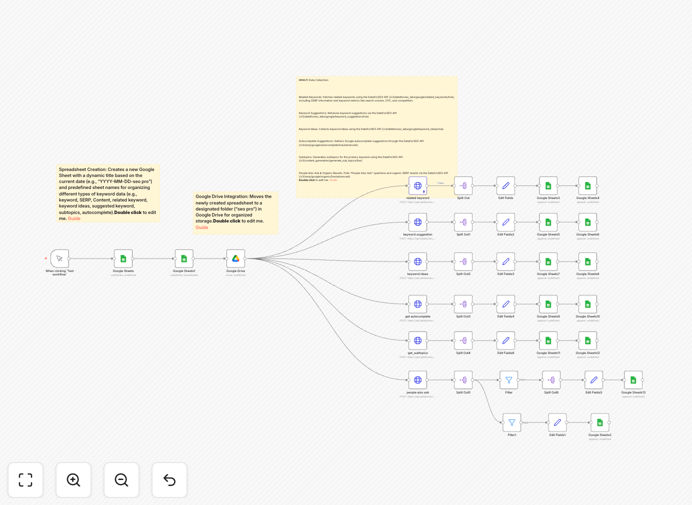
Manual keyword research is a bottleneck for content teams. This n8n workflow, "Keyword Search for Blogs," completely automates the process of gathering and organizing SEO data. It connects DataForSEO's powerful API with Google Sheets to pull keyword metrics, search intent, related terms, SERP features, and content subtopics—all into a structured, timestamped spreadsheet.
The workflow transforms a list of seed keywords into a rich dataset for content planning. For each keyword, it fetches search volume, cost-per-click (CPC), competition level, keyword difficulty, and SERP item analysis (like "People Also Ask" questions). It then organizes this data across multiple tabs in a new Google Sheet, creating a single source of truth for your SEO strategy.
This automation eliminates the need for jumping between multiple tools, copying and pasting data, and manually cleaning spreadsheets. It ensures your keyword research is consistent, comprehensive, and always up-to-date, allowing you to focus on strategy and content creation instead of data collection.
How It Works
The workflow follows a logical, step-by-step process to turn raw keywords into actionable insights.
1. Input & Trigger
You start with a Google Sheet containing your primary seed keywords, target locations, and languages. The workflow is triggered manually (or can be scheduled), reading this input data to define the scope of the research.
2. Spreadsheet Creation & Organization
A new Google Sheet is automatically created with a title based on the current date (e.g., "2025-06-08-seo pro"). Inside, predefined tabs are set up for different data types: Master Sheet, Related Keywords, Keyword Ideas, Suggested Keywords, Autocomplete, Subtopics, and Organic Results.
3. API Data Collection
The workflow makes a series of calls to the DataForSEO API for each keyword. It retrieves related keywords with metrics, keyword suggestions, keyword ideas, Google autocomplete suggestions, generated subtopics for content, and a full SERP analysis including "People Also Ask" questions and organic results.
4. Data Processing & Mapping
Using n8n's "Split Out" and "Set" nodes, the raw API responses are broken down into individual items. Relevant fields—like keyword, search intent, volume, CPC, and difficulty—are extracted and formatted for clean storage in Google Sheets.
5. Storage & Output
The processed data is appended to the corresponding tabs in the new Google Sheet. The final output is a comprehensive, organized dataset ready for analysis, stored in a designated Google Drive folder for easy access by your team.
Who This Is For
This template is designed for SEO professionals, content marketers, digital agencies, and business owners who rely on data-driven content strategies.
SEO Managers & Specialists: Automate the foundational research phase, freeing up time for advanced analysis and strategy. Ensure your keyword databases are always current.
Content Teams & Blog Managers: Generate data-backed content briefs instantly. Use the "subtopics" and "People Also Ask" data to outline articles that answer real user queries.
Digital Marketing Agencies: Scale keyword research across multiple clients. Use the standardized output to deliver consistent, high-value SEO reports and content plans.
Startups & Small Businesses: Compete with larger players by leveraging automated, professional-grade SEO research without the expensive tool subscriptions or manual labor.
What You'll Need
- An n8n instance: Either self-hosted or a cloud account.
- DataForSEO API Credentials: You'll need an account with DataForSEO to get HTTP Basic Authentication credentials (login and password).
- Google Cloud Project: Set up with the Google Sheets and Google Drive APIs enabled to create OAuth2 credentials for n8n.
- A Google Sheet ("SEO PRO"): This serves as your input sheet, with columns for primary keywords, location names, and language names.
- A Google Drive Folder ("seo pro"): This is where the newly created research spreadsheets will be saved.
Pro tip: Start with a small list of 5-10 seed keywords to test the workflow and understand the data output before scaling up. Monitor your DataForSEO API usage to stay within your plan's limits.
Quick Setup Guide
Get this automation running in your n8n instance in under 15 minutes.
- Download & Import: Click the "Download Template" button above and save the JSON file. In your n8n editor, import the workflow file.
- Configure Credentials: Set up the required credentials in n8n:
- Google Sheets OAuth2
- Google Drive OAuth2
- DataForSEO HTTP Basic Auth
- Update Resource IDs: In the "Google Sheets" node, update the "Spreadsheet ID" to point to your input Google Sheet named "SEO PRO". In the "Google Drive" node, update the "Folder ID" to your destination "seo pro" folder.
- Test Execution: Click "Execute Workflow" on the Manual Trigger node. The workflow will read your input sheet, call the DataForSEO API, and create a new dated spreadsheet in your Drive folder.
- Schedule (Optional): For ongoing research, replace the Manual Trigger with a Schedule Trigger node to run the workflow weekly or monthly automatically.
Key Benefits
Save 10+ Hours Per Month: Eliminate the manual, repetitive task of copying data from SEO tools into spreadsheets. This workflow does it all in minutes.
Improve Content Relevance: By analyzing SERP features and "People Also Ask" data, you can create content that directly answers user questions, increasing your chances of ranking for featured snippets.
Centralize Your SEO Data: All research—from keyword metrics to content ideas—lives in a single, organized Google Sheet. This makes it easy to share with team members, clients, or integrate with other tools.
Scale Research Effortlessly: Process hundreds of keywords in a single run. The workflow handles the API calls, pagination, and data formatting, so you can research entire topic clusters at once.
Make Data-Driven Decisions: With metrics like search volume, CPC, and competition readily available, you can prioritize keywords based on potential traffic value and commercial intent, not just guesswork.