What This Workflow Does
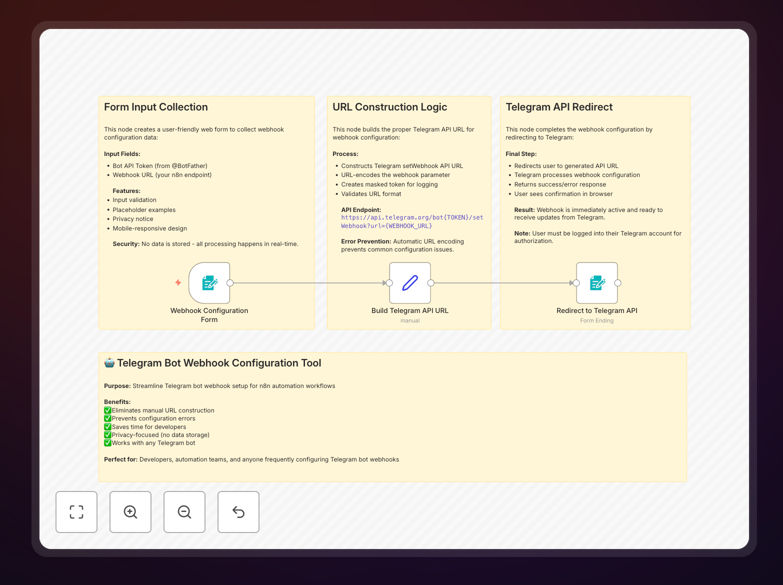
This automation simplifies the process of configuring Telegram bot webhooks by creating a user-friendly web form. Instead of manually constructing complex API URLs, the workflow automatically builds the correct Telegram API endpoint with your bot token and webhook URL.
The solution eliminates common configuration errors while maintaining security since no sensitive data is stored. It's particularly valuable for developers who frequently set up or modify Telegram bot configurations across different environments.
How It Works
1. Form Input Collection
A clean web interface collects your Telegram bot token (from BotFather) and your HTTPS webhook endpoint URL.
2. URL Construction
The workflow dynamically builds the correct Telegram API URL in the format: https://api.telegram.org/bot{TOKEN}/setWebhook?url={WEBHOOK_URL}
3. Automated Configuration
The system redirects you to the constructed URL where Telegram completes the webhook setup, displaying success or error messages directly from Telegram's API.
Who This Is For
This template is ideal for:
- Developers managing multiple Telegram bots
- Teams needing consistent webhook configuration
- Businesses automating customer notifications via Telegram
- Anyone who wants to eliminate manual URL construction errors
What You'll Need
- A Telegram bot token from @BotFather
- An HTTPS webhook endpoint URL
- n8n instance with form trigger support
- Publicly accessible server for your webhook
Quick Setup Guide
- Import the downloaded JSON workflow into your n8n instance
- Activate the workflow to generate your form URL
- Share the form URL with team members if needed
- Enter your bot token and webhook URL when prompted
- Submit to automatically configure your webhook
Pro tip: For testing, you can use a self-signed SSL certificate, but production bots require valid certificates from trusted authorities.
Key Benefits
Reduces configuration time by 80%: What typically takes 5-10 minutes of manual URL construction now happens in seconds.
Eliminates human error: No more typos in bot tokens or malformed API URLs that waste debugging time.
Team-friendly workflow: Share the form URL with colleagues for consistent configurations across your organization.
No data storage: Your bot token and webhook URL are used only for the immediate configuration and never stored.
Reusable template: Use the same workflow for multiple bots by simply entering different credentials.