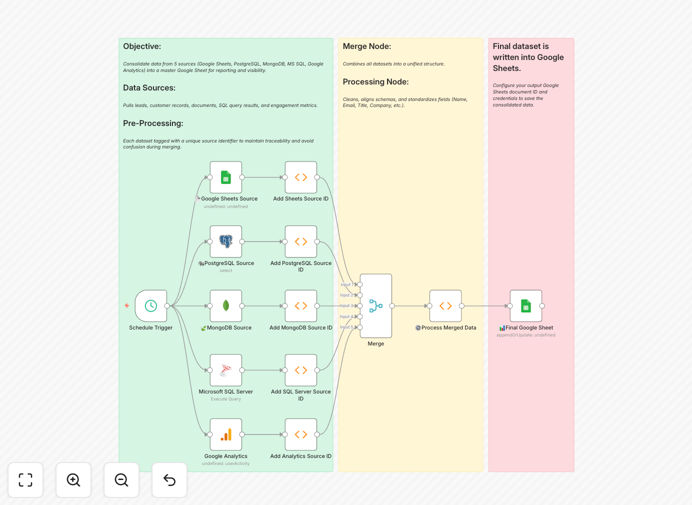
What This Workflow Does
This automation solves the universal business problem of fragmented data. Most companies have critical information scattered across multiple systems: customer data in SQL databases, operational metrics in spreadsheets, web analytics in Google Analytics, and document data in MongoDB. Manually combining these sources for reporting is slow, error-prone, and becomes impossible to scale.
This workflow automatically pulls data from five distinct sources on a scheduled basis, applies source identifiers for traceability, merges everything into a consistent format, and outputs a clean, unified dataset to Google Sheets. It transforms hours of weekly manual work into a fully automated process that runs reliably in the background.
The result is a single source of truth that updates automatically, giving your team real-time visibility across all business functions without spreadsheet gymnastics or data reconciliation headaches.
How It Works
The workflow follows a logical pipeline that extracts, transforms, and loads data from disparate systems into a unified reporting destination.
1. Scheduled Trigger
The automation begins with a schedule trigger that runs the workflow three times per week (configurable). This ensures your consolidated report stays current without manual intervention.
2. Multi-Source Data Extraction
Parallel processes extract data from each source system simultaneously. The workflow connects to Google Sheets for spreadsheet data, PostgreSQL for relational customer data, MongoDB for document-based operational data, Microsoft SQL Server for transaction records, and Google Analytics for website/user engagement metrics.
3. Source Tagging & Identification
Each dataset receives a unique source identifier column before merging. This critical step ensures complete data lineage—you can always trace which record came from which system, even after consolidation.
4. Data Transformation & Cleaning
The workflow standardizes date formats, normalizes field names, handles missing values consistently, and applies business rules to clean the data. This transforms raw extracts from different systems into a consistent analytical format.
5. Intelligent Merging
All tagged datasets merge into a single structured output. The workflow handles schema differences intelligently, preserving all relevant fields while eliminating duplicates and conflicts.
6. Output to Master Report
The final consolidated dataset writes to a designated Google Sheet, either appending new records or updating existing ones. The output is immediately ready for analysis, visualization, or distribution to stakeholders.
Who This Is For
This automation template is ideal for businesses that rely on multiple software systems and need unified reporting. Marketing agencies tracking campaigns across platforms, e-commerce businesses combining store data with analytics, SaaS companies merging customer usage with support tickets, and consulting firms aggregating client data from various sources will find immediate value.
It's particularly valuable for operations managers drowning in manual spreadsheet work, data analysts spending more time collecting than analyzing, and business leaders who need consolidated dashboards but lack technical resources to build custom integrations.
What You'll Need
- n8n instance (cloud or self-hosted) with workflow execution capabilities
- API access to Google Sheets, Google Analytics, and your database systems
- Service accounts or OAuth credentials for each data source with appropriate read permissions
- Destination Google Sheet with proper column structure for your consolidated data
- Basic understanding of your data schemas and reporting requirements
Pro tip: Start with a subset of your data sources first. Implement the workflow with just 2-3 connections to verify the process works, then gradually add remaining sources. This incremental approach reduces complexity and helps identify any schema issues early.
Quick Setup Guide
- Download the template using the button above and import it into your n8n instance
- Configure credentials for each data source in n8n's credential management
- Update connection details in each node (sheet IDs, database queries, property IDs)
- Customize the transformation logic to match your specific data cleaning requirements
- Set the destination Google Sheet URL and tab name in the final node
- Test with a small dataset using the "Execute Workflow" function before enabling the schedule
- Activate the schedule trigger and monitor the first few automated runs
Key Benefits
Save 10+ hours weekly on manual data collection and consolidation. What used to be a day-long monthly reporting process becomes a fully automated background task.
Eliminate human error in data copying and formatting. Automated processes apply the same transformation rules consistently every time, ensuring data integrity.
Enable real-time decision making with always-current consolidated data. No more waiting for manual updates or working with stale information.
Improve data traceability with automatic source tagging. Every record in your master sheet includes metadata about its origin system for complete auditability.
Scale effortlessly as you add more data sources. The modular design makes it simple to incorporate additional databases, APIs, or cloud services into your consolidation pipeline.