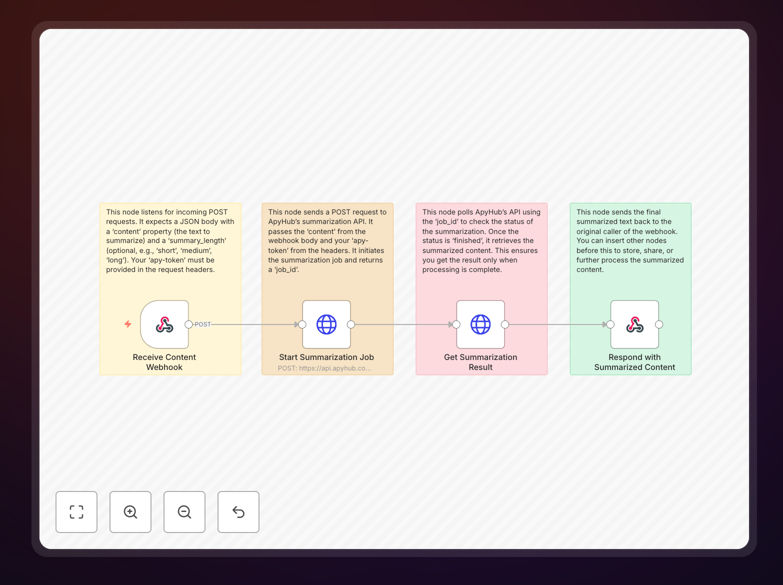
What This Workflow Does
This n8n template solves the universal problem of information overload. It automatically transforms lengthy documents, articles, reports, or any text content into concise, actionable summaries using ApyHub's powerful AI summarization API. Instead of spending hours reading through dense material, you can get the key points in seconds.
The workflow acts as an intelligent summarization engine that you can trigger from anywhere in your tech stack. Send a webhook with your content, and receive back a distilled version that captures the essential information. This is particularly valuable for businesses dealing with research papers, customer feedback analysis, news monitoring, legal document review, or creating executive briefings from detailed reports.
By automating this process, you eliminate manual summarization work, ensure consistency in information extraction, and enable real-time content processing that scales with your business needs. The integration works seamlessly with any application that can send HTTP requests, making it a versatile addition to your automation toolkit.
How It Works
The workflow follows a clean, four-step process that handles everything from receiving content to delivering polished summaries.
1. Receive Content via Webhook
The workflow starts with a Webhook node that listens for incoming POST requests. When triggered, it accepts a JSON payload containing the text to summarize and optional parameters like summary length. This creates a universal entry point that can be called from any application, service, or platform in your ecosystem.
2. Process with ApyHub API
Once content is received, the workflow sends it to ApyHub's summarization endpoint. This is where the AI magic happens—the API analyzes the text, identifies key concepts and main points, and generates a coherent summary based on your specified parameters. The workflow handles authentication and proper formatting automatically.
3. Poll for Completion
Since summarization can take a moment for longer documents, the workflow includes intelligent polling logic. It periodically checks the job status until processing is complete, ensuring reliable operation even with substantial content. This asynchronous approach prevents timeouts and provides a smooth user experience.
4. Return Summarized Content
The final step delivers the polished summary back to the calling application. The workflow structures the response in a clean, consistent format that's easy to integrate into your existing systems—whether you're displaying it in a dashboard, saving it to a database, or forwarding it via email or chat.
Pro tip: You can easily modify the summary length parameter to generate different output styles—use "short" for bullet points, "medium" for paragraph summaries, or "long" for more detailed condensations.
Who This Is For
This automation template delivers value across multiple industries and roles. Content teams and marketers can use it to quickly digest industry reports and create social media snippets. Researchers and academics can process multiple papers to identify relevant studies faster.
Customer support managers can summarize lengthy customer emails and support tickets to identify common issues and trends. Legal and compliance professionals can extract key clauses from contracts and regulatory documents. Executives and business analysts can transform detailed reports into executive summaries for faster decision-making.
Essentially, anyone who regularly processes large volumes of text and needs to extract key information efficiently will benefit from this automation. It's particularly valuable for teams dealing with research aggregation, competitive intelligence, document review processes, or any workflow where time spent reading could be better spent analyzing.
What You'll Need
- An n8n instance – either self-hosted or n8n.cloud account
- ApyHub API key – sign up for a free account at apyhub.com
- Webhook-capable application – any system that can send HTTP POST requests (CRMs, form tools, internal apps)
- Basic understanding of JSON – to structure your webhook payloads
- Destination for summaries – where processed content should go (database, email, chat, etc.)
Quick Setup Guide
Get this summarization workflow running in your environment in just a few minutes with these simple steps.
- Download and import the template JSON file into your n8n instance using the "Import from File" option
- Configure the Webhook node by setting a unique path (like "/summarize-content") and activating the workflow
- Add your ApyHub API key to the HTTP Request node's authentication settings
- Test the integration by sending a sample POST request with text content to your webhook URL
- Connect your applications by updating their webhook endpoints to point to your n8n instance
- Customize output handling based on where you want summaries delivered (Slack, database, email, etc.)
Implementation note: For production use, consider adding error handling and logging nodes to track summarization requests and catch any API issues before they affect your users.
Key Benefits
Save 80%+ reading time by automatically extracting key information from lengthy documents. What used to take 30 minutes of reading now takes seconds of processing.
Improve team productivity by providing instant summaries instead of requiring everyone to read full documents. This is especially valuable for distributed teams and asynchronous work.
Ensure consistent quality with AI-powered summarization that applies the same criteria every time, eliminating human variability in what gets highlighted or omitted.
Scale without adding headcount by processing hundreds or thousands of documents daily without manual intervention. The system grows with your content volume.
Integrate with your existing stack through simple webhooks that work with virtually any modern application, from CRMs to project management tools.