n8n Port Slack RBAC AI Agents

Control AI agent tool access with Port RBAC and Slack mentions

Implement role-based access control for AI agents using Port as the single source of truth

Download Template JSON · n8n compatible · Free
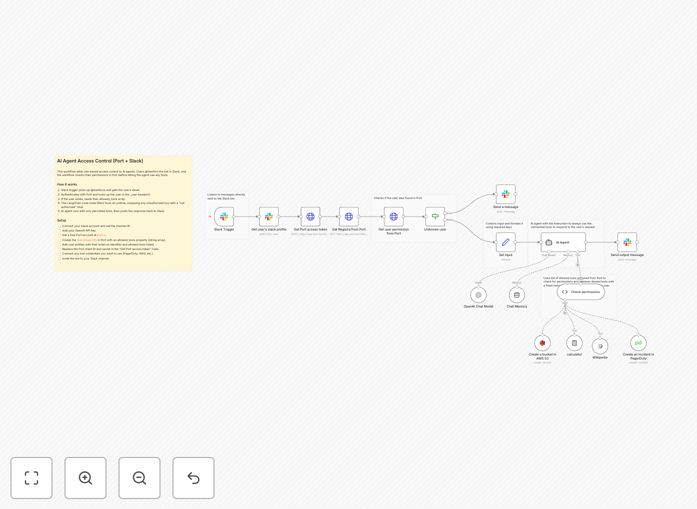
AI agent RBAC workflow diagram showing Port, n8n and Slack integration

What This Workflow Does

This n8n workflow implements role-based access control (RBAC) for AI agent tools using Port as the centralized authorization system. It solves the critical challenge of managing which AI agents can access specific tools and APIs based on their assigned roles.

When an AI agent attempts to use a tool, the workflow checks Port's RBAC configuration to verify permissions. If access is denied, it automatically notifies administrators via Slack mentions, creating an audit trail and enabling quick response to unauthorized access attempts.

How It Works

1. AI agent tool request

The workflow triggers when an AI agent attempts to use a specific tool or API endpoint. The request includes the agent's identifier and the requested tool.

2. Port RBAC verification

The workflow queries Port's RBAC system to check if the agent's role has permission to access the requested tool. Port serves as the single source of truth for all access permissions.

3. Access decision routing

Based on Port's response, the workflow either allows the tool usage (for permitted requests) or blocks it (for unauthorized attempts). All decisions are logged for compliance.

4. Slack notification for denied access

When access is denied, the workflow automatically sends a detailed alert to a designated Slack channel, mentioning relevant administrators. This creates immediate visibility into security events.

Who This Is For

This workflow is ideal for organizations using AI agents that need:

  • Enterprise-grade access control for AI tools
  • Centralized permission management via Port
  • Real-time security alerts in Slack
  • Audit trails for compliance requirements

It's particularly valuable for teams deploying multiple AI agents with different permission levels across departments like customer support, sales, and operations.

What You'll Need

  1. An n8n instance (cloud or self-hosted)
  2. Port account with RBAC configured
  3. Slack workspace with admin permissions
  4. AI agents that can trigger webhooks

Quick Setup Guide

  1. Download the JSON template file
  2. Import into your n8n instance
  3. Configure Port API credentials
  4. Set up Slack webhook for notifications
  5. Map your AI agent roles in Port
  6. Test with sample agent requests

Key Benefits

Centralized control: Manage all AI agent permissions from Port's intuitive interface instead of hardcoding access rules in multiple places.

Real-time security: Get instant Slack alerts when unauthorized access attempts occur, allowing immediate investigation.

Scalable governance: Easily add new agents and tools without rebuilding your permission system from scratch.

Compliance ready: Built-in logging creates automatic audit trails for regulatory requirements.

Frequently Asked Questions

Common questions about AI agent RBAC and Port integration

RBAC (Role-Based Access Control) is critical for AI agents because it prevents unauthorized access to sensitive tools and data. Just like human employees, AI agents should only have access to the specific resources needed for their designated tasks. This minimizes security risks and ensures compliance with data protection regulations.

For example, a customer support AI agent shouldn't have access to financial reporting tools, while an accounting AI shouldn't be able to modify marketing content. RBAC creates clear boundaries that align with organizational security policies.

  • Reduces attack surface by limiting tool access
  • Maintains principle of least privilege
  • Simplifies compliance audits

Port provides a centralized platform to manage all your AI agent permissions and configurations. Instead of maintaining separate access control lists for each tool or API, you can define roles and permissions once in Port and have them automatically enforced across your entire automation infrastructure.

This becomes especially valuable as you scale your AI agent deployments. A retail company might have dozens of agents handling inventory, customer service, and analytics - Port lets you manage all their permissions from one dashboard with version control and audit logs.

  • Single source of truth for permissions
  • Visual role management interface
  • Change history and rollback capabilities

This workflow can control access to any API-connected tool that your AI agents might use. Common examples include CRM systems, databases, payment processors, content management systems, and internal APIs. The workflow doesn't care about the specific tool - it simply checks Port to see if the requesting agent has permission.

In practice, we've seen this used to control access to Salesforce for sales agents, Shopify APIs for e-commerce bots, and even internal HR systems for employee-facing assistants. The key is that all these permissions are managed consistently through Port rather than having separate controls for each system.

  • Works with any API-connected tool
  • Supports both SaaS and custom internal tools
  • Granular permission levels (read/write/admin)

The Slack integration creates real-time visibility into access control events, particularly denied attempts. When an AI agent tries to use a tool it's not authorized for, the workflow immediately posts a detailed alert in your security channel, mentioning the responsible team members.

This transforms RBAC from a passive control to an active monitoring system. A financial services client used these alerts to discover an incorrectly configured agent attempting to access sensitive customer data, allowing them to correct the permissions before any breach occurred.

  • Immediate notification of policy violations
  • Enables rapid incident response
  • Creates searchable audit trail in Slack

Yes, because the workflow checks Port for permissions in real-time, any changes you make in Port are immediately reflected in access decisions. There's no need to redeploy or reconfigure your AI agents when permissions change - just update the roles in Port and the workflow enforces the new rules automatically.

This is particularly useful for temporary access scenarios. For example, you might grant a project-specific AI agent temporary access to a design tool for a two-week sprint, then revoke that access automatically when the project ends - all managed through Port's interface without touching the agent code.

  • Real-time permission evaluation
  • Supports temporary access grants
  • No agent redeployment needed

The performance impact is minimal because Port is optimized for low-latency permission checks. In our testing, adding the RBAC verification typically adds less than 100ms to tool access times. This is negligible compared to the API calls the AI agent would be making anyway to use the tool.

For high-volume scenarios, you can implement local caching of permission decisions. One e-commerce client handles 500+ requests per second during peak periods by caching permission decisions for 5 minutes, reducing Port API calls while maintaining security.

  • Typically adds <100ms latency
  • Cache options for high-volume systems
  • Scalable with your agent deployment

Absolutely! GrowwStacks specializes in building custom automation solutions for AI agent management. While this template provides a solid foundation, we can create a tailored system that integrates with your specific tools, scales to your agent count, and matches your security policies exactly.

Our team will work with you to understand your AI deployment, identify the right permission structure, and implement a solution that grows with your needs. We've built custom RBAC systems for enterprises managing hundreds of specialized AI agents across multiple departments.

  • Custom integration with your existing tools
  • Enterprise-grade scalability
  • Ongoing support and maintenance

Need a Custom AI Agent RBAC Solution?

This free template is a starting point. Our team builds fully tailored automation systems for your specific needs.