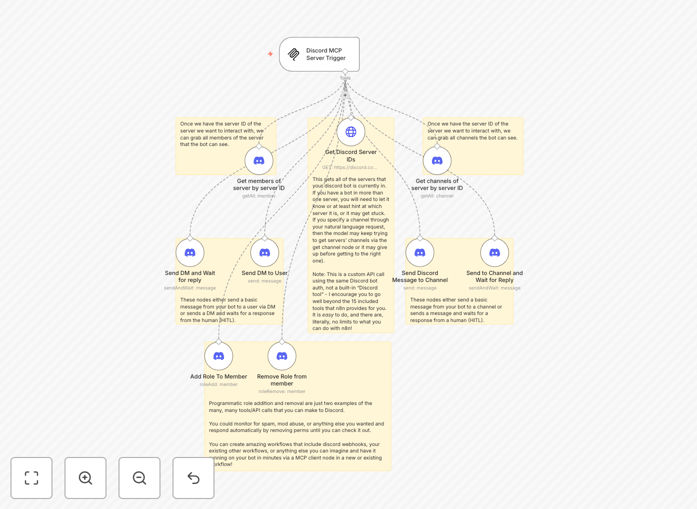
What This Workflow Does
Managing a Discord server often requires memorizing slash commands or writing custom scripts for every bot action. This workflow eliminates that complexity by giving you natural language control over your Discord bot through an MCP (Model Context Protocol) server.
Simply tell your bot what to do in plain English—"send a welcome message to the new member," "pin the announcement in #general," or "timeout @user for 10 minutes"—and the workflow translates your intent into precise Discord API calls. It bridges the gap between conversational instructions and technical execution, making bot management accessible to non-technical team members.
The template provides a foundation for building more sophisticated automations where Discord becomes a conversational interface for your entire operations. Community managers can execute moderation tasks, support teams can trigger workflows, and developers can focus on building rather than maintaining bot command syntax.
How It Works
The workflow acts as an intelligent intermediary between natural language input and Discord's API, using n8n's visual automation platform to process requests and execute actions.
Step 1: Natural Language Input
Users interact with the system through a chat interface or direct message that sends natural language commands to the MCP server. The workflow receives these plain-text instructions like "send a message to #announcements saying the event starts in 30 minutes."
Step 2: Intent Recognition & Processing
n8n's AI nodes (configurable with OpenAI, Claude, or local LLMs) analyze the command to determine the user's intent and extract key parameters—channel names, user mentions, message content, duration for timeouts, etc. This parsing happens automatically without predefined command structures.
Step 3: Discord API Execution
The processed command triggers the appropriate Discord API node in n8n. The workflow uses your bot's authentication token to perform actions like sending messages, managing channels, assigning roles, or moderating users—all while respecting Discord's rate limits and permission systems.
Step 4: Response & Confirmation
The workflow sends confirmation back through the same interface, confirming the action was completed or providing error details if something went wrong. This creates a conversational feedback loop that feels natural to users.
Who This Is For
This template is ideal for community managers, Discord server administrators, developers building interactive communities, and businesses using Discord for customer support or team collaboration.
Community Managers: Moderate servers without memorizing complex bot commands. Issue warnings, manage channels, or welcome new members using simple instructions.
Development Teams: Use Discord as a control panel for development workflows. Trigger deployments, check server status, or manage staging environments through natural conversation.
Support Teams: Create ticket systems, assign support roles, or escalate issues directly from Discord conversations without switching contexts.
Content Creators & Streamers: Automate community engagement, schedule announcements, or manage subscriber perks through intuitive voice or text commands.
What You'll Need
- Discord Bot Token: Create a bot in the Discord Developer Portal and obtain its authentication token with appropriate permissions for your intended actions.
- n8n Instance: A running n8n installation (cloud or self-hosted) where you can import and execute workflows.
- MCP Server Access: The template connects to an MCP server—you can use the provided example or configure your own compatible server.
- AI/LLM Configuration: Access to an AI service (OpenAI, Anthropic, or local model) for natural language processing, configured within n8n's AI nodes.
- Basic Discord Server Management Permissions: Administrative access to the Discord server where you want to deploy the bot.
Quick Setup Guide
Get your natural language Discord bot running in under 15 minutes with this straightforward setup process.
- Import the Template: Download the JSON file and import it into your n8n instance via the workflow import function.
- Configure Discord Credentials: Add your Discord bot token to the "Discord" node in the workflow. Set the appropriate scopes for your use case (send messages, manage channels, moderate members, etc.).
- Set Up MCP Server Connection: Configure the MCP server trigger node with your server details. The template includes example configurations you can modify.
- Configure AI Processing: Connect your preferred AI service (OpenAI, Claude, etc.) to the LLM nodes that will interpret natural language commands.
- Test Basic Commands: Start with simple instructions like "send hello to #general" to verify the connection and parsing work correctly.
- Expand Command Vocabulary: Add more complex command patterns based on your community's needs—the AI will learn to recognize variations of the same intent.
- Deploy & Monitor: Activate the workflow and monitor initial interactions. Adjust parsing logic as needed based on real usage patterns.
Pro tip: Start with a limited set of commands and expand gradually. This helps you identify edge cases and refine the natural language understanding before scaling to more complex interactions.
Key Benefits
Eliminates Command Memorization: Team members no longer need to remember specific slash commands or syntax—they just describe what they want the bot to do in natural language.
Reduces Developer Dependency: Non-technical staff can manage bot interactions without constantly asking developers to write new command scripts or modify existing ones.
Enables Complex Multi-Step Actions: Single natural language commands can trigger sophisticated multi-step workflows that would require multiple traditional bot commands.
Improves Community Engagement: Makes bot interactions feel more conversational and human-like, which can increase engagement and make your server feel more welcoming.
Future-Proofs Your Automation: As Discord's API evolves or your needs change, you can update the natural language parsing without retraining users on new command syntax.