Calendar Automation AI Processing n8n NextCloud Google Calendar

Convert event text to calendar entries with AI and NextCloud/Google/Zoho

Automatically turn event-related text into properly formatted calendar events using AI and your preferred calendar service

Download Template JSON · n8n compatible · Free
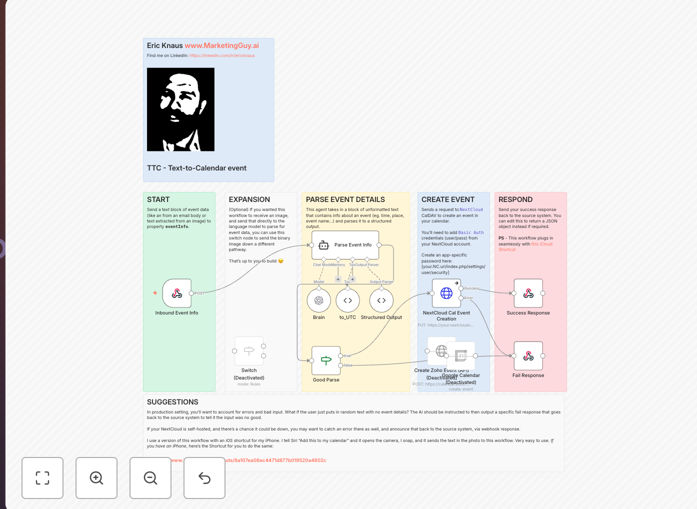
Workflow diagram showing AI processing text to create calendar events

What This Workflow Does

This automation solves the tedious process of manually creating calendar events from various text sources. Whether it's an email announcement, social media post, or printed flyer, this workflow extracts event details and creates a properly formatted calendar entry automatically.

The system uses AI to intelligently parse unstructured text, identify key event components (date, time, location, description), and then creates a new event in your preferred calendar system (NextCloud, Google Calendar, or Zoho Calendar). This eliminates manual data entry errors and saves significant time for busy professionals.

How It Works

1. Text Input

The workflow accepts event information from various sources - emails, text messages, social media posts, or even photos of printed materials using OCR technology.

2. AI Processing

An AI model analyzes the text to identify and extract key event details including date, time, location, title, and description. It handles variations in formatting and natural language.

3. Data Validation

The system checks for missing information and applies default values or requests clarification if needed, ensuring complete calendar entries.

4. Calendar Creation

The parsed event details are formatted according to your calendar system's requirements and added to your specified calendar with proper timezone handling.

Who This Is For

This workflow is ideal for busy professionals, event organizers, administrative assistants, and anyone who needs to manage multiple calendar events from various sources. It's particularly valuable for:

  • Executives who receive event invitations via email
  • Community organizers managing multiple event sources
  • Sales professionals tracking client meetings
  • Students managing academic and social calendars

What You'll Need

  1. An n8n instance (self-hosted or cloud)
  2. Access to an AI service (OpenAI, Google AI, etc.)
  3. Active account with NextCloud Calendar, Google Calendar, or Zoho Calendar
  4. API credentials for your chosen calendar service

Quick Setup Guide

  1. Download the template file
  2. Import into your n8n instance
  3. Configure your AI service credentials
  4. Connect your calendar service
  5. Test with sample event text
  6. Deploy your workflow

Key Benefits

Save 5-10 minutes per event by eliminating manual calendar entry. What used to be a multi-step process now happens automatically.

Reduce errors in event details with AI-powered parsing that understands natural language variations in event descriptions.

Centralize event management by automatically adding events from various sources to your main calendar system.

Improve productivity by focusing on higher-value work instead of administrative tasks.

Pro tip: Use this workflow with email filters to automatically process event invitations and add them to your calendar without manual intervention.

Frequently Asked Questions

Common questions about calendar automation and AI processing

Modern AI models achieve 85-95% accuracy in extracting event details from well-structured text. For more complex or ambiguous text, the system can flag uncertain elements for human review. The technology continues to improve as models are trained on more diverse event formats.

In practice, this means most standard event announcements (like "Team meeting Friday 2pm in Conference Room B") are processed perfectly. More complex events with multiple dates or locations may require slight adjustments.

Yes, the workflow can automatically detect and convert timezones when specified in the source text. For events without explicit timezone information, it uses your calendar's default timezone setting.

This is particularly useful for international teams or when dealing with events in different locations. For example, if you receive an invitation for "3pm EST" but your calendar is set to PST, the event will automatically show as 12pm in your local time.

The workflow can process any text-based event information, including emails, chat messages, social media posts, and documents. With OCR capabilities, it can also extract text from images of printed materials like flyers or business cards.

Common use cases include processing event invitations from email, extracting conference details from LinkedIn posts, or adding networking events from photographed business cards. The system is flexible enough to handle most common event announcement formats.

While some calendar apps offer basic event detection (like Gmail's "Add to Calendar" button), this workflow provides more sophisticated parsing across diverse sources. It handles unstructured text better and works consistently across multiple platforms.

The key advantage is flexibility - where built-in tools only work within their ecosystem (like Gmail to Google Calendar), this solution works across email providers, social platforms, and document types. It also offers more control over how events are processed and categorized.

Absolutely. The workflow template includes configuration options to specify which fields should be included in calendar events. You can add custom fields, set default values, or modify how information is formatted.

For example, you might configure all work-related events to automatically include a specific video conference link, or set personal events to default to a particular calendar color. These customizations help tailor the automation to your specific needs.

The workflow includes error handling to manage ambiguous cases. When the AI can't confidently parse event details, it can either use default values for missing information or flag the event for manual review.

In practice, this means you might receive a notification asking you to confirm uncertain details before the event is created. This safety mechanism prevents incorrect calendar entries while still automating the majority of cases that are clear-cut.

Yes! GrowwStacks specializes in building custom automation solutions for businesses. Our team can create tailored calendar integrations that match your specific workflows and systems.

Whether you need advanced features like team scheduling, resource booking, or complex event processing rules, we can develop a solution that saves your team time and reduces scheduling errors. Custom automations often pay for themselves within weeks through time savings alone.

  • Tailored to your existing systems
  • Built-in error handling for your specific use cases
  • Ongoing support and maintenance

Need a Custom Calendar Automation?

This free template is a starting point. Our team builds fully tailored automation systems for your specific needs.