n8n Fathom Google Docs AI Summaries Meeting Automation

Convert Fathom meeting transcripts to formatted Google Docs with AI summaries

Automatically transform raw meeting transcripts into professional, searchable documents with key insights highlighted

Download Template JSON · n8n compatible · Free
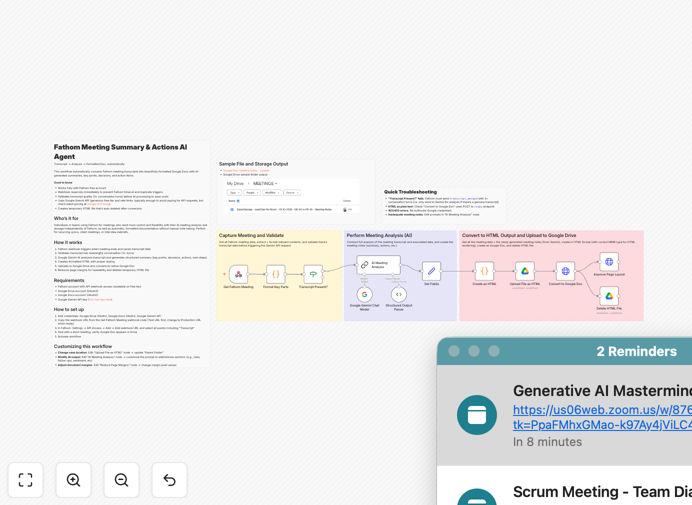
Workflow diagram showing Fathom to Google Docs conversion process

What This Workflow Does

This n8n workflow automatically converts raw Fathom meeting transcripts into professionally formatted Google Docs complete with AI-generated summaries. It eliminates hours of manual transcription work while ensuring consistent documentation across all your meetings.

The system captures every spoken word from your Fathom recordings, structures the content with proper headings and formatting, then adds intelligent summaries highlighting key decisions, action items, and discussion points. The result is searchable, shareable meeting documentation that helps teams stay aligned without tedious note-taking.
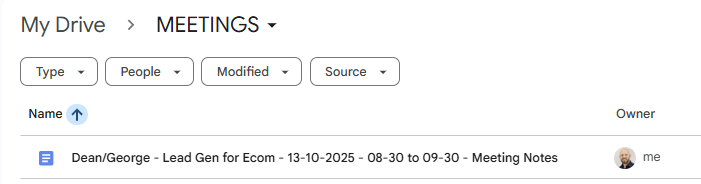
Sample output showing formatted Google Doc with meeting transcript and AI summary
Example of automatically generated Google Doc with formatted transcript and AI summary section

How It Works

1. Trigger from new Fathom recording

The workflow activates whenever Fathom generates a new meeting transcript. It captures the raw text along with meeting metadata like participants, duration, and timestamps.

2. AI analysis and summarization

An AI processing step identifies key discussion points, decisions made, and action items. It generates concise executive summaries while preserving the full transcript context.

3. Document formatting

The system applies your preferred formatting template—adding headings, speaker labels, timestamps, and visual separation between sections. Formatting rules ensure consistency across all meeting docs.

4. Google Doc creation

The formatted content saves as a new Google Doc in your specified Drive folder. The workflow can optionally notify participants or share the doc automatically.

Pro tip: Configure the workflow to add @mentions for action items automatically, making responsibilities clear in the document.

Who This Is For

This automation is ideal for teams that:

  • Conduct frequent client meetings or internal discussions
  • Need accurate records of conversations for compliance or reference
  • Want to reduce time spent on manual note-taking and transcription
  • Share meeting outcomes with stakeholders who weren't present
  • Value searchable archives of past discussions

What You'll Need

  1. An active Fathom account with recording permissions
  2. n8n instance (cloud or self-hosted)
  3. Google Workspace account with Docs API access
  4. Access to an AI service like OpenAI for summarization

Quick Setup Guide

  1. Download the workflow template file
  2. Import into your n8n instance
  3. Connect your Fathom and Google accounts
  4. Configure your preferred document formatting
  5. Set your destination Google Drive folder
  6. Test with a sample meeting recording

Key Benefits

Save 2-3 hours per week by eliminating manual transcription work while getting more comprehensive meeting documentation.

Improve meeting accountability with automatically generated action items and clear attribution of comments to speakers.

Enhance knowledge retention through searchable archives with AI-highlighted key points from every discussion.

Ensure documentation consistency across your organization with standardized formatting applied automatically.

Frequently Asked Questions

Common questions about meeting transcription and documentation automation

Automating meeting transcript conversion saves hours of manual work while improving document consistency. The AI summaries help teams quickly extract key decisions and action items. Formatted documents are easier to reference later and can be automatically shared with stakeholders.

This workflow reduces human error in transcription and ensures all meeting notes follow the same professional format. Sales teams use it to automatically generate follow-up materials, while HR departments benefit from standardized interview documentation.

  • Saves 5-7 minutes per meeting in manual work
  • Ensures no important details are missed
  • Creates searchable knowledge base over time

Modern AI summarization tools achieve 85-95% accuracy for meeting transcripts when properly configured. The summaries focus on extracting key points, decisions, and action items rather than verbatim transcription.

Accuracy improves when the AI has context about meeting participants and objectives. Most businesses find the summaries sufficiently accurate for internal use after minor human review. For client-facing documents, many teams add a quick verification step.

  • Configure with your industry terminology
  • Provide meeting agendas when possible
  • Review first few summaries to train the AI

Structured meetings with clear agendas translate best to automated transcripts. Sales calls, team standups, and client consultations work particularly well. Technical discussions with specialized jargon may require more editing.

The system works best for 1:1 or small group meetings under 60 minutes where participants speak clearly without excessive crosstalk. Board meetings and legal discussions often need tighter security configurations.

  • Ideal for: Sales demos, interviews, sprint planning
  • Good for: Team syncs, client check-ins
  • Needs tuning: Technical deep dives, brainstorming

Yes, the workflow template allows full customization of the Google Doc output format. You can modify headings, font styles, color schemes, and section organization.

Common customizations include adding company branding, standardized headers/footers, and tailored section layouts for different meeting types. The formatting rules apply automatically to every converted transcript.

  • Create multiple templates for different meetings
  • Add your logo and brand colors
  • Include standard disclaimer text

Automated transcription captures 3-4x more content than manual notes with perfect recall of who said what. While humans focus on key points, AI preserves full context.

The hybrid approach of AI transcription plus human review of summaries combines the best of both. Teams report 60-80% time savings versus traditional minute-taking while improving documentation quality.

  • Never miss important details again
  • Reference exact wording when needed
  • Focus on discussion rather than notes

The workflow uses encrypted connections between services and allows restricting Google Doc access. You can configure the system to store transcripts only in specific secured folders.

For highly sensitive meetings, some organizations add a manual approval step before document creation. All AI processing occurs through reputable providers with enterprise-grade data protection.

  • Set granular Google Drive permissions
  • Enable two-factor authentication
  • Audit access logs regularly

Yes, GrowwStacks specializes in building tailored meeting automation systems. We can create custom workflows that integrate with your existing tools, add approval processes, or incorporate specialized formatting requirements.

Our solutions handle unique cases like multi-language meetings, technical terminology, or compliance-specific documentation needs. We'll work with your team to design the perfect automated documentation system for your workflows.

  • Custom integrations with your CRM or PM tools
  • Specialized templates for different departments
  • Advanced security and compliance features

Need a Custom Meeting Documentation System?

This free template is a starting point. Our team builds fully tailored automation systems for your specific needs.