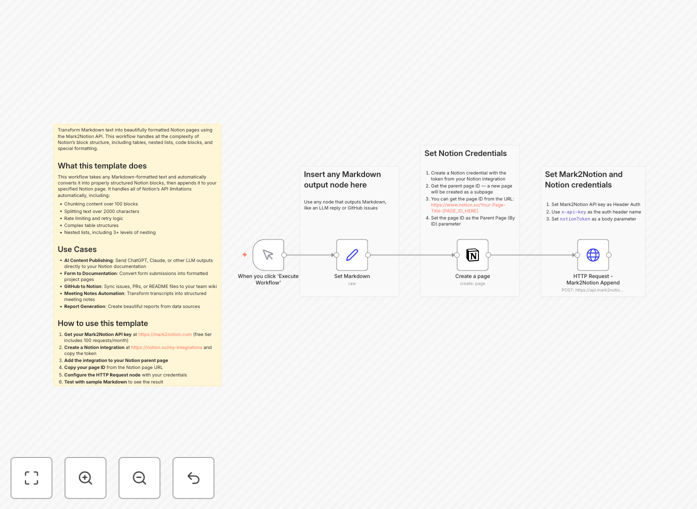
What This Workflow Does
This automation solves the tedious problem of manually copying and formatting content into Notion. If you've ever tried to move AI-generated content, meeting notes, or technical documentation into Notion, you know the frustration of losing formatting, breaking tables, or hitting character limits.
The workflow takes any markdown-formatted text and automatically converts it into properly structured Notion blocks, then appends it to your specified Notion page. It handles all of Notion's API limitations automatically—chunking content over 100 blocks, splitting text over 2000 characters, managing rate limits with retry logic, and preserving complex structures like nested lists and tables.
Instead of spending hours reformatting content, you get a seamless pipeline from your content sources to a beautifully organized Notion database.
How It Works
1. Input Collection
The workflow starts by receiving markdown content from various sources. This could be triggered by a webhook from an AI tool like ChatGPT, a form submission, a GitHub webhook for issues or README files, or even a scheduled import from other documentation systems.
2. Markdown Processing
The markdown text is sent to the Mark2Notion API, which intelligently parses the structure. It identifies headings, lists (including nested items), code blocks, tables, and inline formatting like bold and italic text.
3. Notion Block Conversion
The API converts the parsed markdown into Notion's native block structure. This is where the magic happens—simple markdown syntax becomes the complex JSON structure that Notion's API requires, with proper parent-child relationships for nested elements.
4. Content Chunking & Delivery
Since Notion limits requests to 100 blocks, the workflow automatically splits larger documents into appropriately sized chunks. Each chunk is sent sequentially with proper error handling and retry logic to ensure complete delivery even with API rate limits.
5. Page Update & Confirmation
The formatted content is appended to your target Notion page, and the workflow provides confirmation with a link to the updated page. You can also set up notifications in Slack, email, or other channels to track successful publications.
Who This Is For
This automation is ideal for content teams, product managers, developers, and knowledge workers who regularly publish to Notion. Specifically:
Content Teams & Marketers: Automatically publish AI-generated blog outlines, content calendars, or campaign reports directly to your Notion content hub.
Product Managers: Convert user feedback forms, feature requests, or sprint retrospectives into structured product documentation.
Development Teams: Sync GitHub issues, pull request descriptions, or technical documentation into your engineering wiki.
Consultants & Agencies: Transform meeting transcripts, client reports, or project updates into client-facing documentation portals.
Educators & Researchers: Automatically format lecture notes, research findings, or literature reviews into organized knowledge bases.
What You'll Need
- Mark2Notion API Key: Get a free key from mark2notion.com (100 requests/month included in free tier).
- Notion Integration: Create an internal integration at notion.so/my-integrations and copy your secret token.
- Notion Page Access: Share your target Notion page with your integration (click "Share" and add your integration).
- Page ID: Copy the page ID from your Notion page URL (the alphanumeric string after your workspace name).
- n8n Instance: Either n8n.cloud account or self-hosted n8n installation.
Pro tip: Use the free Mark2Notion tier for testing and light usage. For production workflows with high volume, consider their paid plans which offer higher limits and priority processing.
Quick Setup Guide
Follow these steps to get your automation running in under 15 minutes:
- Download the template using the button above and import it into your n8n instance.
- Configure the HTTP Request node with your Mark2Notion API key (use "x-api-key" as the header name).
- Set up your Notion credentials in n8n's credentials management using the integration token from step 2 above.
- Update the Notion node with your target page ID and configure any additional properties you want to set.
- Test with sample markdown using the manual trigger node to verify the formatting works correctly.
- Connect your content source by replacing the manual trigger with a webhook, schedule, or integration from your actual content source.
Pro tip: Start with a test Notion page in a private section of your workspace. Once you're confident in the formatting and delivery, switch to your production pages.
Key Benefits
Save 5-10 hours weekly on manual formatting. What used to be a tedious copy-paste-reformat process now happens automatically with consistent results every time.
Maintain perfect formatting consistency. Every heading, list, code block, and table follows the same structure, creating professional-looking documentation without manual oversight.
Handle complex documents effortlessly. The automation manages Notion's API limitations transparently—large documents are chunked, rate limits are respected with retries, and nested structures are preserved.
Create living documentation from multiple sources. Connect AI tools, forms, GitHub, meeting tools, and more to build a constantly updated knowledge base that reflects current information.
Scale your documentation without scaling effort. As your team grows and produces more content, the automation handles the increased volume without requiring additional manual work.