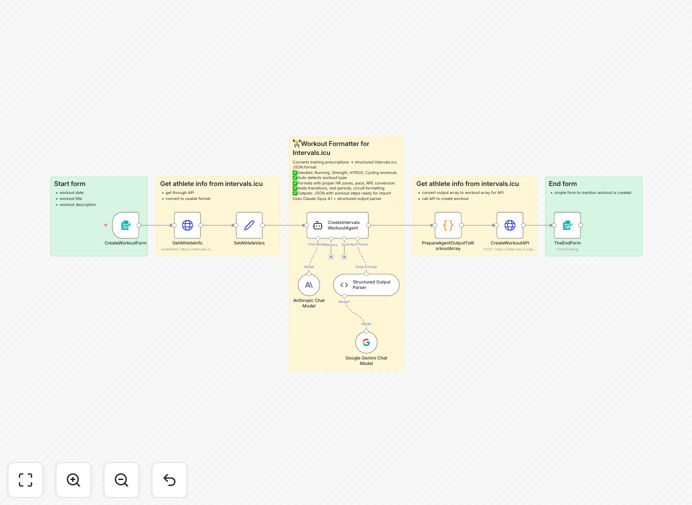
What This Workflow Does
For coaches and endurance athletes, manually converting training prescriptions from documents, emails, or coaching apps into structured Intervals.icu workouts is a time-consuming, error-prone process. Each workout requires calculating heart rate zones, power targets, and proper interval formatting based on the athlete's personal physiology.
This automation solves that problem by intelligently processing free-text training descriptions using Claude Opus AI. It fetches the athlete's specific data from Intervals.icu (FTP, max HR, threshold pace, LTHR), interprets the training prescription, and creates perfectly formatted workouts with proper zones, durations, and structure.
The system handles everything from simple interval sessions to complex multi-sport workouts, ensuring athletes train at the correct intensities while saving coaches 15-30 minutes of administrative work per athlete each week.
How It Works
1. Collect Workout Details
The workflow starts with a web form where coaches or athletes enter the workout date, title, and free-text description. This could be copied from a training plan document, coaching app, or even a voice memo transcription.
2. Fetch Athlete Physiology Data
The system connects to Intervals.icu via API to retrieve the athlete's current training metrics: Functional Threshold Power (FTP), maximum heart rate, lactate threshold heart rate (LTHR), and threshold pace. This personal data ensures accurate zone calculations.
3. AI Processing & Interpretation
Claude Opus 4.1 analyzes the training description, identifying workout type (run, ride, strength, etc.), detecting intervals, circuits, and understanding intensity cues like "RPE 7," "zone 2," or "5x3 minutes hard."
4. Zone Conversion & Formatting
The AI maps perceived exertion and descriptive cues to precise percentages of the athlete's physiological data. It structures the workout with proper warmup/cooldown sections, calculates exercise durations, and formats transitions between intervals or exercises.
5. Workout Creation in Intervals.icu
The formatted workout is sent back to Intervals.icu via API, creating a ready-to-execute training session with all the proper structure, zones, and metadata that the platform needs for tracking and analysis.
Who This Is For
Endurance Coaches: Who create customized training plans for multiple athletes and need to efficiently convert those plans into executable Intervals.icu workouts without manual data entry.
Serious Athletes: Following training programs from books, online coaches, or training platforms who want to automatically import those sessions into their Intervals.icu calendar for proper tracking.
Hybrid Training Facilities: Coaching HYROX, CrossFit, or multi-sport athletes who need to format complex circuit training with proper timing and transitions between exercises.
Team Managers: Overseeing training for groups of athletes who need consistent workout formatting and individualized zone calculations based on each athlete's current fitness level.
What You'll Need
- Intervals.icu Account: With API access enabled (generate an API key from Developer Settings)
- Anthropic API Key: For Claude Opus AI access (available from Anthropic's platform)
- Athlete Data Configured: Training zones (FTP, max HR, LTHR, threshold pace) must be set up in Intervals.icu
- n8n Instance: Self-hosted or cloud version of n8n to run the workflow
- Basic API Knowledge: Understanding how to set up HTTP Basic Auth credentials in n8n
Pro tip: Before using this workflow, ensure your athlete's training zones in Intervals.icu are current and accurate. The quality of the AI's zone conversions depends entirely on the accuracy of the underlying physiological data.
Quick Setup Guide
- Download the template using the button above and import it into your n8n instance.
- Get your Intervals.icu API key by logging into Intervals.icu, going to Settings → Developer Settings, and generating a new key.
- Configure HTTP Basic Auth in n8n: Create a new credential with username "API_KEY" (literally) and your Intervals.icu API key as the password. Apply this to both HTTP Request nodes.
- Add your Anthropic API key to the Claude Opus node credentials.
- Test with a simple workout description like "30 minute zone 2 run with 10 minute warmup" to verify the connection and formatting work correctly.
- Activate the workflow and use the webhook or form trigger to start submitting training prescriptions.
Key Benefits
Save 15-30 minutes per athlete per week by eliminating manual workout entry and zone calculations. Coaches can focus on strategy rather than administrative data entry.
Ensure training accuracy with AI-powered zone conversions based on each athlete's current physiological data, reducing the risk of training at wrong intensities.
Handle complex workout formats including intervals, circuits, supersets, and multi-sport sessions that would be tedious to format manually in Intervals.icu.
Maintain consistency across all athlete workouts with standardized formatting, proper warmup/cooldown sections, and correct exercise transitions.
Scale coaching operations by processing multiple athletes' training plans simultaneously without increasing administrative workload proportionally.