What This Workflow Does
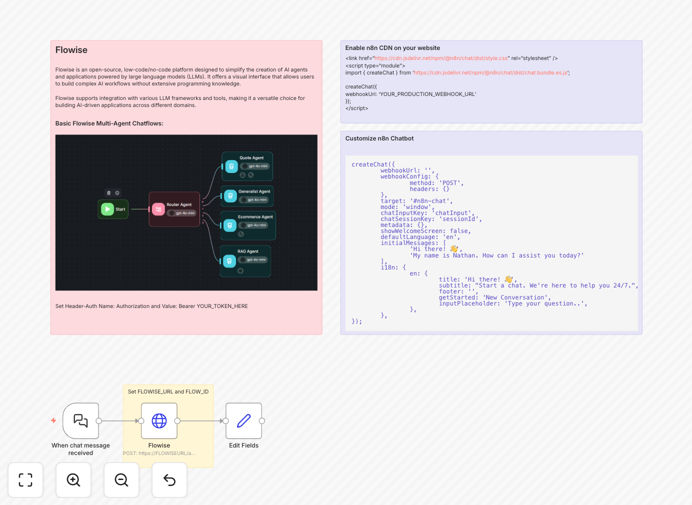
This automation transforms your website into an intelligent, 24/7 conversational interface by connecting a custom-branded chat widget to Flowise's multi-agent AI system through n8n. Instead of static FAQ pages or delayed email support, visitors get instant, context-aware responses that match your brand voice and can trigger real business actions.
The workflow solves the problem of scaling personalized customer interactions without increasing support staff. It captures leads during conversations, answers product questions based on your documentation, and routes complex issues to the right team—all while maintaining a seamless brand experience. By combining n8n's integration capabilities with Flowise's advanced AI orchestration, you get enterprise-grade chatbot functionality without the enterprise price tag.
How It Works
1. Visitor Interaction & Message Capture
When a website visitor types a question into your branded chat widget, n8n's Webhook node captures the message along with metadata (page URL, timestamp, visitor ID). This triggers the workflow instantly, ensuring sub-second response times.
2. Intelligent Routing to Flowise Agents
The message is sent to your Flowise instance via HTTP Request node, where it's processed by specialized AI agents. Multi-agent architecture means different agents handle different query types—sales questions go to product experts, technical issues to support agents, all trained on your specific knowledge base.
3. Context-Aware Response Generation
Flowise agents analyze the query against your uploaded documents, previous conversations, and configured tools. The system selects the most appropriate response strategy, whether retrieving specific information, asking clarifying questions, or executing predefined actions through n8n.
4. Action Execution & Integration
Based on the conversation outcome, n8n can create CRM records, send email follow-ups, generate support tickets, or update internal databases. The Edit Fields node structures the response for consistent formatting before sending it back to the visitor through the chat interface.
Who This Is For
This template is ideal for SaaS companies, digital agencies, e-commerce stores, and professional service firms that receive repetitive customer inquiries. Marketing teams use it to qualify leads before sales handoff. Support teams deploy it to handle Tier-1 questions 24/7. Product teams implement it to gather user feedback automatically. If you spend more than 10 hours weekly answering similar customer questions, this automation will deliver immediate ROI.
Pro tip: Start by deploying the chatbot on high-intent pages like pricing, contact, or documentation sections where visitors are most likely to have questions. Track which questions it handles successfully versus those needing human escalation to continuously improve your agent training.
What You'll Need
- n8n instance (Cloud or self-hosted)
- Flowise deployment with configured AI agents and API access
- Website access to embed the JavaScript chat widget
- API credentials for any connected services (CRM, email, etc.)
- Training materials for your AI agents (PDFs, documentation, past Q&A)
Quick Setup Guide
Follow these steps to deploy your branded AI chatbot in under 30 minutes:
- Import the template into your n8n workspace and activate the workflow.
- Configure the Webhook node to generate your unique endpoint URL.
- Update the HTTP Request node with your Flowise instance URL and flow ID.
- Add authentication headers using your Flowise API key in the credentials.
- Embed the provided JavaScript snippet on your website, replacing the webhook URL.
- Customize the chat widget appearance (colors, logo, welcome message) in the script.
- Test thoroughly with sample questions before going live.
Key Benefits
24/7 customer support without staffing costs: The chatbot handles inquiries anytime, reducing response times from hours to seconds and freeing your team for complex issues.
Consistent brand experience across all touchpoints: Customize the chat interface to match your website design, maintaining visual and tonal consistency that generic chat solutions can't provide.
Automatic lead qualification and capture: When visitors ask about pricing or demos, the chatbot can collect contact details and qualification criteria, then create enriched leads in your CRM automatically.
Scalable multi-agent architecture: Flowise's agent system allows different specialists for different query types, ensuring accurate responses whether the question is about billing, technical specs, or onboarding.
Seamless integration with existing tools: n8n connects the chatbot to your entire tech stack—create tickets in Zendesk, send Slack notifications, update HubSpot records, or trigger internal workflows based on conversation outcomes.