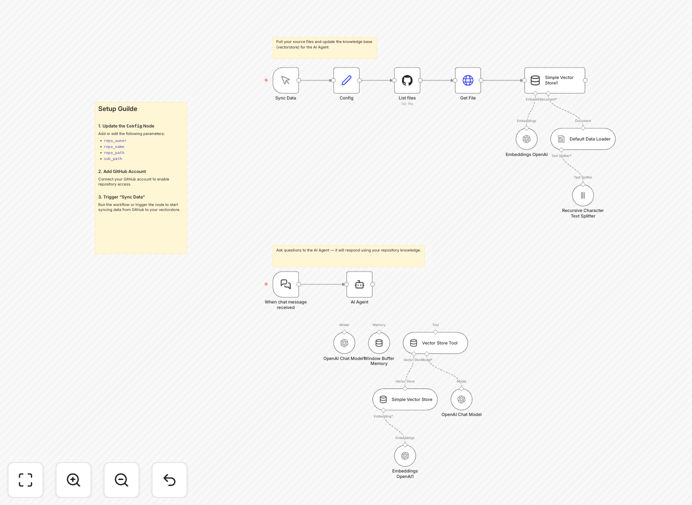
What This Workflow Does
This automation creates an AI-powered code assistant that learns directly from your GitHub repository. It solves the common problem of developers needing to constantly reference their own codebase or explain project-specific patterns to new team members. Instead of manually searching through files or relying on memory, your AI assistant will have instant access to your entire code history and architecture.
The workflow automatically syncs with your GitHub repository, processes the source files, converts them into vectorized knowledge that OpenAI can understand, and creates a responsive coding assistant. This assistant can answer questions about your codebase, suggest improvements based on your existing patterns, and help onboard new developers faster.
How It Works
1. Repository Connection
The workflow connects to your GitHub account and identifies the target repository. It can be configured to monitor specific branches or the entire repo.
2. Code Processing
Source files are extracted and processed, with special attention to file structure, comments, and documentation. The system intelligently organizes the code for optimal AI comprehension.
3. Vectorization
The processed code is converted into vector embeddings using OpenAI's API. This transformation allows the AI to understand relationships between different parts of your codebase.
4. Assistant Creation
An AI assistant is configured with access to these vectorized representations of your code. It's trained to reference your specific implementation patterns when answering questions.
5. Query Interface
The final step creates an interface where developers can ask questions about the codebase and receive answers that reference actual files and patterns from your repository.
Who This Is For
This workflow is ideal for development teams of all sizes who want to:
- Accelerate onboarding for new developers
- Maintain consistency across large codebases
- Reduce time spent explaining implementation details
- Create institutional knowledge that outlives individual team members
- Improve code quality through AI-assisted reviews
What You'll Need
- A GitHub account with repository access
- An OpenAI API key with access to embeddings
- A vector database (optional but recommended for large repos)
- Basic familiarity with n8n workflow automation
Quick Setup Guide
- Download the template and import it into your n8n instance
- Configure the GitHub node with your repository details
- Add your OpenAI API credentials
- Set up the vector database connection if using one
- Test the workflow with a small repository first
- Deploy the assistant interface for your team
Key Benefits
Reduce onboarding time by up to 40%: New developers can get answers about your specific implementation without interrupting senior team members.
Maintain code consistency: The AI assistant helps enforce your team's coding standards by referencing existing patterns.
Capture institutional knowledge: Critical implementation decisions are preserved in an always-available format.
Improve documentation: The assistant can identify gaps in your documentation by analyzing what questions developers ask most frequently.
Scale expertise: Your entire team benefits from collective knowledge, not just individual experience.