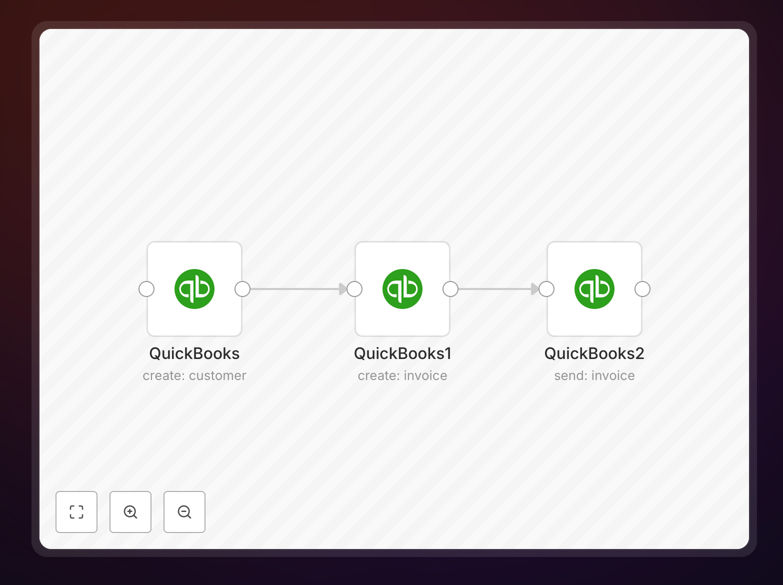
What This Workflow Does
This automation solves a common bottleneck for service businesses, consultants, and e-commerce operations: the manual process of creating customer records and sending invoices. Every time you acquire a new client or complete a sale, you typically need to enter their details into your accounting system, calculate the invoice amount, generate the document, and email it—a process that can take 15–30 minutes per transaction.
This workflow automates that entire chain. It connects your customer data source (like a CRM, form submission, or e-commerce platform) directly to QuickBooks Online. When a new customer appears, the workflow automatically creates their profile in QuickBooks, generates a properly formatted invoice with line items and totals, and sends it to their email address. The entire process happens in seconds, with zero manual intervention.
How It Works
Step 1: Trigger & Customer Data Capture
The workflow starts when new customer data arrives—from a web form submission, CRM update, or purchase notification. This trigger contains essential details: customer name, email, address, and purchase/service details.
Step 2: QuickBooks Customer Creation
The first QuickBooks node receives the customer data and creates a new customer record in your QuickBooks Online account. It maps fields like name, email, billing address, and any custom categories you've configured.
Step 3: Invoice Generation
Using the newly created customer ID and the purchase/service details, the second QuickBooks node generates a complete invoice. It adds line items, applies taxes or discounts based on your rules, calculates totals, and attaches any relevant notes or terms.
Step 4: Invoice Delivery
The final QuickBooks node sends the generated invoice directly to the customer's email address. It can include personalized messages, payment links, and follow-up instructions. The workflow can also log the sent invoice in your internal systems for tracking.
Pro tip: Add a conditional step before sending invoices to flag high-value transactions for manual review. This maintains control while automating routine billing.
Who This Is For
This automation is ideal for businesses that regularly create new customer records and send invoices:
- Service providers & consultants who bill clients after project completion or on a recurring basis.
- E-commerce stores that need to invoice customers for custom orders, wholesale purchases, or B2B transactions.
- Subscription businesses that manage sign-ups and initial billing for new subscribers.
- Freelancers & solo entrepreneurs who spend too much time on administrative billing tasks.
- Companies with high customer acquisition volume where manual invoicing slows down operations.
What You'll Need
- A QuickBooks Online account with API access enabled.
- An n8n instance (cloud or self-hosted) where you can import and run workflows.
- A source of customer data—CRM (like HubSpot), e-commerce platform (like Shopify), form tool (like Typeform), or internal database.
- Basic understanding of how to configure API connections in n8n.
- Your invoice template preferences configured in QuickBooks.
Quick Setup Guide
- Download the template using the button above and import it into your n8n workspace.
- Configure QuickBooks connection by adding your QuickBooks Online API credentials to the three QuickBooks nodes.
- Connect your trigger source by replacing the sample trigger node with your actual customer data source (webhook, CRM node, etc.).
- Test with sample data by running the workflow with a test customer record to verify customer creation, invoice generation, and email sending.
- Deploy & monitor by activating the workflow and checking initial invoices to ensure formatting and delivery meet your standards.
Pro tip: Use n8n's "Workflow History" feature to track every automated invoice for auditing and customer support purposes.
Key Benefits
Reduce billing time from hours to seconds. Each invoice that previously required 15–30 minutes of manual work now processes automatically in under a minute. This time savings compounds rapidly as customer volume grows.
Eliminate manual data entry errors. Automated systems pull data directly from source systems, avoiding mistakes in customer details, pricing calculations, or email addresses that lead to billing disputes and reconciliation headaches.
Ensure consistent billing standards. Every invoice follows the same template, includes all required line items, and applies uniform tax/discount rules—creating a professional, standardized billing experience for all customers.
Improve cash flow with faster invoicing. Invoices sent immediately after purchase or service completion lead to quicker payments. Automated systems can also trigger follow-ups for unpaid invoices, reducing outstanding receivables.
Free up staff for higher-value work. Your team can shift from administrative billing tasks to customer service, sales, or strategic initiatives—directly contributing to business growth instead of overhead maintenance.