WhatsApp AI Agent Evolution API PostgreSQL Redis

Build a Human-like WhatsApp AI Agent with Evolution API

A production-ready n8n template featuring smart buffering, hybrid memory architecture, and context refinement for natural, scalable customer conversations.

Download Template JSON · n8n compatible · Free
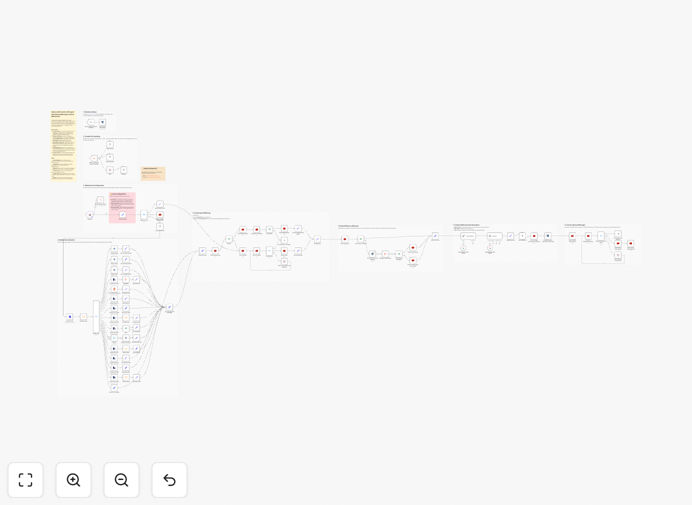
Diagram showing a human-like WhatsApp AI agent architecture with Evolution API, Redis, PostgreSQL, and Gemini AI integration

What This Workflow Does

This template creates a sophisticated AI-powered WhatsApp agent that feels human. Unlike basic chatbots that reply instantly to every message, this system uses smart buffering to wait for users to finish their thoughts—whether they're sending text, voice notes, or image albums—before processing and responding. This creates natural, flowing conversations that dramatically improve customer experience.

The workflow combines Evolution API for WhatsApp communication with Redis for lightning-fast session caching and PostgreSQL for permanent chat history storage. A dedicated context refinement agent summarizes conversations to keep responses relevant without exceeding token limits. The result is a scalable, production-ready automation that can handle customer support, lead qualification, or information delivery through WhatsApp with human-like intelligence.

How It Works

The automation follows a sophisticated pipeline designed to mimic human conversation patterns while maintaining technical efficiency.

1. Message Ingestion & Smart Buffering

The workflow receives messages via Evolution API webhook and immediately checks if the user is still typing. It implements a configurable wait period (typically 3-5 seconds) to collect related messages before processing. This prevents fragmented responses when users send multiple messages or media in quick succession.

2. Context Retrieval & Session Management

The system checks Redis for active conversation sessions using the user's WhatsApp number as a key. If found, it retrieves recent context from the fast cache. If not, it queries PostgreSQL for historical conversation data, ensuring continuity even after session expiration.

3. Context Refinement & Summarization

A specialized AI agent (using Google Gemini or similar) analyzes the conversation history and extracts key information, reducing token usage by 60-80%. This refined context is passed to the main agent, allowing it to understand long conversations without hitting token limits.

4. Intelligent Response Generation

The main AI agent generates a response based on the refined context, current message content, and any business rules you've configured. The system sends the reply through Evolution API while updating both Redis (for immediate future use) and PostgreSQL (for permanent record).

Who This Is For

This template is ideal for businesses that want to automate WhatsApp conversations at scale while maintaining a natural, human-like interaction quality. E-commerce stores can use it for order tracking and customer support. Service businesses can automate appointment scheduling and FAQs. Educational institutions can handle enrollment inquiries. Marketing teams can qualify leads through conversational AI. Any organization using WhatsApp for customer communication will benefit from this automated, intelligent agent.

What You'll Need

  1. Evolution API Instance – A self-hosted or cloud instance of Evolution API configured for WhatsApp Business.
  2. n8n Community Node – The n8n-nodes-evolution-api package installed in your n8n instance.
  3. PostgreSQL Database – For permanent chat history storage with a configured `chat_history` table.
  4. Redis Instance – For fast session caching and message buffering.
  5. AI Model Access – API keys for Google Gemini, OpenAI, or Anthropic for the context refinement and response generation.
  6. Webhook Configuration – Your Evolution API instance must be configured to send incoming messages to this workflow's webhook URL.

Pro tip: Start with Google Gemini for the AI components as it offers excellent performance for conversation tasks at competitive pricing. The template is pre-configured to work with Gemini but can be easily adapted to OpenAI or other LLMs.

Quick Setup Guide

  1. Install the Evolution API node in n8n via Settings → Community Nodes using the package name `n8n-nodes-evolution-api`.
  2. Configure credentials for Redis, PostgreSQL, and your chosen AI provider in the n8n credentials manager.
  3. Set up your database by creating the `chat_history` table with columns matching the Insert node in the workflow.
  4. Adjust global variables in the workflow: set buffer wait time, conversation timeout, and history length according to your needs.
  5. Point Evolution API to your workflow's webhook URL and test with a WhatsApp message to verify the connection.
  6. Customize the AI prompts in the Code and AI nodes to match your brand voice and specific use case requirements.

Key Benefits

Reduces response fragmentation by 90% through intelligent message buffering that groups related content before processing, creating more coherent conversations.

Cuts AI token usage by 60-80% with the context refinement layer that summarizes conversation history instead of passing entire transcripts to the main agent.

Enables 24/7 WhatsApp customer support without increasing staff, handling common inquiries instantly while escalating complex issues to human agents.

Maintains conversation context across days or weeks through the hybrid Redis/PostgreSQL memory system, providing personalized interactions even after long pauses.

Processes multi-modal content seamlessly including text, voice notes, and images, with intelligent grouping to understand complete user intent.

Frequently Asked Questions

Common questions about WhatsApp AI automation and integration

A human-like AI agent for WhatsApp is an automated system that mimics natural human conversation patterns. Instead of replying instantly to every single message, it waits for the user to finish their thought, groups related messages, and responds in a cohesive, contextual manner. This creates a more natural, less robotic interaction, improving user experience and engagement.

Traditional chatbots often interrupt users or provide fragmented responses when messages arrive in quick succession. This template solves that by implementing smart buffering and context awareness, making conversations flow like they would with a human agent who listens completely before responding.

Using Redis and PostgreSQL together creates a hybrid memory architecture that balances speed with reliability. Redis acts as a fast, in-memory cache for active conversations, delivering ultra-low latency responses. PostgreSQL serves as permanent, durable storage for the complete chat history.

This combination ensures your agent is both responsive and capable of maintaining long-term memory across sessions. Redis handles the immediate conversation flow with millisecond response times, while PostgreSQL provides reliable persistence for compliance, analytics, and retrieving historical context when users return after days or weeks.

Context refinement is a technique where a secondary AI model summarizes the conversation history before the main agent generates a response. This process extracts key information, filters out noise, and reduces token usage. It allows the main agent to understand long conversations without hitting token limits or increasing costs, maintaining coherence over extended interactions.

In this workflow, the refinement agent analyzes the last 20+ messages, identifies the core topics and user intent, and creates a concise summary. This summary, rather than the full transcript, is then passed to the main response generation agent, dramatically reducing API costs while improving response quality.

Automating WhatsApp customer support provides 24/7 availability, instant responses to common queries, and consistent service quality. It reduces operational costs by handling repetitive questions, allows human agents to focus on complex issues, and improves customer satisfaction through faster resolution times. Businesses can scale their support without proportionally increasing staff.

Beyond cost savings, automated WhatsApp support creates detailed conversation logs for analytics, enables personalized interactions at scale, and integrates seamlessly with existing CRM and ticketing systems. The human-like interaction pattern maintained by this template ensures customers feel heard rather than processed by a machine.

Yes, this workflow is designed for multi-modal support. It can process text messages, transcribe voice notes to text, and analyze images through Evolution API. The smart buffering system groups related media (like photo albums) with accompanying text, ensuring the AI receives complete context before generating a response, just like a human would when receiving multiple pieces of information.

The system handles different content types through parallel processing paths—audio goes to transcription services, images to vision models, and text directly to the conversation context. All processed content is then unified before the AI generates a response, creating a truly multi-modal conversational experience.

Setting up Evolution API with n8n requires installing the community node and configuring your Evolution API instance, which involves some technical steps. You'll need to set up webhooks, configure authentication, and ensure proper message routing. While not plug-and-play, the template provides a solid foundation that handles the complex logic, reducing implementation time significantly.

The main challenges involve correctly configuring the Evolution API instance (which requires a WhatsApp Business account) and ensuring secure webhook communication. Once these are in place, the n8n workflow manages all the conversation logic, error handling, and integration with databases and AI services.

This template is production-ready because it includes error handling, session management, hybrid database architecture, and configurable timeouts. It implements smart buffering to prevent fragmented responses, includes context refinement to manage token limits, and uses parallel processing to reduce latency. These features address common challenges in deploying conversational AI at scale.

Beyond the core functionality, the template includes monitoring points, fallback mechanisms for failed AI calls, and structured logging for debugging. It's designed to handle variable loads, recover from temporary service interruptions, and maintain conversation state across system restarts—all essential for production deployment.

Yes, GrowwStacks specializes in building custom WhatsApp automation solutions tailored to specific business needs. We can integrate with your existing CRM, add custom logic for handling specific queries, implement industry-specific knowledge bases, and ensure compliance with data regulations. Our team handles the technical complexity while you focus on defining the business rules and customer experience.

Custom implementations might include connecting to your product database for real-time inventory checks, integrating with booking systems for appointment scheduling, adding multilingual support, or implementing advanced analytics to track conversation quality and business outcomes. We work with you to design a solution that aligns with your operational workflows and customer service goals.

  • Seamless integration with your existing tech stack
  • Custom AI training on your specific products/services
  • Compliance with regional data protection regulations
  • Ongoing maintenance and optimization support

Need a Custom WhatsApp Automation?

This free template is a starting point. Our team builds fully tailored automation systems for your specific business needs.