Notion Google Gemini AI Automation n8n

Create a Notion AI assistant with Google Gemini for managing tasks & content

Automate content organization and task management in Notion using advanced AI capabilities

Download Template JSON · n8n compatible · Free
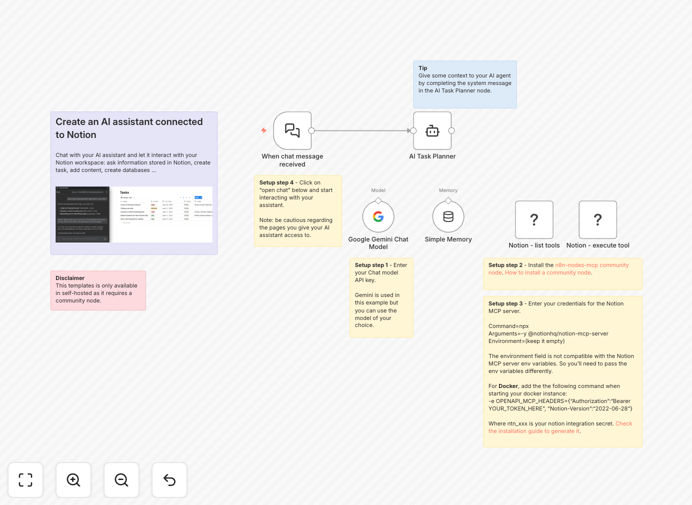
Notion AI assistant workflow diagram showing Google Gemini integration

What This Workflow Does

This n8n workflow transforms your Notion workspace into an intelligent AI-powered assistant using Google Gemini's advanced capabilities. It solves the challenge of manual content organization and task management by automatically processing, categorizing, and structuring information in your Notion databases.

The system acts as a virtual team member that can summarize documents, extract action items from meeting notes, suggest task prioritization, and maintain your knowledge base. For content creators and knowledge workers, this eliminates hours of repetitive organization work while ensuring information remains accessible and actionable.
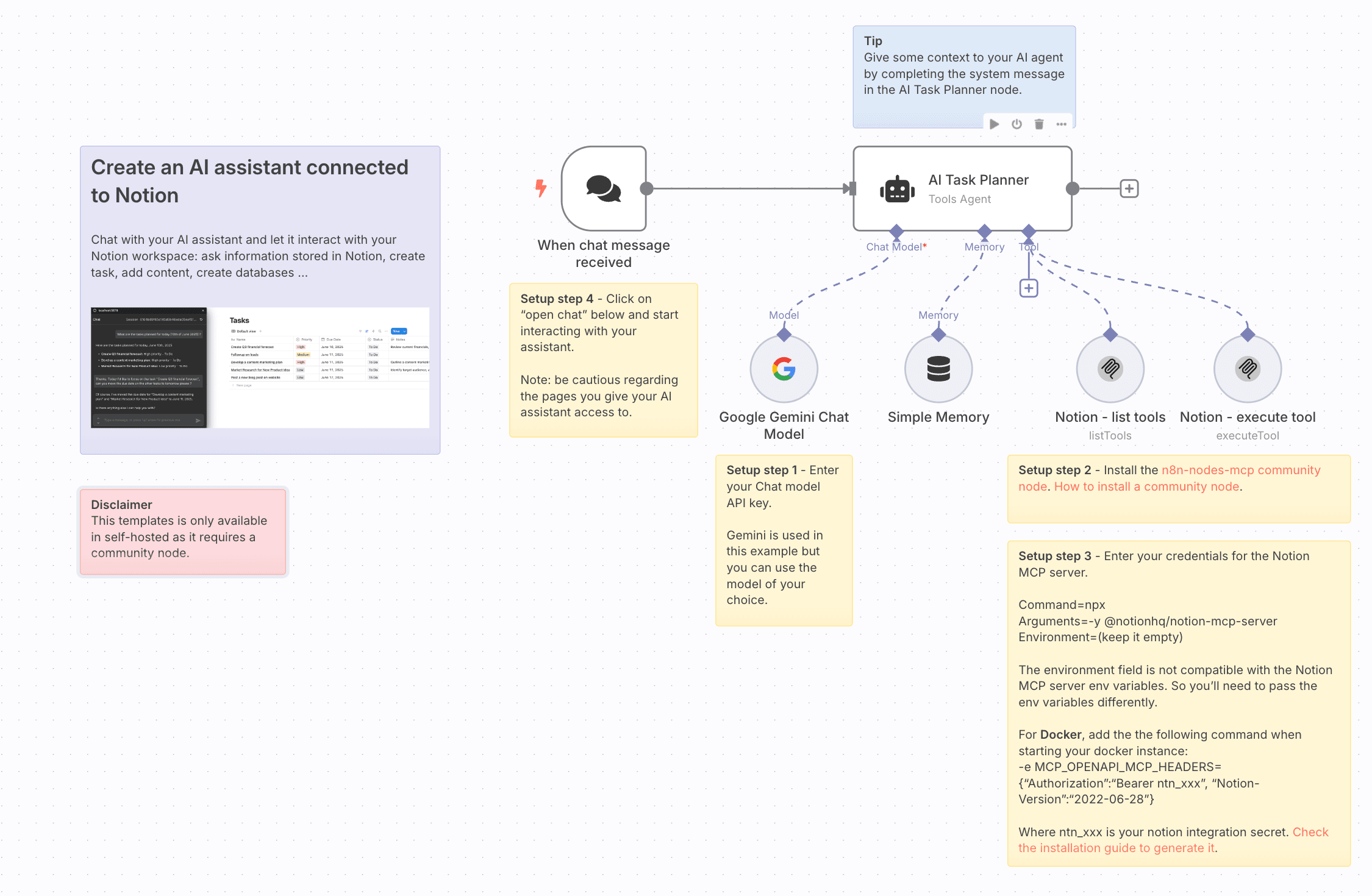
Screenshot showing AI-generated content in Notion
AI-generated content automatically formatted in Notion

How It Works

1. Content ingestion and analysis

The workflow monitors specified Notion databases for new or updated content. When detected, it sends the content to Google Gemini for analysis, extracting key information, themes, and actionable items.

2. Intelligent processing

Google Gemini evaluates the content contextually, determining appropriate categories, tags, and relationships with existing information in your Notion workspace. The AI can summarize lengthy documents, identify deadlines, and flag important items.

3. Structured output creation

The processed information is returned to Notion in a structured format, creating new database entries, updating existing ones, or generating summary pages as needed. This maintains consistency across your workspace while reducing manual data entry.
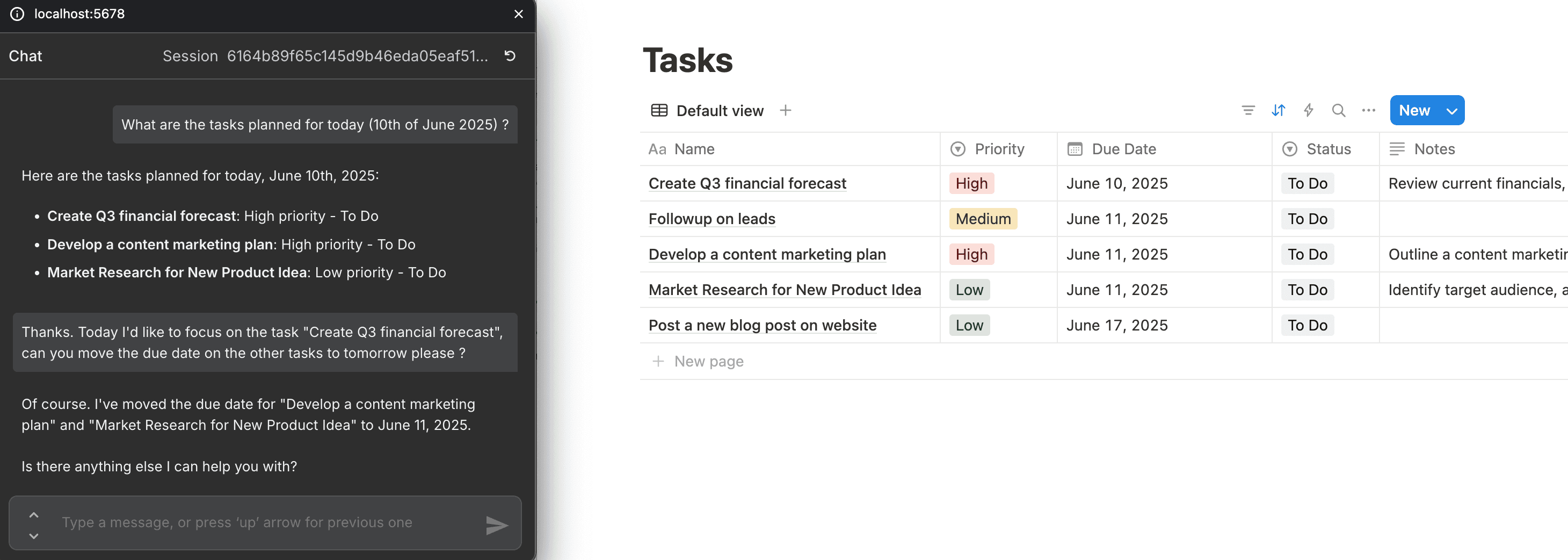
Workflow diagram showing Google Gemini integration steps
Integration steps between Notion and Google Gemini

Who This Is For

This workflow is ideal for content teams, researchers, project managers, and knowledge workers who rely on Notion as their central workspace. It's particularly valuable for:

  • Content creators managing multiple projects and research materials
  • Remote teams needing better meeting note organization
  • Solopreneurs who want an AI assistant for task management
  • Research teams compiling information from multiple sources

Pro tip: Start with a single database or project to test the AI assistant's capabilities before expanding to your entire workspace.

What You'll Need

  1. Self-hosted n8n instance (this template uses community nodes)
  2. Notion account with API access enabled
  3. Google Gemini API credentials
  4. Basic understanding of n8n workflow configuration
  5. Notion databases set up for your content types

Quick Setup Guide

  1. Download the JSON template file
  2. Import into your self-hosted n8n instance
  3. Configure Notion and Google Gemini API connections
  4. Map your Notion database IDs to the workflow
  5. Set up triggers for when content should be processed
  6. Test with sample content before going live

Key Benefits

Save 5-10 hours weekly by automating content organization and task extraction from meeting notes and documents.

Improve information discoverability with AI-powered tagging and relationship mapping between your Notion pages.

Reduce human error in manual data entry and categorization through consistent AI processing.

Scale your knowledge management as your Notion workspace grows, maintaining organization without additional overhead.

Enhance team productivity by surfacing relevant information and action items exactly when needed.

Frequently Asked Questions

Common questions about Notion AI integration and automation

AI assistants in Notion can automatically organize content, suggest task prioritization, and generate summaries of complex documents. They save hours of manual work by intelligently categorizing information and surfacing relevant content when needed. For example, an AI assistant can analyze meeting notes and automatically create follow-up tasks with deadlines.

Beyond basic organization, these assistants learn your work patterns to provide increasingly relevant suggestions. Marketing teams use them to automatically tag campaign assets, while researchers leverage them to connect related findings across multiple projects.

  • Reduces time spent on manual organization by 60-80%
  • Ensures consistent tagging and categorization
  • Surfaces forgotten or buried information

Google Gemini brings advanced natural language processing to Notion, enabling sophisticated content analysis and generation. It can understand context better than basic AI tools, making it ideal for summarizing research, generating structured content, and providing intelligent recommendations. Businesses use this integration to automatically create knowledge bases from raw notes.

Compared to simpler AI models, Gemini maintains better coherence across long documents and can handle complex instructions. This makes it particularly valuable for legal teams analyzing contracts or product teams compiling customer feedback into actionable insights.

  • Handles nuanced language better than most AI models
  • Maintains context across lengthy documents
  • Generates more accurate summaries and action items

Automation transforms knowledge management by ensuring information is always up-to-date and properly organized. AI-powered workflows can tag content, link related documents, and maintain consistency across your knowledge base. This eliminates manual categorization work and makes information instantly findable through intelligent search capabilities.

In practice, this means new team members can onboard faster as they're not digging through disorganized notes. A consulting firm might use this to automatically connect client meeting notes with relevant case studies and templates, creating a self-maintaining knowledge ecosystem.

  • Reduces knowledge silos between teams
  • Automatically surfaces related information
  • Maintains consistency as teams grow

An AI assistant can automate content summarization, task prioritization, meeting note processing, and research organization. It can also handle repetitive actions like formatting documents, creating templates from examples, and maintaining consistent tagging across your workspace. Marketing teams often use these assistants to automatically organize campaign assets and research.

More advanced implementations can draft initial versions of reports based on research notes or automatically update project timelines based on task completion. The key is identifying repetitive cognitive tasks that follow predictable patterns but currently require human attention.

  • Processes meeting notes into actionable tasks
  • Generates first drafts from research materials
  • Maintains consistent document formatting

When properly configured, AI automation with Notion maintains high security standards. The self-hosted n8n approach keeps data processing within your control. Best practices include using API keys with limited permissions and implementing data anonymization for sensitive content before AI processing.

For highly confidential information, you can implement additional safeguards like local AI processing or data redaction. Many legal and healthcare organizations use these workflows by first stripping personally identifiable information before sending content to AI services.

  • API keys can be restricted to specific databases
  • Self-hosted solutions keep data in your infrastructure
  • Data anonymization techniques protect sensitive info

Basic automation handles simple rules like moving items between databases, while AI-powered workflows understand content meaning. AI can interpret natural language requests, make judgment calls about categorization, and generate new content. This enables more sophisticated use cases like automatic research compilation and intelligent task delegation.

Where basic automation might move a task to "Completed" when checked off, AI automation could analyze the task's context to suggest similar future tasks or update related project documentation automatically. The key difference is the ability to understand and work with unstructured information.

  • Understands content meaning rather than just structure
  • Handles unstructured data and natural language
  • Learns patterns to improve over time

Yes, GrowwStacks specializes in building custom AI-powered Notion automations tailored to specific business needs. Our team can create solutions for knowledge management, project tracking, content operations, and more. We design workflows that integrate with your existing tools and processes while maintaining data security standards.

Custom solutions might include specialized document processing for legal teams, automated research compilation for academics, or intelligent client portals for agencies. We start by understanding your unique workflows and pain points before designing an automation strategy.

  • Tailored to your specific business processes
  • Integrates with your existing tool stack
  • Scalable as your needs evolve

Need a Custom Notion AI Integration?

This free template is a starting point. Our team builds fully tailored automation systems for your specific needs.