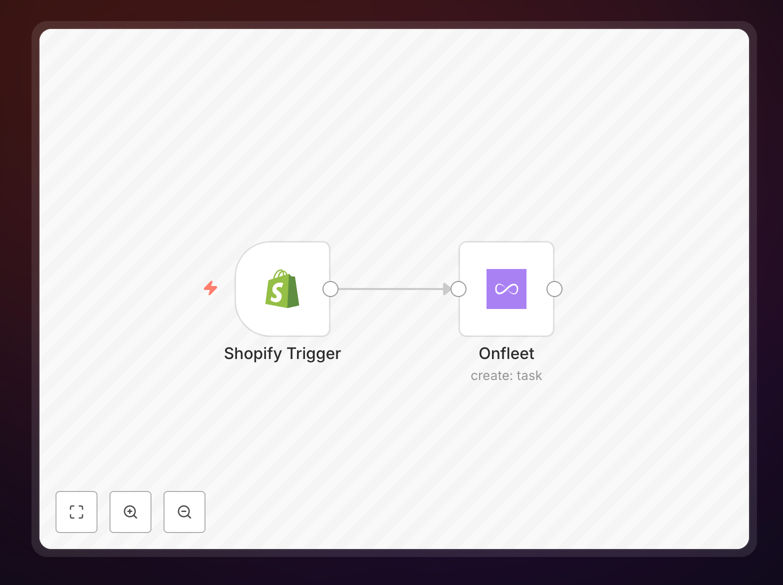
What This Workflow Does
This automation solves a critical bottleneck for e-commerce businesses that handle their own deliveries: the manual transfer of order information from Shopify to delivery dispatch systems. Every time an order is fulfilled in Shopify, someone must copy customer details, addresses, and delivery notes into Onfleet to schedule a delivery. This process is time-consuming, error-prone, and delays drivers from getting on the road.
The workflow automatically monitors Shopify for new order fulfilments and instantly creates corresponding delivery tasks in Onfleet. It maps all essential information—customer name, delivery address, phone number, delivery notes, and order details—ensuring drivers receive complete, accurate information without manual intervention. This eliminates data entry errors, reduces fulfilment time from minutes to seconds, and ensures customers receive their orders faster with proper tracking.
For businesses scaling their delivery operations, this automation provides consistency and reliability that manual processes cannot match. Whether you're delivering 10 or 100 orders daily, the system handles the data transfer seamlessly, allowing your team to focus on customer service and operational improvements rather than repetitive administrative tasks.
How It Works
The automation follows a logical sequence that mirrors how efficient delivery operations should function:
Step 1: Monitor Shopify for New Fulfilments
The workflow starts with a Shopify trigger node that watches for new order fulfilments. When a Shopify order moves to "fulfilled" status, the automation captures all relevant order data including shipping address, customer contact information, items ordered, and any special delivery instructions added during checkout.
Step 2: Process and Structure Delivery Data
Before sending data to Onfleet, the workflow processes the raw Shopify information. It extracts and formats the delivery address into Onfleet's required structure, separates customer name into first and last components if needed, and identifies any delivery notes or special instructions that should accompany the task.
Step 3: Create Onfleet Delivery Task
The processed data is sent to Onfleet's API to create a new delivery task. The automation maps Shopify fields to corresponding Onfleet fields: customer information becomes recipient details, shipping address becomes the delivery location, and order notes become task notes for the driver. The task is automatically assigned based on your Onfleet configuration rules.
Step 4: Handle Confirmation and Errors
After creating the Onfleet task, the workflow captures the task ID and confirmation details. If any errors occur—such as invalid addresses or API issues—the automation can trigger alerts via email, Slack, or other notification systems so your team can intervene promptly.
Pro tip: Add a step to validate addresses before creating Onfleet tasks. This prevents failed deliveries due to incorrect or incomplete addresses, saving driver time and reducing customer service issues.
Who This Is For
This automation is ideal for e-commerce businesses that manage their own local or regional deliveries. If you sell products through Shopify and deliver them using your own vehicles or a contracted delivery team via Onfleet, this workflow eliminates your biggest operational friction point.
Retailers with same-day or next-day delivery promises benefit significantly, as the automation reduces the time between order fulfilment and driver dispatch. Food and beverage businesses, florists, specialty grocers, and boutique retailers who prioritize customer experience will find this automation transforms their delivery operations from a manual chore to a seamless process.
The solution also suits growing businesses scaling their delivery volume. Manual data transfer becomes unsustainable beyond a certain order threshold—this automation ensures you can handle increased volume without adding administrative staff or compromising delivery accuracy.
What You'll Need
- Shopify Store: An active Shopify account with orders being fulfilled through your system.
- Onfleet Account: An Onfleet subscription with API access enabled. You'll need your API key from the Onfleet dashboard.
- n8n Instance: Either n8n.cloud account or self-hosted n8n installation where you can import and run workflows.
- Basic API Knowledge: Understanding how to obtain and securely store API credentials for both platforms.
- Delivery Process Clarity: Clear understanding of your current delivery workflow to map Shopify data appropriately to Onfleet fields.
Quick Setup Guide
Follow these steps to implement this automation in your business:
- Download the template using the button above and import it into your n8n instance.
- Configure Shopify credentials in the trigger node. You'll need to create a private app in Shopify and generate API credentials with appropriate permissions for reading orders.
- Add your Onfleet API key to the Onfleet node. Find this in your Onfleet dashboard under Organization Settings → API Key.
- Test with a recent order by manually triggering the workflow. Verify that the Onfleet task is created with all correct information.
- Activate the workflow and monitor the first few automated deliveries to ensure everything works as expected.
- Optional: Add error handling by connecting notification nodes to catch and alert on any failed task creations.
Pro tip: Start with a small subset of orders or test orders to validate the automation before applying it to all deliveries. This allows you to catch mapping issues without disrupting your live delivery operations.
Key Benefits
Eliminate manual data entry completely. What previously took 2-3 minutes per order now happens instantly and accurately. For 50 daily deliveries, this saves approximately 2 hours of staff time every day—time better spent on customer service or business growth activities.
Reduce delivery errors by 90% or more. Manual copying inevitably leads to mistakes: wrong addresses, missing apartment numbers, incorrect phone numbers. Automated data transfer ensures exactly what the customer entered in Shopify reaches your drivers in Onfleet.
Speed up dispatch time significantly. Drivers can begin deliveries immediately after fulfilment instead of waiting for administrative processing. This can shave 15-30 minutes off your average delivery time, enabling more deliveries per day and happier customers.
Scale delivery operations effortlessly. The automation handles 10 orders as efficiently as 100. There's no additional administrative burden as volume increases, allowing your business to grow without operational bottlenecks.
Improve customer experience with consistency. Customers receive accurate delivery estimates and tracking because the system operates predictably. Consistent, reliable deliveries build customer trust and encourage repeat business.