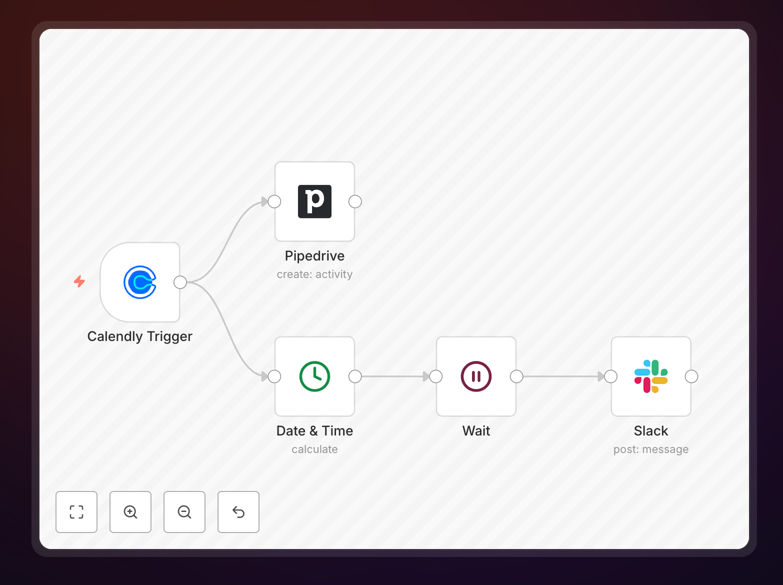
What This Workflow Does
Sales teams spend hours manually logging meetings, creating follow-up tasks, and capturing insights after customer conversations. This automation eliminates that administrative burden by connecting your scheduling tool (Calendly) directly to your CRM (Pipedrive) and team communication platform (Slack).
When a prospect books a meeting via Calendly, the workflow automatically creates a corresponding activity in Pipedrive with all meeting details—date, time, attendees, and topic. Then, 15 minutes after the meeting ends, it sends a Slack reminder to the sales rep prompting them to log their notes and insights. This ensures every conversation is tracked, follow-ups happen timely, and valuable information is captured consistently.
How It Works
Step 1: Calendly Trigger
The workflow starts when someone schedules a meeting through your Calendly link. It captures the event details including the invitee's information, meeting time, duration, and any custom questions answered during booking.
Step 2: Create Pipedrive Activity
Using the Calendly data, the workflow automatically creates an activity in Pipedrive. This activity is linked to the relevant contact or deal, includes the meeting subject, sets the type as "Meeting," and schedules it for the appropriate date and time.
Step 3: Wait for Meeting Completion
The workflow pauses until 15 minutes after the scheduled meeting end time. This delay ensures the reminder arrives when the sales rep has finished the conversation and is ready to capture insights.
Step 4: Send Slack Reminder
A personalized message is sent to the sales rep's Slack channel (or a team channel) reminding them to log meeting notes in Pipedrive. The message includes the meeting details and a prompt to capture key takeaways, next steps, and any follow-up actions.
Pro tip: Customize the Slack message to include specific questions your team should answer after meetings, like "What was the prospect's biggest concern?" or "What follow-up action is needed?" This structures note-taking and improves data quality.
Who This Is For
This workflow is ideal for sales teams, account managers, and business development reps who:
- Use Calendly for prospect scheduling
- Manage contacts and deals in Pipedrive
- Communicate internally via Slack
- Need consistent logging of customer conversations
- Want to reduce manual data entry between systems
- Struggle with timely follow-ups after meetings
It's particularly valuable for teams with high meeting volumes, where manual logging becomes unsustainable, and for managers who want visibility into all prospect interactions.
What You'll Need
- Calendly account with scheduling links configured for your team
- Pipedrive account with API access enabled
- Slack workspace with appropriate channels for reminders
- n8n instance (self-hosted or cloud) to run the workflow
- API credentials for Calendly, Pipedrive, and Slack stored securely in n8n
Quick Setup Guide
- Download the template JSON file using the button above.
- Import it into your n8n instance via the workflow import function.
- Configure the Calendly trigger node with your specific scheduling event type.
- Set up the Pipedrive node with your API credentials and map meeting data to activity fields.
- Configure the Slack node to send messages to the correct channel or user.
- Adjust the wait timer if you prefer reminders at a different interval.
- Test the workflow by scheduling a Calendly meeting and verifying the Pipedrive activity and Slack message.
Key Benefits
Save 2–3 hours per week per sales rep: Eliminate manual logging of meetings and follow-up tasks. Reps can focus on selling instead of administrative work.
Improve CRM data accuracy: Every meeting is automatically recorded with consistent details. Your pipeline reflects actual prospect interactions without gaps.
Ensure timely follow-ups: Slack reminders prompt reps to capture insights immediately after meetings, leading to better note quality and faster action.
Scale sales processes efficiently: As your team grows, automated workflows maintain consistency without increasing managerial oversight.
Enhance team visibility: Managers can see all scheduled and completed meetings in Pipedrive, enabling better coaching and resource allocation.