n8n Redis CRUD Web App

Create a self-contained CRUD app with Redis storage and HTML frontend

Build a complete Redis-powered application with HTML interface using this n8n workflow template

Download Template JSON · n8n compatible · Free
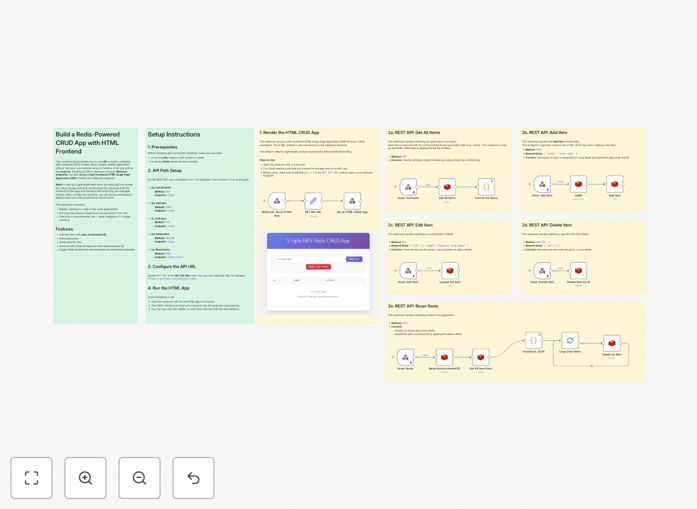
Redis CRUD app workflow screenshot

What This Workflow Does

This n8n workflow template provides a complete solution for building a self-contained CRUD (Create, Read, Update, Delete) application with Redis as the data storage backend and an HTML frontend interface. It eliminates the need for separate server-side components by leveraging n8n's webhook capabilities and built-in HTTP server.

The workflow demonstrates how to implement all CRUD operations against a Redis database while providing a clean HTML interface for user interaction. This approach is particularly valuable for building internal tools, prototypes, or simple web applications without the complexity of traditional full-stack development.

How It Works

1. Frontend Interface Setup

The workflow serves an HTML page through n8n's HTTP node, creating a responsive user interface with forms for creating and updating records, plus display tables for viewing data. The interface communicates with the backend via AJAX calls to n8n webhooks.

2. Redis Connection Configuration

The template includes pre-configured Redis nodes that connect to your Redis instance. You'll need to provide your Redis connection details (host, port, and optional password) during setup.

3. CRUD Operation Implementation

Separate workflow branches handle each CRUD operation: creating new records, retrieving existing ones, updating entries, and deleting data. Each operation maps to specific Redis commands while maintaining data consistency.

Who This Is For

This template is ideal for developers building internal tools, startup founders creating MVPs, and IT professionals who need simple database applications without complex infrastructure. It's particularly valuable for:

  • Teams needing rapid prototyping capabilities
  • Businesses requiring simple database frontends
  • Developers looking to learn Redis integration
  • Organizations wanting to reduce infrastructure complexity

What You'll Need

  1. An n8n instance (self-hosted or cloud)
  2. Redis server access (local or cloud provider)
  3. Basic understanding of HTML/CSS for customization
  4. Web browser to access the application interface

Quick Setup Guide

  1. Import the JSON template into your n8n instance
  2. Configure the Redis nodes with your connection details
  3. Deploy the workflow and note the webhook URLs
  4. Access the HTML interface through the provided URL
  5. Test CRUD operations and customize as needed

Key Benefits

Rapid development: Build functional CRUD applications in hours rather than days, with minimal coding required.

Simplified architecture: Eliminate the need for separate frontend and backend servers, reducing deployment complexity.

Redis performance: Leverage Redis's in-memory speed for sub-millisecond response times on database operations.

Easy customization: Modify the HTML interface or workflow logic without complex redeployment processes.

Pro tip: For production use, consider adding authentication to your Redis instance and implementing proper input validation in the workflow.

Frequently Asked Questions

Common questions about Redis CRUD applications and n8n integration

Redis offers exceptional speed for CRUD operations with sub-millisecond response times, making it ideal for high-performance applications. Its in-memory architecture provides faster data access than traditional databases. Redis also supports various data structures beyond simple key-value pairs, including lists, sets, and sorted sets, giving developers more flexibility in how they store and retrieve data.

For applications requiring frequent reads and writes, Redis can handle thousands of operations per second with minimal latency. This makes it perfect for real-time features, caching layers, and applications where speed is critical. The simplicity of Redis commands also reduces development time compared to more complex database systems.

  • Sub-millisecond response times for all operations
  • Support for multiple data structures beyond key-value
  • Atomic operations ensure data consistency

A self-contained CRUD app bundles both frontend and backend logic into a single deployable unit, eliminating complex infrastructure requirements. Unlike traditional web apps that require separate servers for frontend and backend, self-contained apps simplify deployment and scaling. They're particularly useful for internal tools, prototypes, and applications where simplicity and rapid deployment are priorities.

For example, a customer support dashboard built this way can be deployed as a single service rather than managing separate API servers and frontend applications. This reduces operational overhead while still providing full CRUD functionality. The approach also minimizes dependencies between components since everything runs in the same environment.

  • Single deployment unit simplifies operations
  • Reduced infrastructure costs and complexity
  • Faster iteration cycles during development

n8n is ideal for CRUD applications when you need to quickly prototype or build internal tools without extensive coding. It's particularly valuable when your application needs to integrate with multiple APIs or services. The visual workflow builder allows non-developers to create functional applications while still offering customization options for developers through JavaScript code nodes.

A marketing team might use n8n to build a simple content management system that connects to their CRM and email service. The visual interface makes it easy to modify workflows as requirements change, without needing to rewrite code. For more complex applications, n8n can serve as the backend while you build a custom frontend.

  • Rapid prototyping of database applications
  • Building tools with multiple service integrations
  • Enabling non-developers to create simple apps

Redis excels with frequently accessed but relatively small datasets like user sessions, caching layers, and real-time analytics. It's perfect for applications requiring fast read/write operations such as leaderboards, temporary data stores, or message queues. For larger datasets that don't fit in memory or require complex relational queries, traditional databases might be more appropriate.

An e-commerce site might use Redis to handle shopping cart data, providing instant updates as customers add items. Meanwhile, product catalogs with complex relationships would remain in a relational database. The key is matching Redis's strengths with your data access patterns and performance requirements.

  • Session data and temporary storage
  • High-velocity data like analytics
  • Non-relational datasets with simple access patterns

Redis provides basic security features like authentication and TLS encryption for network traffic. While suitable for many use cases, sensitive data should be encrypted before storage since Redis lacks built-in encryption at rest. Best practices include using Redis in private networks, implementing proper access controls, and regularly rotating credentials for production deployments.

A healthcare application might store patient IDs in Redis but keep actual medical records in a more secure database. For internal tools handling non-sensitive data, Redis's native security features are typically sufficient. Always evaluate your specific security requirements and compliance needs when choosing data storage solutions.

  • Enable authentication for production deployments
  • Use TLS for encrypted network traffic
  • Encrypt sensitive data before storage

Yes, Redis offers several scaling options including replication for read-heavy workloads and clustering for horizontal scaling. For high-availability scenarios, Redis Sentinel provides automatic failover. The key is to design your application with scaling in mind from the start, considering factors like data partitioning strategies and memory optimization.

A growing SaaS platform might start with a single Redis instance for user sessions, then evolve to a clustered setup as traffic increases. By separating data by function (sessions vs. caching vs. real-time features), you can scale each component independently. Regular monitoring helps identify when scaling is needed before performance degrades.

  • Redis Cluster enables horizontal scaling
  • Replication handles read-heavy workloads
  • Sentinel provides high availability

Absolutely! GrowwStacks specializes in building custom Redis-powered applications tailored to your specific business needs. Our team can develop solutions ranging from simple internal tools to complex, high-performance applications with custom HTML interfaces. We handle everything from architecture design to deployment, ensuring optimal performance and scalability for your use case.

Whether you need a customer portal, inventory management system, or real-time analytics dashboard, we'll work with you to understand your requirements and deliver a solution that fits your workflow. Our expertise in n8n and Redis ensures you get a robust application without the overhead of traditional development approaches.

  • Tailored to your specific business processes
  • Optimized for performance and scalability
  • Full support from design to deployment

Need a Custom Redis Application Built?

This free template is a starting point. Our team builds fully tailored Redis applications for your specific business needs.