AI Assistant Voice Interface Groq AI Web Search n8n

Create a Voice-Enabled AI Assistant with Groq, SerpAPI & TTS

Build a conversational AI that listens, thinks, searches the web, and speaks—all in one automated workflow.

Download Template JSON · n8n compatible · Free
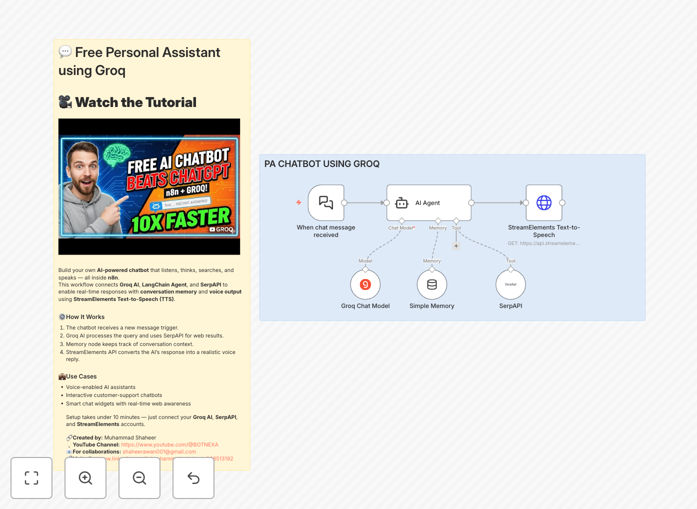
Visual diagram of a voice-enabled AI assistant workflow connecting speech input, AI processing, web search, and voice output

What This Workflow Does

This template solves the challenge of creating intelligent, voice-capable AI assistants without extensive coding. Most businesses want to offer 24/7 conversational support but struggle with the complexity of integrating speech recognition, AI reasoning, real-time data lookup, and natural voice responses.

The workflow bridges this gap by combining Groq's high-speed AI inference with SerpAPI for live web searches and text-to-speech technology for voice output. It creates a complete conversational agent that can answer questions, search for current information, remember conversation context, and respond with a human-like voice—all within a single n8n automation.

Unlike basic chatbots, this assistant can handle open-ended queries, make decisions about when to search for information, and maintain natural dialogue flow. It's particularly valuable for customer support, internal knowledge bases, and interactive voice applications where users expect intelligent, helpful responses.

How It Works

The automation follows a logical conversation pipeline that mimics human interaction patterns while leveraging AI capabilities.

1. Voice Input & Processing

The workflow begins by receiving voice input, which is converted to text using speech recognition. This text is then prepared for the AI agent, with context from previous messages included to maintain conversation continuity.

2. AI Reasoning & Decision Making

Groq AI processes the user's query, determining intent and deciding whether to answer based on existing knowledge or search for current information. The LangChain agent architecture enables tool use—specifically web search via SerpAPI when fresh data is needed.

3. Information Retrieval & Synthesis

If required, the assistant performs real-time web searches through SerpAPI, extracts relevant information, and synthesizes it with the AI's existing knowledge. This ensures responses are both intelligent and up-to-date.

4. Voice Response Generation

The final text response is converted to natural-sounding speech using text-to-speech technology. The workflow can deliver this as an audio file or stream, creating a complete voice conversation experience.

Who This Is For

This template is ideal for customer support teams needing 24/7 voice support, SaaS companies wanting to offer voice interfaces for their products, educational platforms creating interactive learning assistants, and businesses looking to automate initial customer interactions while maintaining high-quality experience.

Marketing agencies can use it for interactive campaign experiences, while internal IT departments benefit from voice-enabled help desks. The solution scales from small businesses needing basic after-hours support to enterprises requiring sophisticated voice interaction systems.

What You'll Need

  1. Groq API Key: For accessing high-speed AI inference capabilities
  2. SerpAPI Account: For real-time web search functionality
  3. Text-to-Speech Service: Such as StreamElements, Google Cloud TTS, or Amazon Polly
  4. n8n Instance: Self-hosted or cloud version of n8n
  5. Voice Input Method: Web interface, phone system integration, or voice capture application

Quick Setup Guide

Getting your voice AI assistant running takes about 30 minutes with this template.

  1. Import the Template: Download the JSON file and import it into your n8n instance through the workflow import function.
  2. Configure API Credentials: Add your Groq, SerpAPI, and TTS service keys to the respective nodes in the workflow.
  3. Customize Agent Behavior: Adjust the AI agent's instructions to match your use case—support tone, knowledge boundaries, and search preferences.
  4. Set Up Voice Interface: Connect your preferred voice input method (webhook, telephony integration, or web interface).
  5. Test & Deploy: Run test conversations, refine responses, and activate the workflow for live use.

Pro tip: Start with a limited knowledge domain for your assistant. Narrow focus areas produce more accurate responses and are easier to manage than trying to create a general-purpose AI from day one.

Key Benefits

24/7 intelligent support without staffing costs: The assistant handles inquiries around the clock, reducing customer wait times from hours to seconds while eliminating after-hours staffing expenses.

Natural voice interaction increases accessibility: Voice interfaces make your services available to users with visual impairments, literacy challenges, or those simply preferring hands-free interaction.

Real-time information accuracy: By combining AI reasoning with live web search, responses stay current with news, prices, weather, and other time-sensitive information.

Scalable conversation handling: The system can manage thousands of simultaneous conversations without degradation, perfect for handling traffic spikes or seasonal demand.

Reduced training and maintenance: Unlike rule-based chatbots requiring constant updates, the AI agent learns to handle variations in user questions naturally.

Frequently Asked Questions

Common questions about voice-enabled AI automation and integration

AI assistants provide 24/7 availability, instant response times, and consistent answers, reducing customer wait times by up to 90%. They handle routine inquiries, freeing human agents for complex issues, and can scale instantly during peak periods without additional staffing costs.

Beyond efficiency gains, AI assistants improve customer satisfaction by providing immediate assistance and reducing frustration from hold times. They also gather valuable interaction data that can inform product improvements and identify common customer pain points.

Voice-enabled AI creates more natural, accessible interactions, especially for users with visual impairments or those multitasking. It increases engagement by 40-60% by providing human-like conversation flow and emotional tone, making technical support and information retrieval feel more personal and less transactional.

Voice interfaces also reduce cognitive load since users don't need to read or type, which is particularly valuable in mobile contexts, driving situations, or when hands are occupied. The conversational pacing of voice interactions often yields more detailed user queries and better problem descriptions.

Consider latency, cost per token, context window size, and available tool integrations. Groq offers exceptional speed for real-time voice applications, while other models may provide better reasoning for complex tasks. Always test with your specific use case and evaluate response quality, not just benchmark scores.

Also assess the model's ability to follow instructions precisely, handle your expected query volume, and integrate with your existing systems. For voice applications specifically, response speed is critical—users expect near-instant replies in conversation, making low-latency models essential.

Combine LLM reasoning with real-time data sources like web search APIs (SerpAPI), internal knowledge bases, and live database queries. Implement fact-checking layers, set confidence thresholds for responses, and maintain human-in-the-loop review for critical information. Regular training with updated company data is essential.

Establish clear boundaries for what the assistant should answer versus when it should defer to human experts. Monitor conversation logs for accuracy issues and create feedback loops where incorrect responses trigger immediate knowledge base updates.

Simple chatbots follow predefined flows and have limited contextual understanding. AI agents with tool access can reason, make decisions, and execute actions like searching the web, updating databases, or triggering workflows. This enables them to solve complex, multi-step problems rather than just answering FAQs.

Tool-equipped agents can adapt to novel situations, use external data sources, and perform actual work on behalf of users. They're essentially autonomous workers that can complete tasks end-to-end, while traditional chatbots are more like interactive FAQ documents.

Track reduced support ticket volume, decreased average handling time, increased customer satisfaction scores (CSAT/NPS), and agent productivity improvements. Calculate cost savings from reduced staffing needs during off-hours and compare against implementation and API usage costs. Most businesses see ROI within 3-6 months.

Also consider indirect benefits like increased sales from 24/7 lead qualification, reduced customer churn from better support experiences, and brand differentiation through innovative technology adoption. The data collected from AI interactions often reveals insights worth more than the direct cost savings.

Yes, GrowwStacks specializes in building custom AI automation solutions tailored to your specific business processes, integration needs, and user experience requirements. We can create voice-enabled assistants that connect to your CRM, internal systems, and unique workflows with proper security and scalability.

Our team handles everything from initial consultation and design to implementation, training, and ongoing optimization. We ensure the solution integrates seamlessly with your existing technology stack while delivering measurable business value from day one.

  • Custom integration with your CRM, help desk, or internal databases
  • Industry-specific knowledge base training and optimization
  • Multi-language support and regional voice customization
  • Compliance with security standards and data privacy regulations

Need a Custom Voice AI Automation?

This free template is a starting point. Our team builds fully tailored automation systems for your specific business needs.