Telegram AI Video Content Creation Marketing Automation n8n

Create AI-generated UGC Marketing Videos with Telegram & GPT-4

Automate authentic user-generated content video production. Send a product photo via Telegram, and get a complete marketing video created by AI in minutes.

Download Template JSON · n8n compatible · Free
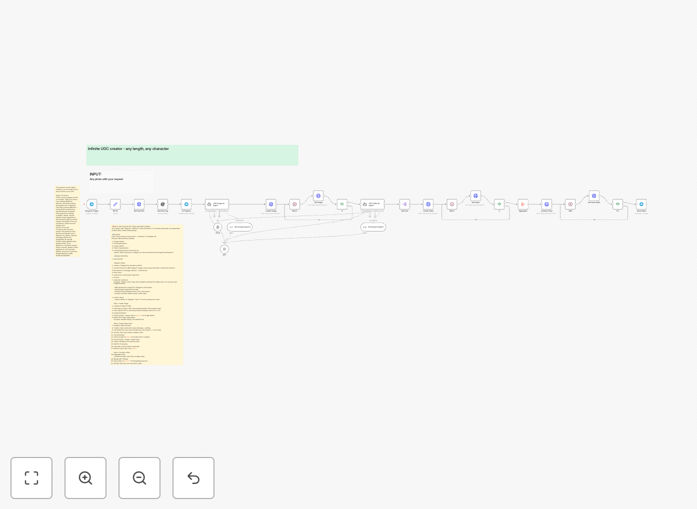
AI UGC video automation workflow diagram showing Telegram integration with AI models for video generation

What This Workflow Does

This automation system solves the expensive and time-consuming problem of creating authentic user-generated content (UGC) videos for marketing. Instead of hiring creators, scheduling shoots, and editing footage, you simply send a product photo through a Telegram bot. The workflow then uses AI to analyze the image, generate realistic video clips of people using your product, and combine them into a complete marketing video.

The system bridges the gap between product photography and engaging video content. It understands product context, creates natural usage scenarios, and produces videos that look like they were filmed by real customers on their phones. This authenticity drives higher engagement and conversions compared to traditional branded content.

By automating the entire production pipeline, businesses can generate dozens of UGC videos per day at a fraction of traditional costs. The workflow handles everything from initial image analysis to final video delivery, making professional-quality UGC accessible to businesses of any size.

How It Works

1. Input via Telegram

You send a compressed product image (and optional character reference) to your Telegram bot with a simple text instruction like "Create a 20-second UGC video showing someone enjoying this coffee maker." The bot acknowledges receipt and begins processing.

2. AI Image Analysis

An OpenAI agent analyzes the uploaded image to extract product details (brand, color, features) and any character elements. This understanding forms the foundation for generating contextually appropriate video content that matches your product's actual appearance.

3. Prompt Generation & Image Creation

The system generates natural, UGC-style prompts describing realistic usage scenarios. It then creates supporting images using AI models, ensuring the visual style matches authentic "phone-filmed" aesthetics with proper aspect ratios for social platforms.

4. Video Clip Production

Based on your requested video length, the AI creates a script and divides it into scenes. Each scene prompt is sent to video generation models that produce short clips (typically 8 seconds each) showing your product in authentic usage situations.

5. Video Assembly & Delivery

All generated clips are automatically stitched together into a seamless final video. The completed file is then sent back to your Telegram chat or can be routed to other destinations like Google Drive, Dropbox, or your content management system.

Who This Is For

This workflow is ideal for e-commerce brands, digital marketers, social media managers, and content creators who need to produce authentic-looking product videos at scale. DTC (Direct-to-Consumer) companies selling physical products benefit particularly well, as do agencies managing multiple client accounts.

Small businesses with limited marketing budgets can now access UGC video production that was previously only available to large corporations. SaaS companies showcasing physical products or real-world applications also find tremendous value in demonstrating their solutions through authentic user experiences.

Marketing teams running frequent social media campaigns will appreciate the ability to generate fresh content daily without creative fatigue. The system works equally well for established brands maintaining consistent content calendars and startups building initial social proof.

What You'll Need

  1. A Telegram account and bot token (free to create)
  2. An n8n instance (cloud or self-hosted)
  3. Access to AI video generation services (like Key.AI or similar)
  4. OpenAI API access for image analysis and prompt generation
  5. Clear product photography with good lighting and angles
  6. Basic understanding of your target audience's preferences

Pro tip: Prepare a library of product images from different angles and in various settings. This gives the AI more visual context to work with, resulting in more varied and authentic-looking video scenarios.

Quick Setup Guide

  1. Import the template: Download the JSON file and import it into your n8n instance using the workflow import function.
  2. Configure Telegram: Create a Telegram bot via BotFather, obtain your token, and add it to the Telegram trigger node in the workflow.
  3. Connect AI services: Add your API keys for OpenAI and your chosen video generation service in their respective nodes.
  4. Test with a simple product: Start with a straightforward product image and basic instructions to verify the pipeline works end-to-end.
  5. Customize outputs: Adjust video length, style preferences, and delivery destinations based on your specific marketing needs.
  6. Scale production: Once configured, you can process multiple images simultaneously by duplicating workflow instances or adding batch processing.

Key Benefits

Reduce video production costs by 95%+ compared to traditional UGC creation. Instead of paying $100-500 per video, you're only covering minimal AI service fees—typically less than $5 per complete video.

Scale content production infinitely without adding team members. Generate dozens of unique videos daily to feed social media algorithms that reward consistent, fresh content with increased reach and engagement.

Maintain authentic aesthetics that drive 3-5x higher engagement rates than polished branded content. The AI replicates the casual, genuine look of real user videos that modern consumers trust and respond to.

Accelerate campaign deployment from weeks to minutes. What previously required weeks of planning, shooting, and editing now happens automatically within minutes of submitting a product image.

Ensure brand consistency while appearing authentic. You maintain control over product presentation and messaging while benefiting from the perceived objectivity of user-generated content.

Frequently Asked Questions

Common questions about AI UGC video automation and integration

UGC (User-Generated Content) video marketing involves real people showcasing your product in authentic, everyday settings. It's highly effective because it builds trust—viewers see genuine reactions, not polished ads. This authenticity leads to higher engagement and conversion rates compared to traditional branded content.

Consumers today are skeptical of corporate messaging but trust peer recommendations. UGC videos tap into this psychology by presenting your product through the lens of everyday users rather than professional marketers. The casual, unpolished aesthetic feels more relatable and credible.

  • Builds social proof through authentic experiences
  • Increases engagement 3-5x over branded content
  • Provides diverse content perspectives at scale

Manual UGC video production typically costs $100–$500 per video, involving hiring creators, filming, editing, and coordination. AI automation reduces this to just a few dollars per video—mainly covering AI model usage fees. This represents a 95%+ cost reduction while maintaining similar quality and authenticity.

The savings extend beyond direct costs. Manual production involves time-consuming coordination, content approval processes, and scheduling delays. AI automation eliminates these overheads while providing consistent output quality and immediate scalability for seasonal campaigns or product launches.

  • Eliminates creator recruitment and management
  • Removes geographic limitations for diverse representation
  • Provides predictable budgeting with per-video cost clarity

Physical products with distinct visual features work best—books, electronics, apparel, cosmetics, home goods, and food items. The AI analyzes product images to generate realistic usage scenarios. Services or abstract concepts may require more creative prompting but can still benefit from this automation approach.

Products with clear use cases and visual appeal generate the most convincing videos. The AI excels at showing products in authentic environments: someone reading a book in a café, using kitchen gadgets while cooking, or applying skincare products. Even software products can be showcased through screen recordings combined with authentic user reactions.

  • Focus on products with tangible benefits
  • Provide clear reference images from multiple angles
  • Include usage context in your initial prompts

Modern AI video models produce remarkably realistic content that most viewers cannot distinguish from human-created videos. The key is proper prompting to maintain authentic, casual aesthetics. When configured correctly, these videos maintain the 'amateur' look that makes UGC effective while ensuring professional quality.

Subtle imperfections actually enhance authenticity—slight camera movements, natural lighting variations, and casual framing all contribute to believable UGC. The automation can be tuned to avoid overly polished results that might trigger skepticism. Regular A/B testing helps refine the balance between quality and authenticity.

  • Use natural language in scene descriptions
  • Request subtle camera movements and lighting
  • Avoid perfection—embrace authentic imperfections

AI-generated UGC videos integrate seamlessly into social media (Instagram Reels, TikTok, YouTube Shorts), email campaigns, product pages, and ad platforms. The automation workflow can deliver finished videos directly to your content calendar, social scheduling tools, or asset management systems for immediate deployment.

Most marketing teams connect the output to their existing content pipelines. Videos can be automatically uploaded to social media schedulers like Buffer or Hootsuite, added to email marketing sequences in platforms like Klaviyo, or integrated into product pages via Shopify or WooCommerce. The flexibility allows for complete automation from creation to publication.

  • Connect to social media scheduling APIs
  • Automate product page updates with fresh content
  • Trigger email campaigns based on new video availability

AI-generated faces typically don't require model releases since they don't depict real individuals. However, you should review platform terms (especially Meta's policies) and ensure your AI service provides commercial usage rights. Always disclose AI-generated content when required by platform guidelines to maintain transparency.

Platform policies continue evolving around AI content disclosure. Currently, most platforms don't require disclosure for AI-generated UGC unless it could mislead viewers about important matters. Best practice includes reviewing terms quarterly and maintaining clear documentation of your content creation process to address any future policy changes.

  • Verify commercial rights with your AI provider
  • Monitor platform policy updates regularly
  • Maintain transparency with your audience when appropriate

Yes, GrowwStacks specializes in building custom AI video automation systems tailored to your specific products, brand voice, and distribution channels. We can integrate with your existing tech stack, create unique prompting strategies, and scale production to match your content calendar requirements.

Our team works with you to understand your brand guidelines, target audience preferences, and content distribution needs. We then design automation that produces videos matching your aesthetic while optimizing for each platform's requirements. The result is a turnkey system that generates brand-appropriate UGC videos automatically.

  • Custom prompting aligned with brand voice
  • Integration with your existing marketing stack
  • Scalable architecture for seasonal demand spikes

Need a Custom AI UGC Video Automation?

This free template is a starting point. Our team builds fully tailored automation systems for your specific business needs.