n8n Gemini AI Slack Notion Newsletters

Create AI intelligence briefs from newsletters with Gemini, Slack, and Notion

Automatically process industry newsletters into actionable intelligence briefs that filter signal from noise

Download Template JSON · n8n compatible · Free
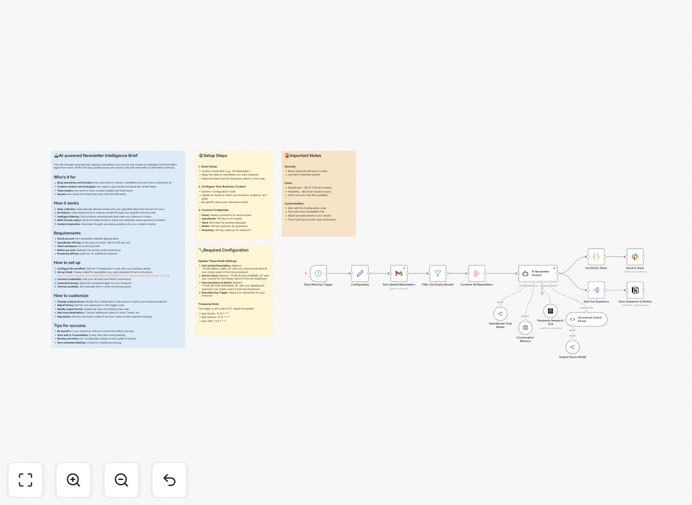
AI newsletter processing workflow diagram showing newsletter to Gemini AI to Slack and Notion

What This Workflow Does

This n8n workflow solves the problem of newsletter overload by automatically processing incoming industry newsletters through Gemini AI to create concise, actionable intelligence briefs. Instead of manually reading through dozens of newsletters each week, the system extracts key insights, summarizes important updates, and delivers them directly to your team via Slack and Notion.

The automation filters out promotional content and noise while highlighting strategic information like competitor moves, market trends, and technology updates. It transforms raw newsletters into structured knowledge assets that help teams stay informed without wasting time on irrelevant content.

How It Works

1. Newsletter Ingestion

The workflow begins by collecting newsletters from your configured email accounts or RSS feeds. It processes both HTML and plain text newsletter formats, preparing the content for AI analysis.

2. AI Processing with Gemini

Gemini AI analyzes the newsletter content using natural language processing to identify key themes, extract important facts, and generate executive summaries. The AI is configured to focus on information relevant to your specific industry and business priorities.

3. Insight Organization

The system categorizes insights by topic, urgency, and relevance. It applies your custom filters to determine which items should be highlighted versus archived for reference.

4. Slack Delivery

High-priority insights are formatted into Slack messages and posted to designated channels. The workflow can @mention relevant team members and include quick action buttons for follow-up.

5. Notion Archiving

All processed newsletters and their AI-generated briefs are stored in Notion as searchable knowledge assets. The system creates properly tagged pages with links to source material and related insights.

Pro tip: Configure different Slack channels for different types of insights (e.g., #competitor-updates, #market-trends) to help teams focus on what matters most to them.

Who This Is For

This workflow is ideal for:

  • Executives and strategists who need to stay informed but don't have time to read all industry newsletters
  • Competitive intelligence teams tracking market movements and competitor activities
  • Research departments that need to synthesize information from multiple sources
  • Sales teams monitoring for customer mentions and industry developments
  • Any knowledge worker who subscribes to more newsletters than they can realistically read

What You'll Need

  1. An n8n instance (cloud or self-hosted)
  2. Google Cloud account with Gemini API access
  3. Slack workspace with appropriate permissions
  4. Notion account with integration capabilities
  5. Newsletter subscriptions (email or RSS)

Quick Setup Guide

  1. Download the JSON template file
  2. Import into your n8n instance
  3. Connect your Google Cloud credentials for Gemini
  4. Configure Slack and Notion webhook connections
  5. Set up your newsletter sources (email accounts or RSS feeds)
  6. Customize the AI prompts to match your industry focus
  7. Test with sample newsletters and refine as needed

Key Benefits

Save 5-10 hours per week by eliminating manual newsletter reading while actually improving information retention through focused briefs.

Never miss important updates as the AI consistently monitors all newsletters for relevant content regardless of volume.

Improve team alignment by sharing standardized intelligence briefs rather than individual interpretations of raw newsletters.

Create searchable knowledge assets in Notion that team members can reference long after newsletters would typically be forgotten.

Scale your information processing as newsletter volume grows without requiring additional staff time.

Frequently Asked Questions

Common questions about newsletter automation and AI processing

AI newsletter processing uses natural language understanding to extract key insights, summarize content, and filter out noise. Gemini AI can analyze newsletter content at scale, identifying trends, extracting action items, and highlighting only the most relevant information for your team. This saves hours of manual reading while ensuring you never miss important updates.

For example, a marketing team might receive 20 industry newsletters weekly. The AI can scan all of them for mentions of competitor product launches, then compile just those relevant sections into a single briefing. This transforms an overwhelming information stream into actionable intelligence.

  • Identifies patterns across multiple newsletters
  • Filters out promotional and irrelevant content
  • Standardizes formatting for easier consumption

AI summarization works particularly well for industry newsletters, market reports, competitor updates, and research digests. The most effective newsletters for automation are those containing structured information like product updates, pricing changes, or technology trends. Newsletters with clear sections or bullet points tend to yield the best summarization results.

Technical and business newsletters often contain the kind of factual information AI can reliably extract. For example, a SaaS industry newsletter might include new feature releases from various vendors - perfect content for AI to identify and summarize for product teams.

  • Avoid newsletters heavy on opinion/commentary
  • Prioritize those with clear sections or headings
  • Best for factual updates rather than narrative pieces

Notion provides a flexible knowledge base for storing and organizing intelligence briefs. The AI-generated summaries can be automatically formatted into Notion pages with proper tagging, categorization, and linking to related information. Teams can then easily search, filter, and collaborate on these insights without digging through raw newsletters.

A sales team might configure the system to create Notion pages tagged by competitor name and product category. This allows instant access to all intelligence about a particular competitor's pricing changes when preparing for client negotiations.

  • Creates structured, searchable knowledge base
  • Enables cross-linking between related insights
  • Supports team collaboration on intelligence

Slack integration allows teams to receive and discuss key insights directly in their communication platform. The workflow can post summarized briefs to specific channels, tag relevant team members, and even trigger discussions about important updates. This creates a seamless workflow where insights lead directly to team conversations and decisions.

For instance, when the AI detects a major industry development, it can immediately alert the leadership channel in Slack with a concise summary and prompt for discussion. This bridges the gap between information discovery and action.

  • Reduces context switching between tools
  • Encourages timely discussion of insights
  • Customizable alerts for different teams

When processing newsletters with AI, consider data sensitivity and compliance requirements. The workflow should only process newsletters you're authorized to analyze, and sensitive information should be handled appropriately. Using enterprise-grade AI services like Gemini helps ensure data protection, while proper access controls in Notion and Slack maintain confidentiality of insights.

Financial services firms, for example, need to ensure newsletter processing complies with regulatory requirements. The workflow can be configured to exclude certain types of information or require manual review before sharing sensitive insights.

  • Use secure API connections for all integrations
  • Configure access controls on output destinations
  • Consider data residency requirements

Modern AI like Gemini achieves 85-95% accuracy for newsletter summarization when properly configured. The accuracy depends on newsletter structure, writing quality, and prompt engineering. Best practice is to review summaries initially and refine the AI instructions until results meet your standards. Most teams find AI summaries capture key points while filtering out fluff effectively.

A healthcare company might start by having clinicians review AI summaries of medical newsletters, providing feedback to improve the system's understanding of critical versus secondary information.

  • Accuracy improves with clear prompt engineering
  • Human review enhances results over time
  • Works best for factual rather than subjective content

Absolutely. You can train the AI to prioritize specific types of information based on your needs. For example, sales teams might want pricing changes highlighted, while product teams focus on feature updates. The workflow can be customized to extract and emphasize different information types through targeted prompts and filtering rules.

A retail company could configure the system to specially flag any mentions of holiday shopping trends or supply chain issues, ensuring these critical topics always surface in briefings.

  • Create custom filters for different teams
  • Prioritize information by business impact
  • Adjust sensitivity to different trigger terms

Yes, GrowwStacks specializes in building tailored newsletter processing systems. We can create custom workflows that match your specific information needs, integrate with your existing tools, and deliver insights in your preferred format. Our solutions help businesses save 5-10 hours weekly by automating newsletter analysis and knowledge sharing.

We'll work with you to understand your key information priorities, configure the AI to focus on what matters most to your team, and design output formats that fit seamlessly into your existing workflows. The result is a system that feels like having a dedicated research assistant.

  • Tailored to your industry and priorities
  • Integrates with your current tech stack
  • Ongoing optimization as needs evolve

Need a Custom Newsletter Automation?

This free template is a starting point. Our team builds fully tailored automation systems for your specific needs.