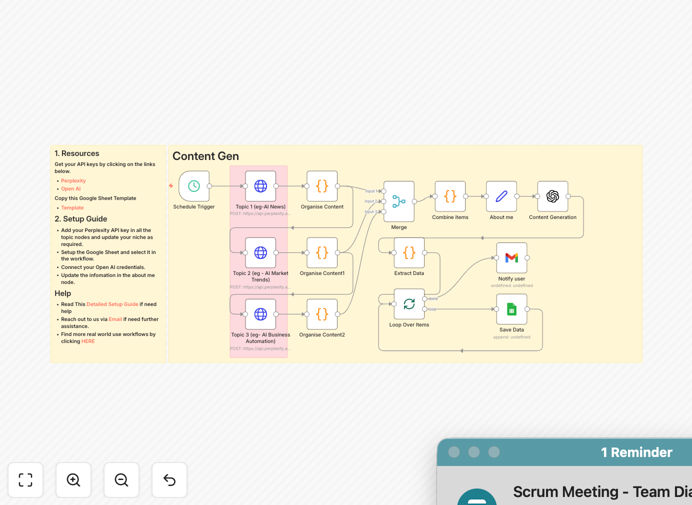
What This Workflow Does
This Zapier automation solves a critical problem for founders, thought leaders, and content teams: the daily grind of finding fresh, engaging topics for short‑form video content. Instead of manually scouring news sites and brainstorming scripts, this workflow automatically harvests the latest AI‑related news from Perplexity, synthesizes it, and uses OpenAI to craft complete video packages—including scripts, captions, and text overlays.
It runs daily at 6 AM IST (or your chosen time), delivering ready‑to‑use content ideas saved directly to a Google Sheet. You get a consistent pipeline of topical, professionally written material that aligns with your personal brand, helping you build authority and attract inbound leads without a dedicated content team.
The workflow is designed for scalability. Whether you’re a solo founder, an agency serving multiple clients, or a marketing team, it turns sporadic content creation into a reliable, automated system. It ensures you’re always posting relevant, timely insights about AI trends, business automation, and industry news.
How It Works
1. Scheduled Daily Trigger
The workflow activates automatically each morning. This scheduled trigger ensures you start your day with fresh content ideas, eliminating the need to manually kick off the process.
2. AI‑Powered News Gathering
Three separate HTTP Request nodes query Perplexity AI for the latest stories across three key topics: General AI News, AI Market & Industry Trends, and AI Business Automation. Perplexity curates summaries and citations from multiple sources, providing rich input for the next stage.
3. Content Organization & Merging
A Merge node combines the outputs from all three topic searches into a single, comprehensive dataset. This consolidated information forms the foundation for your personalized content generation.
4. Personal Brand Injection
A crucial “About me” node lets you define your personal brand details: your name, niche, business name, type, website, and key services. This context is fed into the AI to ensure generated scripts reflect your unique voice and business objectives.
5. AI Content Generation
OpenAI (acting as “CreatorAI”) takes the merged news and your personal details to produce a complete content package:
- Unique Angle Identification: Finds a distinct, engaging perspective from the news that aligns with your content pillars.
- Video Scripts: Generates concise scripts (under 700 characters) with powerful hooks, mini‑narratives (problem → AI solution → impact), and subtle references to your business as a thought leader.
- Captions: Creates friendly, expert‑toned captions with engaging hooks, additional context, clear calls‑to‑action (e.g., “Comment ‘Workflow’ for more”), and relevant hashtags.
- Text Overlays: Produces short, punchy overlay text (3‑7 words, ALL CAPS or Title Case) perfect for video thumbnails or opening screens.
6. Storage & Notification
Each generated package (Text Overlay, Video Script, Caption) is appended as a new row in your designated Google Sheet. A Gmail node then sends you a notification confirming new ideas have been saved, ready for your review and approval.
Who This Is For
This workflow is ideal for:
- Founders & Entrepreneurs: Who need to build authority and attract leads through consistent content but lack a dedicated team.
- AI Thought Leaders & Consultants: Who want to stay atop the latest AI developments and share insights effortlessly.
- Content Marketing Teams: Looking to automate the ideation and initial drafting phases of their short‑form video strategy.
- Digital Agencies: Offering AI‑powered content generation as a scalable service to multiple clients across different niches.
- Social Media Managers: Responsible for daily posting across platforms and needing a reliable source of fresh, topical ideas.
What You'll Need
- Zapier Account: Access to Zapier to run the workflow.
- Perplexity AI API Key: Obtain from Perplexity AI and insert into the three HTTP Request nodes.
- OpenAI API Key: Connect your OpenAI credentials to the “Content Generation” node.
- Google Sheets: OAuth2 API credentials set up for the “Save Data” node.
- Gmail Account: OAuth2 credentials connected for the “Notify user” node.
- Google Sheet Template: Copy the provided template (with columns for Text Overlay, Video Script, Caption, Approval, Published) and update the document ID in the Zapier step.
Quick Setup Guide
- Import the Template: Download the JSON file and import it into your Zapier account.
- Configure API Keys: Replace the placeholder Bearer tokens in the three Perplexity HTTP Request nodes with your actual Perplexity API key. Connect your OpenAI API key to the content generation step.
- Set Up Google Sheets: Ensure OAuth2 credentials are connected. Copy the template sheet and update the document ID in the “Save Data” node.
- Personalize “About me”: Fill in your Name, Niche, Business Name, Business Type, Website, and Key Services & Products in the dedicated node.
- Set Notification Email: Update the “sendTo” field in the Gmail node with your email address.
- Adjust Schedule: Modify the trigger time if 6 AM IST isn’t suitable. Choose a time that fits your content review routine.
- Activate & Monitor: Turn on the Zap. Check your Google Sheet daily for new rows, mark ideas for approval, and track publication status.
Key Benefits
Save 10‑15 hours weekly: Manual research and scripting for daily videos can consume 2‑3 hours per piece. This automation condenses that to minutes, reclaiming time for filming and engagement.
Ensure topical relevance: Perplexity pulls the latest AI news, so your content is always based on current trends, not outdated articles. This boosts credibility and viewer interest.
Maintain brand consistency: By injecting your personal details, the AI tailors scripts to your voice and business goals, making output feel uniquely yours while being automatically generated.
Scalable for agencies: Clone the workflow for each client, adjusting only the “About me” node. Deliver daily AI‑powered content ideas across niches without increasing staff workload.
Turn sporadic posting into a reliable engine: Daily execution means you never miss a posting day. Consistency builds audience trust and accelerates growth.
Pro tip: Review the generated scripts each morning and select the most compelling one for filming. Even with automation, human curation ensures the highest quality output.